
iTechGuides is reader-supported. When you buy through links on our site, we may earn an affiliate commission. As an Amazon Associate I earn from qualifying purchases. Learn more
Neither connection is universally better. Choose wireless if you value a clear play area and freedom to sit away from the screen. Choose wired if your seat is near the console or PC, you want to avoid battery maintenance, or you prefer the most direct connection your setup supports. Microsoft describes Xbox Wireless as a low-latency protocol, while its Xbox Series X explanation says wired state changes are transmitted immediately. That technical difference does not establish a guaranteed, noticeable millisecond advantage in every game, console, display, or PC.
What the current Xbox controller supports
The standard Xbox Wireless Controller is designed to work in both modes. On Xbox consoles it can use Xbox Wireless or a USB-C cable. Microsoft’s controller bundle includes a 9-foot USB-C cable for wired play. The controller also supports Bluetooth on compatible Windows, Android, and iOS devices, subject to the device and operating-system requirements listed by Microsoft.
That means the decision is usually about how you play rather than buying separate hardware. You can use the same controller wirelessly from the sofa, then connect it by cable at a desk when you want a fixed setup. A cable is not automatically a charger, however: battery and charging behavior depends on the controller model and battery configuration.
Free tools Windows power users keep installed
One-click scans. No signup required.
Does wired actually have lower input lag?
What Microsoft says about the signal path
In its Xbox Series X latency explanation, Microsoft says a wired controller sends a digital state change as soon as it occurs. Wireless input is sent over the Xbox Wireless radio protocol. The company describes Xbox Wireless as offering low latency, compatibility, bandwidth, support for up to eight controllers, and audio and voice transmission.
#1 Best Overall

- Versatile compatibility: supports Xbox Series X/S, Xbox One X/S consoles and PC Win10 and above (including the game platform Steam).
- Precise control: features Hall joysticks and Hall triggers for a comfortable feeling, long service life and improved game accuracy.
- Plug and Play Convenience: Wired USB connection (removable) for easy setup and instant play without the need for additional drivers.
- Customizable experience: Includes 2 custom backbuttons that allow users to eliminate false triggers and improve their gaming experience.
- Impressive gameplay: Provides a pulsating vibration trigger and an asymmetric vibration grip motor for intense tactile feedback.
Those statements describe how the systems are engineered; they are not a current, standardized head-to-head measurement showing that wired always wins by a particular number of milliseconds. No reliable, directly comparable figure for wired versus wireless Xbox input was established in the official material available for this guide, so forum estimates should not be treated as authoritative statistics.
Why the controller link is only one part of latency
The time between pressing a button and seeing an action includes the controller connection, the console or PC, the game’s input-reading schedule, rendering, and the display. A fast connection cannot remove delay introduced later in that chain.
Microsoft’s Dynamic Latency Input (DLI) system is intended to align controller reports with the game’s input-reading pattern. Microsoft’s Game Development Kit documentation says DLI is available on Xbox consoles, not PC. A game and platform must also support the relevant behavior. Consequently, a wired controller can be technically more direct without producing a perceptible advantage in every title.
“While wireless is better than ever, when a controller is wired, the team implemented the ultimate solution: as soon as a digital state changes, the data gets transmitted.” — Xbox Wire, March 16, 2020
Rank #2
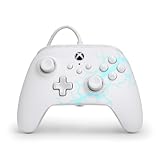 PowerA Advantage Wired Controller for Xbox Series X|S - Arctic Ice, gamepad, hall effect thumbsticks, gaming controller, USB-C, Works with Xbox One, Officially Licensed
- Now Including Hall Effect Modules – Say goodbye to stick drift with contract-free magnetic sensors in the thumbsticks giving you smoother control, enhanced precision, and increased longevity
- Advanced Gaming Buttons – Get an edge over the competition with two mappable buttons you can program on-the-fly, mid-game—no system settings to configure
- 3-Way Trigger Locks – Set the travel distance of the triggers with three different positions to pull off quicker actions in your favorite FPS games or go full throttle in a high-end race car
- Dual Rumble Motors – Take your gaming experience to the next level, providing tactile feedback and sensations that bring your virtual worlds to life
- Immersive Impulse Triggers – Provides reactive rumble sensations using built-in motors so you can feel the action of the game*
For competitive play, test both modes on your own display and network-free local setup if possible. Consistent frame rate, a responsive game mode on the TV, and correct display settings can matter as much as the controller connection.
Wired versus wireless Xbox controllers at a glance
| Consideration | Wired | Wireless |
|---|---|---|
| Responsiveness | Uses a direct USB data path; Microsoft says state changes are transmitted as they occur on Xbox Series X. | Uses Xbox Wireless, which Microsoft describes as low latency. Real-world advantage depends on the entire input-to-screen chain. |
| Freedom of movement | Limited by cable length and where the cable can run. The current Microsoft bundle includes a 9-foot cable. | Lets you sit farther from the console or PC without a cable across the room. |
| Battery maintenance | No battery interruption while the controller is connected by USB, although model-specific charging behavior differs. | Requires AA batteries or a compatible rechargeable solution. Microsoft estimates up to 40 hours from AA batteries for the current standard controller, with actual life varying by use and accessories. |
| Console and PC compatibility | Requires a compatible USB port and a cable that carries data. A power-only USB-C cable cannot be assumed to work. | Uses Xbox Wireless on supported Xbox hardware and Bluetooth on compatible Windows, Android, and iOS devices. |
| Room setup | Cable routing, snag hazards, and reach become part of the setup. | Cleaner floor and desk area, but radio pairing and battery status must be managed. |
| Extra cost | Usually no new purchase if you already own a suitable data cable; otherwise you need a compatible cable. | No cable is needed for play, but replacement batteries or a rechargeable accessory may add cost over time. |
When a wired Xbox controller is the better choice
You sit close to the console or PC
If your chair is within cable reach, wired play removes pairing steps and leaves the controller ready whenever you connect it. A 9-foot cable is enough for many desk and living-room arrangements, but measure the route rather than assuming the advertised length will reach comfortably around furniture.
You do not want battery interruptions
A USB connection lets you keep playing without stopping to replace AA cells. This is especially useful for long sessions, local multiplayer, or a controller stored with batteries removed. Do not infer that every wired controller charges an internal battery: check the model’s manual and battery design.
Recommended Free Tools
You want a fixed tournament or practice station
A cable can make one setup repeatable. The controller is connected to the same port, the same seat, and the same display each time, reducing variables when you are practicing timing. That consistency is a practical benefit even when no universal latency advantage has been measured.
Rank #3

- No Stick Drift, More Accurate Every Match: Updated Hall Effect sticks deliver ultra-precise control with zero stick drift, zero deadzone, and exceptional recentering, helping you land accurate headshots, smoother movement, and more reliable inputs even after years of intense gaming sessions.
- Adjust Joystick Feel for Every Game in Seconds: Unlike ordinary XBOX controllers, Vader 5S lets you physically adjust joystick tension from 40gf to 100gf on the fly. Use lighter tension for fast FPS aiming and flick shots, or tighten the sticks for smoother steering and precision control in racing and sports games — all without opening software or replacing parts.
- Switch Trigger Response for FPS or Racing Games Instantly: Use micro-click triggers for rapid firing and faster reactions in shooting games, or switch to Hall Effect linear triggers for smoother throttle and braking control in racing games. One controller optimized for multiple genres without needing separate setups.
- Feel Recoil, Acceleration, and Impact More Realistically: 4-motor vibration across both triggers and grips makes shooting, driving, crashing, and combat feel more immersive. Experience stronger recoil feedback in shooters and more realistic acceleration and road feel in racing games.
- Quick In-Game Adjustments Without Interrupting Gameplay: Fine-tune vibration, switch profiles, remap buttons, or adjust volume directly on the controller while gaming. No need to pause the match or open software — perfect for players who constantly switch between FPS, RPG, racing, and multiplayer games.
You are troubleshooting wireless pairing or interference
Connecting by USB can help determine whether a problem is radio pairing, battery power, or the controller itself. If the issue remains while using a known-good data cable and USB port, the wireless link is less likely to be the cause.
When wireless is the better choice
You play from a sofa or move around
Wireless removes the cable from the floor and lets you change seats without moving the console or PC. It is the natural choice for a living-room Xbox, projector, or any setup where a cable would cross a walkway.
You share the room with other players
Wireless controllers avoid several cables converging on the console. Xbox Wireless is designed to support up to eight controllers, according to Microsoft’s Series X latency article, although the game itself may support fewer local players.
Windows Errors? Fix Them Before They Spread
Repair common Windows errors and clear accumulated junk for a smoother, more stable PC - no reinstall needed.Free scan · no reinstallCrashes, No Sound, or Screen Glitches?
Random freezes, missing sound and display glitches usually trace back to one bad driver. Find and replace yours safely.Free scan · under a minuteYou switch between supported devices
The current standard controller can use Xbox Wireless with Xbox consoles and Bluetooth with compatible Windows, Android, and iOS devices. Check the exact operating-system and device support before relying on Bluetooth; compatibility is not identical across every phone, tablet, PC, and console.
Rank #4

- Drift Free Hall Effect Sticks: GameSir T7 uses GameSir's non-contact magnetic Hall effect technology to ensure that the sticks do not wear out throughout their life and provide an ultra life of up to 5 million cycles. This prevents GameSir T7 from drifting the sticks and ensures reliable, long-lasting stick performance for games on Xbox, PC and Steam.
- PRECISION MATCHED ANOG HALL EFFECT TRIGGERS With precisely tuned Hall Effect Triggers for an even, smooth pull, you can race confidently and enjoy a seamless gaming experience like never before.
- REALISTIC & SUPPLY VIBRATION The controller features a total of four rumble motors, with a motor in each handle and trigger that provide immersive and realistic vibration feedback. In addition, the two asymmetric actuators in the handles improve the realism of the vibrations and ensure that you feel every small impact and shot in your hands as if it happened on the spot.
- COMFORTABLE ERGONOMIC DESIGN & TEXTURED SURFACE The ergonomic design combined with the fine laser textured surface of the handles, bumpers and triggers ensures a secure grip and provides a comfortable, stable grip, even during extended gaming sessions.
- 3.5mm Headphone Jack: The 3.5mm audio jack allows you to easily connect a headset for impressive sound and clear communication.
You value the cleanest physical setup
Wireless avoids cable wear at the controller port and eliminates a lead that can catch on a chair. You still need to monitor battery level and keep spare batteries or a compatible rechargeable option available.
Independent reader supportYour contribution helps us test, update, and keep practical guides available for everyone.How to use the current controller in wired mode
- Confirm the controller port. The current standard Xbox Wireless Controller uses USB-C. Older or third-party models may use a different connector.
- Use a data-capable cable. Choose a USB-C cable specified for data and charging, not one sold only for power. The Microsoft bundle’s 9-foot cable is a known supported option for that controller.
- Connect directly to the console or PC. Plug the cable into the controller and an available USB port. Avoid an unpowered hub while diagnosing a connection problem.
- Wait for recognition. On Xbox, the controller should become available without wireless pairing. On Windows, allow the operating system a moment to install or select the controller before launching the game.
- Test every input. Check both sticks, triggers, bumpers, the directional pad, menu buttons, and headset audio if you use it. A cable that supplies power but not data can light the controller without carrying input.
- Secure the cable. Keep slack near the controller, route the lead away from walkways, and avoid sharp bends at the USB-C port.
If the controller still does not respond, try a second known-good data cable and another USB port. If it works wirelessly but not by USB, the cable, port, or model-specific USB behavior needs investigation.
How to use it wirelessly
- Install power. Insert AA batteries or the model’s compatible rechargeable solution. The current standard controller’s Microsoft estimate is up to 40 hours from AA batteries; actual life changes with headset use, accessories, and play habits.
- Pair with an Xbox console. Turn on the console and controller, press the console’s pairing button, then press and hold the controller’s pairing button until the Xbox logo stops flashing.
- Pair with a Windows, Android, or iOS device. Enable Bluetooth in the device settings, put the controller into pairing mode, and select it from the device list. Follow the device maker’s prompts if a permission or firmware message appears.
- Check the active connection. If the controller was recently used with another device, it may reconnect there. Turn Bluetooth off on the other device or pair again with the intended one.
- Check power before diagnosing lag. Replace depleted batteries or recharge the approved battery accessory. A low-power condition can look like intermittent wireless performance.
Cable, battery, and compatibility pitfalls
- Not every USB-C cable is equivalent. Connector shape does not guarantee data support. Look for explicit USB data capability.
- Plugging in does not prove charging. Some controllers use USB only for wired operation; others support charging through a specific battery pack. Read the exact manual.
- Elite and third-party models differ. Do not assume that an Elite controller or another manufacturer’s model behaves like the standard Xbox Wireless Controller. Verify its port, firmware, battery arrangement, and console support.
- Older accessories need a model check. PowerA’s Enhanced Wired Controller for Xbox One documentation describes a detachable 9.8-foot USB cable and programmable rear buttons. Microsoft’s 2020 Designed for Xbox statement says officially licensed Xbox One accessories connected to a console by USB are supported on Xbox Series X, but verify the exact model and current support before buying.
- Bluetooth is not the same as Xbox Wireless. Bluetooth is useful for compatible phones and PCs, while Xbox Wireless is the console-oriented protocol. Features and behavior can vary by platform.
Choosing by gaming situation
| Your situation | Better starting choice | Reason |
|---|---|---|
| Living-room Xbox several feet from the sofa | Wireless | Movement and a clear floor outweigh cable management. |
| Desk setup with the console or PC beside you | Either; wired is convenient | A short, safely routed cable avoids battery checks without restricting your seat. |
| Long sessions where stopping is disruptive | Wired | USB play avoids battery replacement during the session. |
| Competitive player seeking consistent variables | Try wired first, then compare | Wired has the direct state-change path documented by Microsoft, but your display and game determine the visible result. |
| Phone, tablet, or laptop gaming | Wireless Bluetooth | It avoids a cable adapter and is supported on compatible devices; check OS requirements. |
| Shared local multiplayer | Wireless, if the room allows | Fewer cables are easier to manage, and Xbox Wireless supports up to eight controllers at the protocol level. |
A simple decision test
Start with your physical setup, not internet claims about a fixed “wired advantage.” If the cable can reach your seat without crossing a walkway and you dislike battery management, use wired. If the cable would be taut, hazardous, or limiting, use wireless and keep fresh batteries or a compatible rechargeable solution nearby.
What’s actually slowing this PC down?
Pick the symptom - the matching free tool is one click away.
For a latency-sensitive comparison, use the same controller, game, display mode, and frame-rate settings. Play a familiar local section in wired mode, then wireless mode, and look for repeatable differences rather than a one-off impression. If you cannot reliably tell the difference, choose the mode that is more comfortable and dependable in your room.
Bottom line
Wired Xbox play is the practical winner for a nearby, stationary setup and for players who want to avoid battery interruptions. Wireless is better for sofas, shared rooms, and anyone who needs freedom from cable reach. Microsoft’s documentation supports a direct wired input path and a low-latency Xbox Wireless protocol, but it does not justify declaring one universally faster. The right choice is the connection that fits your seat, device, game, and tolerance for cable or battery maintenance.
Quick Recap
Product prices and availability are accurate as of the date/time indicated and are subject to change. Any price and availability information displayed on Amazon at the time of purchase will apply.

