
iTechGuides is reader-supported. When you buy through links on our site, we may earn an affiliate commission. As an Amazon Associate I earn from qualifying purchases. Learn more
Smart locks can be safe, but safety is a system property rather than an encryption checkbox. A sound decision depends on how the lock stores and recovers credentials, what happens when the internet or a hub is unavailable, whether an independent entry method exists, how batteries are replaced, and whether the hardware is installed correctly. Encryption protects data in transit or storage; it does not by itself prove that a particular lock, account, phone, bridge, firmware process, or door installation is secure.
No universal safety ranking or reliable compromise rate has been established. Evaluate the exact model and configuration, because offline behavior, physical-key availability, battery design, and remote-access requirements differ substantially.
What “safe” means for a smart lock
A smart lock adds electronics, software and sometimes cloud services to a door that previously depended mainly on a mechanical cylinder. Its safety therefore has several separate dimensions:
Recommended Free Tools
- Confidentiality: Can an outsider read credentials or unlock commands while they are stored or transmitted?
- Authentication: Does the lock correctly verify a keypad code, phone, account or physical key?
- Availability: Can an authorised person still enter during an internet, hub, phone or battery failure?
- Recovery: Is there a controlled way to regain access if an account, phone or credential is lost?
- Physical security: Is the lock correctly fitted to a sound door, frame and strike plate?
- Maintenance: Does the manufacturer provide firmware updates, vulnerability notices and replacement guidance?
A product may encrypt communications yet still leave you vulnerable to account takeover, an unprotected recovery process, a poorly installed strike, or a dead battery with no emergency-entry plan. Conversely, a lock can preserve local keypad operation during a network outage even though its phone app and cloud notifications are unavailable.
#1 Best Overall
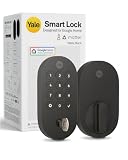
- MORE WAYS TO ENTER: Hands full of groceries? This keyless entry door lock unlocks with a tap on your phone, a code on the keypad, Google Assistant voice commands, plus a backup key if all else fails.
- COMPLETE CONTROL: This electronic door lock puts home security in your pocket. Lock up, share access, and track entries via Yale Access App or Google Home (US & Canada only). Remote access available with a Matter hub.
- DESIGNED FOR GOOGLE HOME: This smart front door lock integrates seamlessly into Google Home systems. Control access and monitor activity using the setup you already trust.
- SMART HOME FREEDOM WITH MATTER: Built with Matter technology, this lock connects to your favorite devices, including Google TV, Nest Hub, and more. Mix and match without being locked into one ecosystem.
- LONG-LASTING BATTERY: Matter over Thread technology uses an energy-efficient mesh network that minimizes power drain so your smart door lock goes longer between battery changes. Grade 2 certified by BHMA & designed to perform from -22 - 140°F.
What encryption does—and does not—tell you
Encryption makes stored or transmitted information difficult for unauthorised parties to read. The claim is useful, but incomplete. You also need to know where keys and credentials are held, who can recover them, how devices synchronise, and how account access is protected.
Cloud and synchronised credentials
NIST’s SP 800-63B guidance for synced authenticators says synchronised authentication keys are exportable and should be encrypted in the synchronisation fabric, access-controlled so only the authenticated user can reach them, and protected with authentication equivalent to AAL2 multi-factor authentication. This is general guidance, not a certification of any smart lock. A manufacturer would need product-specific documentation to show how its design addresses those controls.
When comparing products, ask whether a code or digital key is copied to a cloud account, a phone, a hub, the lock itself, or several of these. Ask what happens when you change phones, lose your account password, remove a household member, or restore a backup. A convenient recovery flow can also become an attack path if an intruder can reset the account without strong identity checks.
What’s actually slowing this PC down?
Pick the symptom - the matching free tool is one click away.
Key-management and backup language
NIST SP 800-57 Part 1 is broad key-management guidance about protecting cryptographic keying material and managing its lifecycle. It is not a smart-lock test. NIST’s definition of backing up a cryptographic key or metadata means copying it to separate media from operational storage so it can be recovered if the original is lost or altered. That technical backup is different from a consumer lock’s physical key, external battery contact, or other emergency-entry method.
Therefore, treat phrases such as “encrypted,” “secure backup” and “bank-grade security” as prompts for further questions, not as proof that the whole door system is safe.
Rank #2
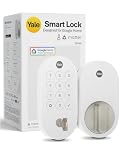
- MORE WAYS TO ENTER: Hands full of groceries? This keyless entry door lock unlocks with a tap on your phone, a code on the keypad, Google Assistant voice commands, plus a backup key if all else fails.
- COMPLETE CONTROL: This electronic door lock puts home security in your pocket. Lock up, share access, and track entries via Yale Access App or Google Home (US & Canada only). Remote access available with a Matter hub.
- DESIGNED FOR GOOGLE HOME: This smart front door lock integrates seamlessly into Google Home systems. Control access and monitor activity using the setup you already trust.
- SMART HOME FREEDOM WITH MATTER: Built with Matter technology, this lock connects to your favorite devices, including Google TV, Nest Hub, and more. Mix and match without being locked into one ecosystem.
- LONG-LASTING BATTERY: Matter over Thread technology uses an energy-efficient mesh network that minimizes power drain so your smart door lock goes longer between battery changes. Grade 2 certified by BHMA & designed to perform from -22 - 140°F.
Will a smart lock work if Wi-Fi or the internet goes down?
Sometimes, but the answer is model-specific. Separate local entry from remote features:
- Local keypad or interior thumb turn: May continue to work because the lock can verify a code locally or operate mechanically from inside.
- Phone control nearby: May use Bluetooth or another local radio and can work without internet when you are within range.
- Remote app control: Usually needs a functioning hub or bridge and an internet connection.
- Cloud notifications and activity updates: Cannot reach your phone while the lock or bridge is offline.
- Scheduled or guest credentials: May require a current cloud connection, depending on how the lock synchronises them.
Example: Nest × Yale behavior
Google says most Nest × Yale passcodes and the interior thumb turn continue to work when the lock is offline. Scheduled-access passcodes may not work. While offline, the Nest app cannot operate the lock, and the lock cannot send alerts or information to the phone. Nest × Yale reaches the internet through Nest Connect rather than directly over Wi-Fi, so the bridge and its network connection are part of the remote-access chain.
Crashes, No Sound, or Screen Glitches?
Random freezes, missing sound and display glitches usually trace back to one bad driver. Find and replace yours safely.Free scan · under a minutePC Slower Than It Used to Be?
A free scan shows the junk files, broken settings and background clutter dragging Windows down - then fixes them in one click.Free scan · Windows 10 & 11Google also says the keypad does not rely on home Wi-Fi for locking and unlocking. That is a statement about this product, not a rule for every keypad lock.
Example: Bluetooth and Wi-Fi configurations
Yale says compatible devices can connect to the Yale Access app over Bluetooth when the phone is nearby. Adding Wi-Fi enables remote control and notifications for compatible configurations. Exact behavior depends on the lock model and the way it is configured, so verify the manual for the model sold in your region.
Does a smart lock have a physical key backup?
There is no universal answer. A physical exterior key can provide an independent entry path when batteries, electronics, a phone, a hub or an account fail. Some keypad locks deliberately omit a key cylinder and rely on codes plus an interior thumb turn.
Rank #3

- Secure smart lock for your front door; replaces the deadbolt lock you already have.Note: Measure your door's backset, cross bore and thickness to ensure you find the right fit
- Keyless entry on the LED keypad so you can lock and unlock your front door without a key; keypad chimes play sounds to confirm responses, such as locking, unlocking, or turning Privacy Mode on or off
- Let someone in from anywhere; unlock the door with your phone for easy guest access
- Give unique passcode to family and guests and set a schedule to control when they work; when you don’t want to be disturbed, Privacy Mode disables the keypad so it can’t be unlocked with a passcode
- Get alerts when someone locks or unlocks the door or tries to tamper with your smart door lock
| Product or configuration | Physical exterior key | Offline or local behavior stated by the manufacturer | Remote-access dependency | Battery or emergency detail |
|---|---|---|---|---|
| Nest × Yale Lock | No; Google describes it as keyless, using a keypad and interior thumb turn. | Most passcodes and the interior thumb turn work offline; scheduled-access passcodes may not. | Nest Connect links the lock to Wi-Fi; app control and phone alerts are unavailable while offline. | Four standard AA alkaline batteries; keypad locking and unlocking does not rely on home Wi-Fi. |
| Yale Smart Lock with Matter (Google Store listing) | Yes; the listing advertises a physical key backup. | Specific offline passcode behavior is not stated in the cited listing. | A Matter hub and Thread border router are required for Google Home Matter compatibility and remote access. | Emergency battery and depletion behavior are not stated in the cited listing. |
| Compatible Yale Access setup | Varies by lock model; not stated as a universal Yale Access feature. | Nearby Bluetooth operation is described; behavior of scheduled codes is model-specific. | Wi-Fi enables remote control and notifications for compatible configurations. | Battery and emergency-entry details vary by model and configuration. |
A physical key is only useful if you can reach it. Keep a spare with a trusted person or in another controlled location, not under the doormat. If a model has no key cylinder, identify its published emergency-entry method before installation and practice it while the lock is powered.
Do these 3 things before closing this tab:
1Fix the driver behind crashes, sound loss and screen glitches2Clear out junk files and repair common Windows errors3Scan for outdated or missing drivers - takes under a minuteWhat happens when the batteries die?
Battery planning is part of access planning. A lock can be cryptographically well designed and still leave you outside if its power source is exhausted.
Before installation
- Read the exact model’s battery type, quantity, expected warning method and replacement procedure.
- Confirm whether low-battery warnings appear on the keypad, in an app, or both.
- Find out whether an external emergency power contact exists and what power source it accepts.
- If there is a mechanical key cylinder, decide where the spare key will be kept.
- Check whether the lock can be opened from inside without a battery; an interior thumb turn often provides that local path, but do not assume it for another model.
When a warning appears
- Replace all cells with the type specified by the manufacturer; do not mix old and new cells or incompatible chemistries.
- Test locking and unlocking from both the normal local method and any required app or hub.
- Confirm that the low-battery warning has cleared and record the replacement date.
- Keep a fresh, sealed set of the specified batteries available.
For Nest × Yale, Google specifies four standard AA alkaline batteries. That specification should not be generalized to other locks.
Remote access, bridges and smart-home integrations
Remote unlocking is a chain, not a single feature. The lock, its local radio, a bridge or hub, the home network, the cloud service and your phone account may all be involved. A failure in any link can remove remote control while leaving local entry intact—or can remove both, depending on the design.
Questions to ask about a bridge
- Is a bridge included, optional or required?
- Does the bridge connect by Wi-Fi, Thread or another network?
- What functions remain if the bridge loses power or internet access?
- Can the lock be controlled locally without the manufacturer’s cloud?
- What happens to existing users and schedules during an outage?
The Google Store listing for Yale Smart Lock with Matter says a Matter hub and Thread border router are required for Google Home Matter compatibility and remote access. Matter compatibility therefore does not mean that every feature works without those network components.
Free tools Windows power users keep installed
One-click scans. No signup required.
Rank #4

- MORE WAYS TO ENTER: Hands full of groceries? This keyless entry door lock recognizes when you’re home and unlocks automatically. For everyone else, there’s a keypad, full smartphone and Apple Watch control, or a backup key if all else fails.
- CONTROL FROM ANYWHERE: This electronic door lock puts home security in your pocket - connecting directly to 2.4 or 5 GHz Wi-Fi without a hub or bridge. Lock up, let someone in, and get real-time alerts with the Yale Access app (US & Canada Only).
- UNLIMITED CODES, TOTAL CONTROL: No more hiding spare keys. Give the dog walker Tuesday access, your parents a permanent code, and your Airbnb guest entry that expires at checkout. Share, schedule, or revoke access in seconds.
- STOP WONDERING IF YOU LOCKED UP: DoorSense knows when your door is fully closed and Auto-Lock secures it for you. Head to bed, rush out the door, or chase after the kids — your smart front door lock handles the details so you don't have to worry.
- ENGINEERED FOR RELIABILITY: Grade 2 certified by BHMA, the industry standard for commercial-grade durability. Built to perform from -22°F winters to 140°F summer heat. Low-power alerts let you know when batteries are about to run out.
Physical installation is part of security
Smart electronics cannot compensate for a weak door or an incorrectly aligned latch. Before buying, verify that the lock fits the door thickness, bore dimensions, backset, handing and frame. After installation, check that the bolt extends fully without forcing the motor and that the strike plate is firmly attached to the frame. Follow the manufacturer’s alignment and calibration procedure rather than filing or forcing parts until they move.
Keep the lock’s firmware and companion app current when updates are offered by the manufacturer. Use a unique account password, enable multi-factor authentication when available, limit administrative users, remove former occupants promptly, and review access logs or notifications if the product supplies them. Do not share a permanent administrator credential with guests when a time-limited code is available.
Independent reader supportYour contribution helps us test, update, and keep practical guides available for everyone.A practical buying checklist
- Define your outage requirement. Decide whether you need entry during an internet outage, a hub outage, a dead phone, or a total battery depletion. These are different tests.
- Choose an independent entry method. Select a physical key, a local keypad, an interior mechanical control, or the manufacturer’s documented emergency-power method. Prefer a method you can operate without a cloud account.
- Read the offline rules. Look specifically for scheduled codes, guest codes, app control, notifications and firmware updates while offline.
- Map the dependency chain. Write down every required component: lock, bridge, router, cloud account, phone and smart-home hub.
- Check credential recovery. Find out how ownership is recovered after a lost phone or account compromise, and whether multi-factor authentication is supported.
- Confirm battery logistics. Note cell type, quantity, warning lead time, replacement access and emergency power.
- Verify current support. Check that the exact regional model still receives firmware and app support, and that required hubs or border routers are available.
- Plan installation. Confirm door compatibility or budget for a qualified locksmith if the fit, frame or alignment is uncertain.
Failure scenarios to rehearse
Internet outage
Stand at the locked door with your normal code or local credential and confirm whether it opens. Do not rely on an app test performed while the phone is still using cellular data; disable the home network only if the manufacturer’s instructions permit a safe test.
Dead phone or lost account
Use the independent entry method. Then secure the account from another trusted device, revoke the lost phone, rotate shared codes and review administrator access.
Dead batteries
Use the documented emergency method—physical key, external power contact or another manufacturer-supported procedure. Replace the cells, test the lock, and investigate why warnings were missed.
Best Value

- MORE WAYS TO ENTER: Hands full of groceries? This keyless entry door lock recognizes when you’re home and unlocks automatically. For everyone else, there’s a touchscreen keypad, smartphone app access, and Apple Watch control.
- CONTROL FROM ANYWHERE: This electronic door lock puts home security in your pocket—connecting directly to 2.4 or 5 GHz Wi-Fi without a hub or bridge. Lock up, let someone in, and get real-time alerts with the Yale Access app (US & Canada Only).
- UNLIMITED CODES, COMPLETE CONTROL: No more hiding spare keys. Give the dog walker Tuesday access, your parents a permanent code, and your Airbnb guest entry that expires at checkout. Share, schedule, or revoke access in seconds.
- WONDERING IF YOU LOCKED UP? DoorSense knows when your door is fully closed and Auto-Lock secures it for you. Head to bed, rush out the door, or chase after the kids—your smart front door lock handles the details so you don't have to worry.
- ENGINEERED FOR RELIABILITY: Grade 2 certified by BHMA, the industry standard for commercial-grade durability. Built to perform from -22°F winters to 140°F summer heat. Low-power alerts let you know when batteries are about to run out.
Hub or bridge failure
Try local keypad, Bluetooth or mechanical entry. Remote control and notifications may remain unavailable until the bridge is powered and reconnected.
Former occupant still has access
Delete their code or digital key, remove them from the household account, and change administrator credentials. If the product cannot clearly show which credentials remain active, contact the manufacturer before relying on it for a high-risk entry.
How to judge a security claim
Prefer documentation that explains credential storage, encryption scope, account recovery, update delivery, authentication options, offline operation, battery warnings and emergency entry. Treat a marketing statement that names only encryption as incomplete. Ask whether independent security testing is documented; the cited product material does not establish independent testing or a comparative safety ranking.
The safest choice is the model whose failure behavior matches your household. A keyless lock with reliable local codes may suit someone who wants no exterior key, while another household may require a mechanical cylinder. A Matter setup can provide useful integration, but it adds hub and border-router dependencies for the functions that require them.
Bottom line
Smart locks are not automatically unsafe or safe. Encryption is one layer. Choose a specific model only after checking its credential and account design, local operation during outages, physical backup or emergency entry, battery plan, bridge requirements, update support and installation fit. Then test those recovery paths before you need them.
Quick Recap
Product prices and availability are accurate as of the date/time indicated and are subject to change. Any price and availability information displayed on Amazon at the time of purchase will apply.

