
What’s actually slowing this PC down?
Pick the symptom - the matching free tool is one click away.
iTechGuides is reader-supported. When you buy through links on our site, we may earn an affiliate commission. As an Amazon Associate I earn from qualifying purchases. Learn more
Choose an arcade cabinet if the defining experience is standing or sitting at a dedicated control panel, using arcade joysticks and buttons, launching a curated menu quickly, and sharing a two-player centerpiece. Choose a gaming PC if you want the broadest range of systems and games, keyboard-and-mouse support, an upgrade path, or one machine that also handles modern games and general computing. A PC installed in a cabinet, or connected to a television with arcade controls, combines much of the flexibility with an arcade-style interface, but requires more setup and maintenance.
Quick verdict
| Decision factor | Arcade cabinet | Gaming PC | Best choice |
|---|---|---|---|
| Controls and feel | Dedicated sticks, buttons, panel spacing and two-player layout feel immediate in fighters, beat-’em-ups and other 2D arcade games. | USB gamepads work well, but each emulator or system may need controller mapping; keyboard and mouse are available when required. | Cabinet for authentic arcade play; PC for flexibility. |
| Library breadth | Depends on the installed or licensed software. A commercial machine may be intentionally limited for licensing and reliability. | Provides the broadest route across arcade systems and consoles when you use lawful ROMs or disc images. | PC. |
| Setup effort | Often close to plug-and-play after delivery, although configuration and troubleshooting vary by product. | Requires an operating system, drivers, emulator software, front-end configuration and controller mapping. | Cabinet for simplicity; PC for control. |
| Upgrades and other uses | Value is concentrated in the enclosure, controls, display and presentation. Parts can be replaceable, but the format is specialized. | Components can be upgraded, and the machine can run modern games, streaming, browsing and productivity software. | PC. |
| Space and service | Needs room, a clear delivery path, and access to the control panel, display and internal electronics for repairs. | Can use an existing desk or television, but still needs a display and suitable controls. | PC for limited rooms; cabinet for a dedicated game room. |
| Best match | Players who want a physical centerpiece and a curated arcade experience. | Players who want a large, changing library or one computer for many jobs. | Depends on your priorities. |
There is no universal winner. The most important question is whether the cabinet itself is the product you want, or whether the games and flexibility are the product. The RETROCADE Arcade Machine Buying Guide expresses the right buying order: choose the cabinet format first, then the games and controls, then the hardware.
What you are actually comparing
A full-size or compact arcade cabinet
An arcade cabinet combines an enclosure, display, speakers, control panel, power system and game computer in one physical object. An upright model creates a standing or seated focal point; a bartop or compact control panel occupies less floor space but normally needs a table, stand or wall-mounted display. The controls are part of the cabinet rather than an accessory: joysticks, buttons, player count, panel angle and spacing determine how the machine feels.
Commercial cabinets may ship with a curated operating system and games, while DIY cabinets can use a PC, Raspberry Pi or Android hardware for emulation or native ports. JVL notes that many commercial machines are locked down for licensing and reliability. That can make them easier to operate, but it also limits what you can install or change. Confirm exactly which systems, games, artwork and input options are included instead of assuming that a cabinet contains a particular number of titles.
#1 Best Overall

- 14 Classic Games Included: Play PAC-MAN, Galaga, Dig Dug, Pac-Land, Mappy, and more—14 built-in titles deliver hours of iconic retro arcade fun at home
- Authentic Arcade Experience: Real-feel joystick and buttons let you dodge ghosts, eat pellets, and chase high scores just like you did in the arcade
- Crisp 17-Inch Display: BOE color monitor brings every glowing maze and character to life with sharp visuals that stay true to the original arcade look
- Wi-Fi Leaderboards: Compete with players across the country by posting high scores online using built-in Wi-Fi—no quarters required
- Deluxe Cabinet Design: Over 5 feet tall with a light-up marquee, molded faux coin door, and sleek cabinet that adds retro style to any game room or space
A gaming PC with emulators
A gaming PC is a general-purpose computer connected to a monitor or television and controlled with a gamepad, keyboard and mouse, or arcade controls. You select the operating system, emulator software, front end, storage and input hardware. That separation lets you replace one component without replacing the whole setup.
PC emulation is the broadest option in the cited comparison, provided you have lawful ROMs or ISOs. It can cover arcade platforms through MAME as well as home consoles and handhelds, while retaining access to modern PC games and ordinary desktop applications. The trade-off is that you become responsible for updates, drivers, mappings, display settings, backups and troubleshooting.
A hybrid PC-in-cabinet setup
A hybrid places a PC inside a cabinet or connects a PC to a television with a dedicated arcade control panel. It can deliver a cabinet’s instant two-player interface and a PC’s upgrade path and library. It is not a free shortcut: you still need to select compatible controls, mount or position the display, manage heat and cables, configure the software, and leave enough access for service.
The Tool Desk
Outbyte PC Repair FREERepair Windows errors before they cause bigger problemsFix Now →Outbyte Driver Updater FREEFix the driver behind crashes, sound loss and screen glitchesFind Drivers →Controls and playing feel
Why a cabinet feels different
Dedicated controls put the joystick and buttons in a fixed, repeatable position. A two-player panel keeps both players on the same surface, and the display, speakers and controls are aligned as one machine. That consistency matters in fighting games, shoot-’em-ups, beat-’em-ups, classic platformers and other games designed around an arcade panel.
A cabinet also starts with the expected control scheme. You do not have to place a gamepad on a desk, find batteries or decide where a second player will sit. If the panel uses the stick type, button layout and player count required by your games, the physical experience is difficult for a conventional desk setup to match.
What a PC controller can and cannot solve
A quality USB gamepad can be excellent for console games, and a PC can accept a keyboard and mouse when a title needs them. However, emulators may identify the same button differently, and each system can require its own mapping. Some PlayStation 1 controller setups in Tom’s Hardware’s testing needed additional support software. A PC therefore offers more choices, but those choices create configuration work.
Modern games designed around keyboard and mouse generally fit fixed arcade controls poorly, according to JVL. Fighting games and 2D platform games adapt much better. If you expect to play contemporary strategy, shooter or productivity software, keep a keyboard and mouse available or choose a desk-based PC rather than relying on a permanently wired arcade panel.
Recommended Free Tools
Controls to specify before buying
- Player count: Decide whether you need one, two or more simultaneous players; do not assume a two-player cabinet has the spacing or buttons your games require.
- Stick style and button layout: Match the panel to the genres you play. A layout comfortable for a fighter may not be ideal for a six-button arcade game or a console title.
- Extra inputs: Check for start, select, menu, pause, coin and exit controls. Hidden or awkward system buttons make maintenance and game switching harder.
- Connection and replacement: Confirm whether controls use standard USB encoder boards or proprietary wiring, and whether replacement parts are available.
- Accessibility: Check reach, panel height, button force, seating position and whether the panel can accept alternative switches or a different controller.
Library breadth and emulation
What the PC advantage means
Tom’s Hardware compared PC emulators with Raspberry Pi, original consoles and retro mini systems across cost, game selection, controls, performance and play experience. In that comparison, the PC emulator was the clear winner for game selection when the player had ROMs or ISOs. That does not mean every game behaves identically: compatibility, latency, display behavior and controller support vary by system, emulator and configuration.
Rank #2
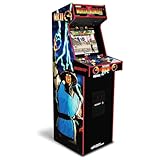
- 14 Classic Games Included: Play Mortal Kombat I–3, Ultimate MK3, and 10 more retro hits like Rampage, Paperboy, and Gauntlet for nonstop arcade action
- Authentic Arcade Feel: Real-feel joysticks, responsive buttons, and dual speakers deliver a true arcade experience in the comfort of your home
- Crisp 17-Inch Display: BOE color monitor showcases every detail, from pixel-perfect punches to vibrant retro graphics, just like the original machines
- Wi-Fi With Multiplayer: Compete online with friends or players across the country using built-in Wi-Fi leaderboards and online multiplayer features
- Premium Cabinet Design: Over 5 feet tall with a sleek finish, light-up marquee, and molded faux coin door for a nostalgic look that stands out in any room
The same testing found that PC emulation worked well for SNES and Sega Genesis, with GBA and N64 also working. Some PlayStation 1 controller arrangements needed extra support software. Treat those findings as examples of tested systems, not a guarantee that every title or peripheral will work without adjustment.
What a cabinet library means
A cabinet’s library is determined by its installed software and the rights attached to the games. One listed 2 Player Economy Arcade Cabinet, for example, advertises preconfigured CRT shaders, bezels and control mappings and support for MAME, NES, SNES, Genesis, N64, PlayStation 1, Game Boy families, Neo Geo and other systems. That illustrates how convenient a prepared cabinet can be, but you still need to verify the current product configuration, included titles, licensing terms, update policy and region.
Some commercial machines deliberately restrict installation or storage changes. That can reduce accidental misconfiguration and support costs, but it prevents you from adding an emulator, changing a front end or replacing a game set. A DIY cabinet gives you more control over the library and interface, at the cost of building and maintaining it.
PC Slower Than It Used to Be?
A free scan shows the junk files, broken settings and background clutter dragging Windows down - then fixes them in one click.Free scan · Windows 10 & 11Crashes, No Sound, or Screen Glitches?
Random freezes, missing sound and display glitches usually trace back to one bad driver. Find and replace yours safely.Free scan · under a minuteFront ends and curation
A front end presents systems and games through a controller-friendly menu. On a PC, it can hide desktop windows, apply per-system settings and show artwork or bezels. On a cabinet, curation is often part of the appeal: fewer choices can mean faster startup and less menu browsing. Decide whether you want a focused collection you can learn and share, or a library that can expand as your interests change.
Setup effort, maintenance and reliability
Cabinet setup
A commercial cabinet may be close to plug-and-play after delivery. You still need to assemble any sections, connect power, position the display, set controls and update software if the manufacturer supports updates. Read the warranty and service instructions before opening the control panel. A cabinet that is easy to start but impossible to access when a button fails can become frustrating later.
PC setup
A PC build has more stages because the parts are separate. Plan to install the operating system, graphics and chipset drivers, emulator software, a front end, controller profiles and the game files you are legally entitled to use. Test each system before hiding the computer inside furniture. Keep a keyboard and mouse connected during setup so that you can recover from a controller or front-end error.
Windows and driver setup are normal parts of a gaming-PC build, as HP’s comparison notes. Driver updates can improve compatibility but can also change display or input behavior. Record working emulator versions and settings, and back up configuration files before making major changes.
Maintenance differences
| Task | Cabinet | PC setup |
|---|---|---|
| Cleaning | Wipe the panel and display, keep vents clear, and inspect buttons and sticks. | Clean the keyboard, controller, display and computer filters or vents. |
| Failed input | Trace the switch, wiring and encoder; proprietary parts can complicate replacement. | Replace or remap a USB controller, then check the emulator profile. |
| Software change | May be restricted by the cabinet’s operating system or license. | Install another emulator or front end, subject to compatibility and legal game files. |
| Heat and access | Requires ventilation and an accessible service opening inside the enclosure. | Uses standard case cooling, but a cramped cabinet can still obstruct airflow. |
Image, audio and performance considerations
Retro games were designed for different resolutions, aspect ratios and display behavior. A cabinet may present a consistent look with bezels and CRT-style shaders already configured. A PC lets you tune scaling, integer options, shaders, latency settings and per-system profiles, but those choices require testing. A setting that looks right for a 240-line arcade game may be wrong for a handheld or a 3D console.
Rank #3

- Classic Arcade Experience: Enjoy 12 legendary games from 1981 on a full-size cabinet with real-feel joysticks, buttons, and authentic arcade-style gameplay
- Vibrant 17" Display: Features a crisp BOE 17" LCD screen that brings retro graphics to life with bright colors and sharp details for immersive gaming fun
- Wi-Fi Leaderboards: Connect to Wi-Fi and compete with players nationwide by posting high scores on global leaderboards—no subscription required
- Premium Retro Design: Over 5 feet tall with a sleek cabinet, light-up marquee, and faux coin door for a nostalgic look that enhances any game room or space
- Crisp Stereo Sound: Dual speakers deliver classic arcade soundtracks and effects just like you remember, bringing every game to life with rich audio
Do not judge performance from the computer’s modern-game specifications alone. Emulator quality, driver behavior, graphics settings, input latency, audio buffering and the individual title all matter. The cited testing supports good results for several 16-bit systems and workable GBA and N64 emulation, while also showing that controller support can be the limiting factor. There is no single performance result that applies to every emulator and game.
For a cabinet, check whether the display is replaceable, whether its mounting supports the intended orientation, and whether speakers can be serviced. For a PC connected to a television, verify the television’s game mode, refresh behavior and available inputs before buying other equipment.
Upgradeability and non-gaming uses
Where the PC wins
A PC can gain storage, memory, graphics capability, cooling, networking and replacement controllers over time. You can move it from a desk to a cabinet, replace the display without replacing the computer, or add modern PC games and streaming applications. HP describes gaming PCs as upgradeable and useful beyond gaming; that versatility is a major part of their value for a household that needs one machine for more than retro play.
Do these 3 things before closing this tab:
1Fix the driver behind crashes, sound loss and screen glitches2Clear out junk files and repair common Windows errors3Scan for outdated or missing drivers - takes under a minuteWhere the cabinet wins
A cabinet concentrates its value in presentation and interaction. The enclosure hides cables, keeps controls in one place and makes the machine a visible centerpiece. If your goal is a dedicated arcade station that anyone can approach and understand, adding PC components may not improve the experience as much as choosing the right panel, display and service access in the first place.
The trade-off in a hybrid
A PC in a cabinet preserves the upgrade path, but the enclosure can limit graphics-card length, power-supply choice, cooling and access to ports. Before building, measure the internal mounting area and plan how you will remove the computer, reach the power switch and disconnect controls. A hybrid is best when you are willing to maintain both a computer and a piece of furniture.
Space, delivery and service
Measure more than the cabinet footprint
RETROCADE’s buying guidance calls out delivery path, weight, player count, support and parts access. Measure the room, doorway, stairway, lift, hallway turns and final position. Include the packaged dimensions and turning clearance, not only the assembled footprint. A full-size upright that fits beside a wall may not fit through the front door or around a landing.
Leave room to stand or sit at the panel, open the service door and remove the display or control panel. Place ventilation openings where they will not be blocked by a wall. A bartop can solve a floor-space problem, but it shifts the requirements to a sturdy table, a suitable display and cable management.
Serviceability questions
- Can you reach the buttons, joystick switches, encoder, power supply and computer without dismantling the entire cabinet?
- Are replacement controls and display parts standard sizes or custom components?
- Does the seller provide a wiring diagram, troubleshooting process and warranty coverage?
- Can two adults move the unit safely, and does the delivery service carry it to the room you need?
- Will the cabinet continue to receive software updates, or is the installed configuration fixed?
Cost and value without a misleading price tag
There is no single meaningful price comparison because cabinets and PCs bundle different things. A cabinet’s purchase can include the enclosure, display, controls, speakers, wiring, software integration and assembly. A PC quote may include only the computer, leaving you to add a display, gamepad or arcade panel, operating-system license and furniture. Compare the complete setup rather than the headline hardware.
Rank #4

- Retro Arcade Cabinet: Celebrate the legacy of Street Fighter with a 9/10 scale home arcade machine that captures the look, feel, and excitement of the iconic 90s arcade experience.
- Authentic Arcade Controls: Responsive joysticks and buttons let you perform your favorite combos with the precise, arcade-style control that fans know and love from the 90s.
- 15+ Capcom Games: Choose from more than 15 classic Capcom titles, including Street Fighter favorites, for endless hours of competitive and nostalgic gameplay with friends.
- Modern Retro Performance: Officially powered by Raspberry Pi 5 hardware with a vivid 19.5 inch viewable screen, lighted marquee, lit faux coin door, and HDMI Out for streaming or recording.
- Online Multiplayer Fun: Assembly is easy, and the feature-rich online multiplayer system lets you plug in and challenge friends in competitive showdowns from your game room or den.
| Cost area | Cabinet questions | PC questions |
|---|---|---|
| Initial hardware | What are you receiving: enclosure, display, controls, speakers, computer and power system? | Does the computer include the performance, storage, operating system and ports your emulators need? |
| Controls | Are the stick, buttons, player count and encoder suitable, and can worn parts be replaced? | Budget for a gamepad or arcade panel, USB encoder, mounting hardware and possibly a second-player setup. |
| Software | Are the installed games licensed, and can you legally add or replace software? | Emulator software and game files are separate; plan only for files you are entitled to use. |
| Furniture and display | Usually integrated, but confirm orientation, resolution, speakers and mounting. | Add a monitor or television, stand or desk, and cable management if you do not already own them. |
| Long-term service | Consider shipping, warranty, proprietary parts and access for repairs. | Consider upgrades, replacement controllers, storage, cooling and time spent configuring software. |
The least expensive route on paper can become the most expensive in time if it requires unavailable parts or repeated troubleshooting. Conversely, paying for a prepared cabinet may be worthwhile even when a self-built PC offers more computing power, because you are buying a finished control and presentation experience.
Legal ownership of emulators and game files
Emulator software and game files are separate legal questions. Nintendo’s official Intellectual Property & Piracy FAQ explains that emulator software enables games to be played on another console, PC or handheld and discusses unauthorized copies and counterfeit hardware. The legality of obtaining, making or using a particular ROM or disc image varies by country, title and circumstance.
Do not assume that a cabinet’s advertised game count means every title is properly licensed, and do not assume that dumping or downloading every ROM is lawful. Review the terms that apply where you live, use software from legitimate sources, and keep records of the games and copies you are authorized to use. RETROCADE also warns that game-file availability and legality vary by product, title and country.
Quick wins for a faster PC:
Scan for outdated or missing drivers - takes under a minuteDriver Scan →Repair Windows errors before they cause bigger problemsFix Now →Which setup fits your playing style?
Choose a cabinet when you are arcade-first
- Your favorite games were designed for sticks and buttons, especially fighters, shoot-’em-ups, beat-’em-ups and 2D platformers.
- You want a dedicated two-player centerpiece rather than a general-purpose computer.
- You value a curated menu and quick access more than adding every possible system.
- You are prepared to measure delivery access and confirm warranty and parts support.
Buy the exact control layout, player count and display orientation your games need. A visually impressive cabinet with the wrong controls will feel wrong every time you play.
Choose a gaming PC when breadth comes first
- You want arcade, console and handheld emulation in one library.
- You expect to add systems, change front ends or upgrade storage and components.
- You also need modern games, streaming, browsing or productivity software.
- You are comfortable installing drivers, mapping controllers and troubleshooting individual emulators.
Pair the PC with a quality USB controller for console games, then add an arcade panel if arcade controls are important. This avoids forcing every game into one input scheme.
Choose a hybrid for a shared game room
- You want an arcade cabinet’s physical presence but do not want to give up PC upgrades.
- You can provide ventilation, service access and enough internal space for the selected computer.
- You accept that a hybrid takes longer to configure than a ready-made cabinet.
Choose a bartop or compact panel for a small room
When floor space is limited, a bartop or compact control panel can preserve the dedicated controls without committing to a full upright. Measure the table, stand, display and cable route, and verify that the finished setup remains comfortable for one or two players.
Independent reader supportYour contribution helps us test, update, and keep practical guides available for everyone.How to evaluate and buy an arcade cabinet
- Define the format. Select upright, seated, bartop or control-panel-only based on room, posture and player count.
- List the games and systems. Separate must-have arcade titles from console and handheld games so you can test whether the advertised software covers them.
- Specify the controls. Check stick type, button count, layout, player spacing, system buttons and replacement parts.
- Verify the computer and software. Ask which hardware, operating system, emulators, front end, shaders and bezels are included, and whether the configuration is locked.
- Check legality and support. Confirm licensing claims, warranty scope, update policy, country availability and who supplies replacement parts.
- Measure delivery. Record packaged and assembled dimensions, weight, doorway clearance, stair access and turning space.
- Inspect service access. Ensure you can reach the controls, display, wiring, power components and computer after installation.
- Test immediately. Before accepting the final placement, test every button, both players, audio, display orientation, menu controls and the games you care about.
How to build a PC setup for retro games
- Choose the display location. Decide whether the PC will use a desk monitor, television or cabinet display; confirm available inputs, orientation and viewing distance.
- Select a balanced computer. Prioritize reliable cooling, enough storage for your lawful library, current drivers and accessible USB ports. Do not buy solely on modern-game specifications.
- Install the operating system and drivers. Finish Windows and graphics-driver updates while the computer is easy to access. Create a restore point or backup before changing major drivers.
- Install emulators from legitimate sources. Keep each emulator’s version and configuration documented so you can reproduce a working setup.
- Install a front end. Configure system names, artwork, menus and exit commands. Keep a keyboard and mouse connected until the front end is stable.
- Add and verify lawful game files. Organize files by system, confirm that each emulator recognizes the expected format, and do not download files you are not authorized to use.
- Map controls per system. Create separate profiles for arcade, SNES, Genesis, N64, GBA, PlayStation 1 and other systems rather than assuming one layout fits all.
- Test video and audio. Set aspect ratio, scaling, shaders, bezel behavior, refresh rate, audio latency and controller response. Test representative games, including two-player titles.
- Back up the working configuration. Save emulator profiles, front-end data, controller mappings and a list of software versions on separate storage.
- Only then mount the PC. Leave ventilation, power access, USB access and a safe removal path. Re-test temperatures, controls and shutdown behavior after installation.
Best setup for MAME and console emulation
Dedicated MAME and arcade games
Use a PC with a front end and a properly mapped arcade control panel when you want broad arcade coverage but still care about the cabinet feel. A commercial cabinet with preconfigured MAME mappings, bezels and CRT-style shaders is the simpler route if its controls and licensed software match your collection. Test the exact games and input combinations rather than relying on a system-level compatibility label.
Console-heavy retro play
Use a PC with a gamepad and per-system profiles when SNES, Genesis, GBA, N64 or PlayStation 1 make up most of your time. The cited testing found good SNES and Genesis results and workable GBA and N64 emulation, while some PlayStation 1 controller setups required extra support software. A six-button arcade panel should not replace a comfortable console controller for every game.
Best Value

- 13 Classic Games: Mortal Kombat, Mortal Kombat II, Mortal Kombat 3, Ultimate MK 3, Rampage, Joust, Wizard of Wor, Gauntlet, Rootbeer Tapper, Defender, Bubbles, Paperboy, Klax
- 4 Feet Tall, with 15.6” IPS Color Monitor
- Dual Speakers for crisp arcade sound
- WiFi Leaderboards to challenge the world, Online Multiplayer
- Real feel Joysticks and Buttons
One shared machine
Install the PC in a cabinet only if the household accepts the maintenance involved. Provide a simple front-end menu for casual players, retain a keyboard and mouse for recovery, and document how to exit an emulator, switch systems and restart the computer. This arrangement offers the most capability, but it has the most possible failure points.
Common problems and practical fixes
A button works in the menu but not in a game
Check the active emulator profile first. A front end and an emulator can use different mappings, and a per-game override may replace the system profile. Rebind the control inside the emulator, remove an unintended override, then save the profile under the correct system or game name.
Two-player controls conflict
Verify that each encoder or gamepad has a distinct device assignment. Reconnect devices in a consistent order, map player one and player two separately, and test a two-player title before sealing the panel or cabinet.
Free tools Windows power users keep installed
One-click scans. No signup required.
The picture looks stretched or cropped
Check the emulator’s aspect-ratio and integer-scaling settings, then confirm the display’s own aspect mode. Apply shaders and bezels after the geometry is correct. Do not use one profile for systems with different native resolutions and orientations.
Input feels delayed
Test with the display’s game mode enabled, remove unnecessary wireless links, check USB connections and review emulator video and audio buffering. Compare a wired controller with the arcade encoder to identify whether the delay is in the display, controller or software.
A game file is not detected
Confirm that the file is a format the emulator supports, that it is in the configured directory, and that the front end has rescanned its library. Keep the legal source and any required firmware files documented; do not solve a missing-file error by downloading an unauthorized copy.
The cabinet is difficult to repair
Disconnect power before opening it, photograph wiring before removing parts, and label connectors. If the machine uses proprietary boards or undocumented harnesses, contact the seller before substituting parts. Service access and replacement availability should have been checked before purchase.
Final decision
Buy the arcade cabinet when the physical control panel, shared two-player layout and curated presentation are the reason you want retro games. Buy the gaming PC when library breadth, upgrades, keyboard-and-mouse support and other computer uses matter more than a dedicated enclosure. If you want both, a PC with a well-mapped arcade panel is the most flexible compromise, provided you accept the additional configuration and maintenance.
Quick Recap
Product prices and availability are accurate as of the date/time indicated and are subject to change. Any price and availability information displayed on Amazon at the time of purchase will apply.

