
Recommended Free Tools
iTechGuides is reader-supported. When you buy through links on our site, we may earn an affiliate commission. As an Amazon Associate I earn from qualifying purchases. Learn more
An Android phone is usually the lowest-cost gaming device when you already own a capable handset and want Android games or a portable streaming screen. A mini PC is the better fit when you want to install and run compatible PC games locally at a desk or on a TV. Neither wins universally: the right choice depends on your actual games, the hardware you already have, whether you need portability, and whether streaming from another computer or a cloud service is acceptable.
Compare the complete setup rather than the device price alone. A phone may need a controller or clip, while a mini PC normally needs a display and input devices. A phone streaming a PC game also depends on a host computer and network; that is not the same as running the game on the phone.
Quick verdict
Choose the Android route first if you already own a recent phone, mainly play Android-native titles, or want a portable client for PC or cloud streaming. Choose a mini PC if local PC gaming is the priority, you need desktop-style controls and display support, and you can reuse or afford the rest of the setup.
| Your priority | Better starting point | Why |
|---|---|---|
| Android games on hardware you already own | Android phone | No second computer is required, and the phone already includes a screen and battery. |
| Portable PC-game access | Android phone plus a streaming method | The phone can act as a streaming client, but a host PC or cloud service remains necessary. |
| Installing and running compatible PC games locally | Mini PC | A mini PC is a Windows or Linux computer with desktop storage, ports and cooling designed for that role. |
| Lowest additional spend when you own no accessories | Whichever route reuses more of your existing equipment | A phone may need only a controller; a mini PC may need a display, keyboard, mouse and controller. |
| Gaming away from a desk | Android phone | It is inherently portable and does not require a separate monitor. |
This is a decision framework, not a performance ranking. The available evidence does not provide controlled cross-device benchmarks or current regional prices, so a universal frame-rate or value winner would be misleading.
#1 Best Overall
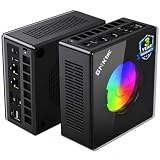
- AMD Ryzen 9 8945HS Processor - GMKtec K11 mini pc equipped with the AMD Ryzen 9 8945HS CPU, featuring 8 cores, 16 threads, and boost up to 5.4 GHz. It offers superior multitasking performance for demanding tasks like gaming and content creation, with energy-efficient power management at 35W TDP (upgradable to 70W)
- 32GB DDR5 + 1TB PCIe 4.0 SSD - GMKtec K11 mini computers comes with 32GB(dual-channel) DDR5 RAM at 5600 MT/s , which can be expanded to 128GB and 1TB PCIe 4.0 M.2 2280 SSD supports dual PCIe Gen4 x4 SSD slots expanded up to 8TB, ensures lightning-fast read/write speeds
- WHY CHOOSE DDR5 5600MHz DUAL CHANNEL (2×16GB) - With a 5600MHz clock—a 17% frequency uplift over 4800MHz—this kit delivers massive bandwidth gains that elevate real-world performance. Gamers enjoy higher minimum FPS and less stutter in open-world and sim titles for a smoother competitive experience. Video editors and 3D creators benefit from faster 4K/8K timeline scrubbing, quicker renders in DaVinci Resolve and Premiere, and swifter asset loading. For AI/LLM workloads, the superior throughput reduces I/O bottlenecks, cuts token generation latency, and accelerates model fine-tuning by keeping processing cores fed with data—so you wait less and create more.
- Oculink Port - The Oculink port enables higher bandwidth capabilities, better frame rates and lower lag. The standard also operates at PCIe x4 speeds, compared to Thunderbolt's x3. Gamers and content creators can benefit from Oculink's higher bandwidth, resulting in better performance and lower lag for eGPU setups
- 4-Screen 4K Display Support - K11 mini pc supports simultaneous 4K display output on 4 screens via HDMI 2.1 (4K@60Hz), DisplayPort 2.1 (4K@60Hz), and USB4 (up to 40Gb/s). Ideal for multitasking, it provides an immersive experience for professional work, gaming, and entertainment
Decide what “gaming” means in your setup
The same phone or mini PC can participate in three very different arrangements. Identify the arrangement before comparing specifications.
Local Android gaming
The phone downloads and runs an Android game itself. Compatibility, graphics quality and sustained performance depend on the exact handset, Android version, game and thermal condition. A title that works well on one phone can be unavailable, restricted or uncomfortable on another. Check the game’s current Android requirements and controller support for your model.
PC streaming to a phone
In this arrangement, a separate computer renders the PC game and sends the video to the phone. Valve describes Steam Link as extending Steam Link functionality to Android phones, tablets and TVs running Android 5.0 and newer. The official wording is: “The Steam Link app on Android extends Steam Link functionality to many Android phones, tablets, and TVs, running Android 5.0 and newer.” Valve’s Android Steam Link support page explains the app.
Steam Link therefore does not turn a phone into a standalone PC gaming computer. You still need a host PC with the game installed, and the experience depends on the host, the network and the controls. The phone is a display and input endpoint.
Cloud gaming
A cloud service renders the game on remote servers and streams it to the phone or mini PC. Service access, supported games, account requirements, plan limits and network quality determine the result. Do not compare cloud-rendered performance with a mini PC’s local performance as if both came from the same hardware: the remote server, not your client device, performs the game rendering.
Local PC gaming on a mini PC
The mini PC installs an operating system and runs compatible PC games on its own processor, graphics hardware, memory and storage. It can also be used as a cloud or streaming client, but its main advantage in this comparison is the option to run games locally without a separate host computer.
Compare the complete setup, not just the box
Use a bill of materials for each route. Write down what you already own and count only the new items you need.
Quick wins for a faster PC:
Scan for outdated or missing drivers - takes under a minuteDriver Scan →Repair Windows errors before they cause bigger problemsFix Now →Fix the driver behind crashes, sound loss and screen glitchesFind Drivers →| Item | Android phone route | Mini PC route |
|---|---|---|
| Core device | An existing phone may add no purchase cost; a new handset must be priced for your market and date. | The mini PC, including its exact processor, memory, storage and operating-system configuration. |
| Display | Built-in phone screen. | Usually a monitor or TV, unless you already have a compatible display. |
| Controls | Touch controls, or an Android-compatible Bluetooth, USB or telescopic controller. A clip may be useful for handheld play. | Keyboard and mouse for desktop games, plus a controller for controller-focused titles. |
| Power and mounting | Phone charger and possibly a stand or clip. | Power adapter and a place for the mini PC; some setups also need a display cable. |
| Network | Needed for PC or cloud streaming and for any online game. | Needed for cloud or remote streaming and online play; local single-player games can reduce that dependency. |
| Software | Android games, Steam Link or a supported cloud-gaming app. | Operating system, graphics drivers, game launcher and the games themselves. |
No current regional prices were verified for these parts. Check prices in your country on the same date and include delivery, adapters, storage upgrades and controllers. A statement such as “the phone is cheaper” is valid only when the phone is already owned or when the two complete bills of materials have been compared.
Rank #2

- Built to Conquer. Ready to Rule: Powered by the AMD Ryzen 9000 Series processor, ROG GR70 delivers elite-tier gaming performance once reserved for bulky desktops—now in a compact form that answers your call for more power, less space.
- Every Frame. Every Kill—Faster: Paired with NVIDIA GeForce RTX 50-Series mobile GPU, ROG GR70 ensures ultra-smooth gameplay with high FPS and low latency. Dominate every match with lightning-fast reflexes and no dropped frames.
- Always Connected. Always Ahead: Featuring Wi-Fi 7 with certified Bluetooth 5.4, ROG GR70 is built to eliminate bottlenecks and get you ahead—whether you're online, syncing gear, or booting into the next match.
- Cool. Quiet. Ruthless: Advanced thermal design with custom cooling system keeps temperatures down and acoustics low—even under intense loads. It’s deadly silent and deadly fast.
- Mini Size. Mega Impact: ROG GR70 fits power and aesthetics into an ultra-compact, silver-hued chassis. It’s desk-friendly, travel-ready, and designed to stun—without compromising what's under the hood.
What the Android phone route does well
It can reuse hardware you already own
If your phone meets a game’s requirements, the screen, battery, speakers, wireless connectivity and operating system are already paid for. That can make the additional cost a controller or clip rather than an entire computer setup. It is also the only option here that remains a practical pocket-sized device after the gaming session.
It supports several play styles
Touch controls are adequate for many mobile games. A Bluetooth, USB or telescopic controller is preferable for games designed around physical buttons. NVIDIA’s GeForce NOW guidance recommends a gamepad clip for phone use and says its Android virtual gamepad is not recommended for long-term gameplay. Read the current GeForce NOW Android system requirements before buying an accessory or relying on touch controls.
It can be a streaming endpoint
Steam Link and other supported services let a phone display a game rendered elsewhere. This is useful when the host computer is in another room or when you want a small screen, but it introduces two dependencies: the host must be available and the network must carry responsive video and input. A phone with excellent local gaming performance does not remove those dependencies.
Its limits are model-specific
“Android phone” covers low-cost handsets, older flagships and current high-end models with very different processors, graphics drivers, cooling systems, storage speeds and displays. Check the exact model, memory capacity, Android release and game support. Do not infer game performance from a phone’s brand or from a processor name alone.
What the mini PC route does well
It provides a local PC platform
A mini PC gives you desktop operating-system support, larger external displays, standard keyboard and mouse input, local storage and access to compatible PC game stores. It is the more direct option when the goal is to install a PC game and play without a separate host machine.
The complete configuration matters
One relevant platform is AMD’s Ryzen 7 7840HS. AMD lists eight cores, 16 threads, Radeon 780M integrated graphics and a 35–54 W configurable TDP in its 2025 consumer quick reference. Those are manufacturer specifications, not a benchmark or a promise of a particular frame rate. The same processor can behave differently in mini PCs because manufacturers choose different memory configurations, power limits, cooling systems and firmware.
Use the AMD Ryzen consumer quick reference to verify the listed specification. AMD’s Ryzen 7 7840HS support page lists Radeon 780M graphics and support for Windows 11, Windows 10, RHEL and Ubuntu; driver availability and labels can change, so check the page when configuring the system.
Free tools Windows power users keep installed
One-click scans. No signup required.
It needs a fuller desk setup
The mini PC itself is only one part of the experience. Add a monitor or TV, keyboard, mouse and, where appropriate, a controller. If you already own those items, the mini PC becomes easier to justify. If you do not, the accessories can outweigh the difference between two device prices.
Rank #3

- Office Gaming Mini PC - UPGRADED GMKtec Nucbox M5 Ultra Series is equipped with the powerful AMD Ryzen 7 7730U processor, 8 Cores/16 Threads, Base 2.00GHz (Power Saving Quiet Mode) with Turbo Boost up to 4.50GHz (Performance Mode) in BIOS settings, Based on the ZEN 3+ architecture, this small but powerful mini pc delivers satisfying results in productivity, office work, and gaming. 35% Performance increase over AMD Ryzen 5 7430U/ Ryzen 7 5700U, 5600U, 5560U, 5500U.
- 16GB DDR4 RAM & 256GB PCIe SSD - Installed with DDR4 16GB RAM (1x16GB), the Nucbox M5 Ultra mini pc support expansion to 64GB RAM. Featured with 256GB M.2 2280 PCIe 3.0 SSD, support dual slot expansion to 4TB SSD. (Upgrades not included)
- DUAL NIC LAN 2.5G RJ45 - Fast Network Speeds: Enjoy up to 2500Mbps data transmission speed without worrying about lagging. Ideal for working, gaming, and surfing the internet. Great for Untangle, Pfsense or as a server office PC.
- Mini Desktop Computer with 4K Triple Screen Display - Nucbox M5 Ultra integrates AMD Radeon Graphics 8 Cores 2000 MHz GPU to deliver powerful graphics processing power to easily handle the demands of complex design software, 4K@60Hz UHD video editing, and playback. It can connect to 3 display screens simultaneously.
- Fast Internet WiFi 6E + BT5.2 Connection - GMKtec Mini PC with WiFi-6E Wireless, have 2.5G/5G/6G triple band, more faster and lower latency. Bluetooth 5.2 allowing you more quickly to connect other wireless devices (headset, mouse, keyboard, etc.) Interface features 2*USB3.2 ports, 2*USB2.0 ports, 1*HDMI 2.0 port(4K@60Hz), 1*USB-C port(PD/DP/DATA), 1*DP Port, 1*Audio 3.5mm (HP&MIC), 1*DC Power Port.
It is compact, not handheld
A mini PC saves desk space compared with a full tower, but it still needs a power source, display and input devices for normal play. Moving it between rooms is possible, yet it is not equivalent to taking a phone with you.
How to set up the Android route
For local Android games
- Record the exact phone model, Android version, available storage and memory. Remove or move large files if the game needs more free space.
- Check the game’s current store listing for Android compatibility, required version, controller support and account requirements.
- Install the game from its official distribution channel and update the phone’s system software and game before testing.
- Start with the game’s default graphics settings. Test a complete session, not just the menu, because heat and battery state can change sustained performance.
- Pair a controller if touch controls are uncomfortable. Confirm that the game recognizes the controller; Android-level pairing does not guarantee in-game support.
- Use a stable charging arrangement that does not block the phone’s vents or make the grip unsafe. A stand or clip can improve comfort, but verify that it fits your handset and leaves ports accessible.
For Steam Link streaming
- Confirm that the phone meets the Android requirement shown by Valve and install the official Steam Link app.
- Prepare the host PC: install the game, sign in to the relevant Steam account and leave the PC available to stream. The phone does not replace this host.
- Open Steam Link on the phone and follow its pairing and connection prompts. Keep the app, host and network software current.
- Pair a supported controller or use touch controls only for games where they are comfortable. NVIDIA specifically cautions against relying on an Android virtual gamepad for long-term play.
- Test input response and image stability in the game you actually intend to play. A connection that feels fine in a menu may feel slow in a fast action game.
- If the stream is unstable, reduce competing network traffic, move closer to the access point where practical, and test the host PC’s load. If the problem follows the host, upgrading the phone will not solve it.
For cloud gaming
- Check the service’s current Android support, supported games, account tier and network requirements.
- Install the service’s official app, sign in and confirm that your intended game is available in your region and plan.
- Use a compatible controller for games that need analog sticks or many buttons.
- Test at the time and location where you normally play. Cloud quality can vary with congestion even when the phone itself is unchanged.
How to set up the mini PC route
- Choose the exact configuration, recording processor, integrated or discrete graphics, memory amount and channel layout, storage capacity, operating system, power adapter and warranty.
- Confirm that the package includes the accessories you need. Plan for a display or TV, display cable, keyboard, mouse and controller if those are not already available.
- Connect the display and input devices, install the operating system if required, and apply the manufacturer’s firmware and graphics-driver updates.
- Check each game’s PC requirements against the complete system. Pay attention to graphics requirements, memory, storage and operating-system support rather than comparing CPU names alone.
- Install one representative game first. Verify resolution options, controller recognition, storage space and temperature behavior before filling the drive.
- Test sustained play for the length of a normal session. A mini PC’s power limit and cooling can affect behavior over time; a specification sheet does not establish a measured frame rate.
- For cloud or remote streaming, treat the mini PC as a client and apply the same network and service checks used for a phone.
Performance, heat and reliability questions
Why a component name is not a benchmark
The Radeon 780M name identifies integrated graphics in the Ryzen 7 7840HS platform; it does not state how a particular mini PC performs in a particular game. Memory speed and dual-channel operation, cooling, firmware power limits, game settings, resolution and driver version all affect results. Use independent, game-specific tests for the exact mini PC configuration if performance is important.
Why sustained sessions matter
Short demonstrations can hide heat-related power changes. Phones may reduce performance as they warm, while mini PCs may change clock speeds when their cooling system reaches its limits. Test the games and session length that matter to you, and leave room for ventilation around either device.
Why storage and memory affect convenience
A game can be technically compatible yet impractical if the device lacks free storage for updates or has insufficient memory for the operating system and background services. Check the actual installed capacity rather than the advertised drive size, and leave headroom for patches.
Controls, screens and comfort
Input is one of the biggest differences between the two routes. Touch controls eliminate an accessory but are not a substitute for analog sticks, triggers or a keyboard in every genre. A phone controller can improve precision while making the setup wider and less pocketable. Verify handset dimensions, connector clearance and compatibility before purchasing a clip or telescopic controller.
A mini PC supports a larger display and conventional desk controls, which can be preferable for strategy, simulation, keyboard-heavy games and long sessions. It also means more cables and a fixed play location. A TV can replace a monitor, but check its available inputs and whether your chosen controller works with the operating system.
Network dependence and troubleshooting
Local Android and local mini-PC games can reduce network dependence, although online features still need connectivity. PC streaming and cloud gaming cannot: video travels to the client and input travels back to the host or service.
Do these 3 things before closing this tab:
1Fix the driver behind crashes, sound loss and screen glitches2Clear out junk files and repair common Windows errors3Scan for outdated or missing drivers - takes under a minute- High input delay: test a local game to separate controller or display delay from network delay. If only streaming feels slow, inspect the host, service and network path.
- Image drops or blockiness: stop other high-bandwidth traffic and retest. A more powerful phone or mini PC cannot repair congestion between the client and renderer.
- Controller not recognized: verify pairing, connection mode, battery and in-game support. A controller working in Android or Windows menus may still be unsupported by a particular title.
- Phone overheating: remove unnecessary background load, improve airflow and test a lower game setting. Do not cover vents or use an unsafe charging arrangement.
- Mini PC throttling: check ventilation, power settings and driver status, then test again over a full session. Compare results only after confirming the exact configuration.
- Game unavailable: distinguish Android, PC, streaming and cloud versions. A title’s existence on one platform does not prove that another version or service supports it.
Decision matrix by reader situation
| Situation | Recommended first test | Reasoning | What could change the decision |
|---|---|---|---|
| You already own a recent Android phone and play mobile titles | Install your main games and test a controller only if needed. | The screen and core device are already available. | Incompatible games, poor sustained performance or uncomfortable controls. |
| You own a gaming PC and want to play from another room | Try Steam Link on the phone. | The phone can be a portable client instead of another local gaming computer. | Unacceptable latency, unreliable network or the need for a larger display. |
| You own a monitor, keyboard and mouse but no gaming computer | Price a mini PC configuration against the games’ PC requirements. | Most of the supporting hardware is already covered. | The chosen games require graphics hardware beyond the mini PC’s configuration. |
| You own neither a display nor a controller | Calculate both complete bills before buying. | The mini PC route may require several peripherals; the phone route may require only controls. | Existing TV access or a phone that is not powerful enough for the intended games. |
| You need to play while traveling | Use the phone for local games or supported streaming where connectivity allows. | Portability is built in. | Battery life, heat, data limits and the need for desktop controls. |
| You want local PC games without another host | Evaluate the mini PC’s exact configuration and game requirements. | A mini PC can render compatible PC games locally. | Game requirements, thermal behavior, storage and the total accessory cost. |
Buying checklist
Before choosing a phone
- Write down the exact model and Android version, not just the manufacturer name.
- Check every target game’s Android availability and controller support.
- Confirm free storage for the game and updates.
- Decide whether touch controls are acceptable for your genres.
- If streaming, confirm that you have a usable host PC or an appropriate cloud account.
- For a controller or clip, verify physical fit, connection type and game compatibility.
Before choosing a mini PC
- Record the processor, graphics solution, memory configuration, storage and operating system.
- Compare the exact configuration with each game’s current PC requirements.
- Check cooling, power limits, ports, display outputs and included accessories.
- Price the monitor or TV, keyboard, mouse, controller, cable and storage expansion that you still need.
- Look for current driver support for the installed operating system.
- Plan a sustained-session test before buying additional games or accessories.
Bottom line: match the device to the game path
For an owner of a suitable Android phone, the phone route is the sensible first experiment: it can run Android games locally and can stream from a host PC or cloud service with the right app and controls. For a reader whose goal is local PC gaming at a desk, a mini PC is the more direct platform, provided its complete configuration meets the games’ requirements and the display and peripherals are included in the budget.
Make the final decision using your game list, existing hardware, tolerance for streaming dependence, desired portability and complete local prices. Treat processor and graphics names as specifications to investigate, not as a substitute for game-specific testing.
Quick Recap
Product prices and availability are accurate as of the date/time indicated and are subject to change. Any price and availability information displayed on Amazon at the time of purchase will apply.

