
Quick wins for a faster PC:
Clear out junk files and repair common Windows errorsFree Scan →Fix the driver behind crashes, sound loss and screen glitchesFind Drivers →iTechGuides is reader-supported. When you buy through links on our site, we may earn an affiliate commission. As an Amazon Associate I earn from qualifying purchases. Learn more
AltspaceVR is no longer an active service, so no PC can connect to its live worlds today. Microsoft’s documentation states: “AltspaceVR is shutting down on March 10, 2023.” The specifications below remain useful as a historical compatibility checklist for an old installation, archived software, or a study of what the Steam version required.
The key distinction is between the modest 2D minimum and the much higher historical target for headset use. A 64-bit Windows 10 PC with an Intel i5, 4 GB of memory and a DirectX 9-compatible dedicated graphics card with 1 GB of video memory met the 2D minimum. Historical VR use targeted an Intel i5-4590, 8 GB of RAM and GTX 970/Radeon R9 290-class graphics, plus a compatible headset and SteamVR connections.
AltspaceVR availability comes before the hardware check
Microsoft’s AltspaceVR documentation records the shutdown date as March 10, 2023. That means passing the old Steam requirements does not restore account access, matchmaking or the hosted AltspaceVR experience. Treat every specification in this guide as archival information rather than a current purchasing requirement.
Outdated Drivers Are Slowing You Down
One free scan finds every outdated or missing driver and matches the right update for your exact hardware.Free scan · exact hardware matchWindows Errors? Fix Them Before They Spread
Repair common Windows errors and clear accumulated junk for a smoother, more stable PC - no reinstall needed.Free scan · no reinstallThe historical checklist can still answer three practical questions:
#1 Best Overall
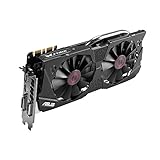
- DirectCU II + 0dB fan technology; silent gaming at 30% cooler. Fits PCI Express 3.0 bus.
- ASUS GPU Tweak Utility Real-time and intuitive tweaking software.
- Gigantic 4GB 7010 MHz GDDR5 memory, 256-bit interface. DIGI+ VRM with 6-phase Super Alloy Power.
- GPU Boost Clock : 1253 MHz, GPU Base Clock : 1114 MHz
- Interface: DVI, Output : Yes x 1 (DVI-I), Yes x 1 (DVI-D), HDMI Output : Yes x 1 (HDMI 2.0), Display Port : Yes x 1 (Regular DP), HDCP Support : Yes
- Would a particular Windows PC have met the old 2D Steam minimum?
- Would it have been in the performance range expected for a headset?
- Did it have the ports and peripherals that SteamVR required?
Those are separate tests. A computer can pass the 2D minimum but fail the VR graphics or headset-connection requirements, and a powerful computer can pass every test while the discontinued service remains unavailable.
Historical AltspaceVR requirements on Steam
Steam listed separate minimum requirements for 2D mode and recommended requirements for VR mode. The 2D minimum was explicitly described as applying without a VR headset.
| Category | 2D minimum | VR recommendation |
|---|---|---|
| Operating system | 64-bit Windows 10 or newer | 64-bit Windows 10 or newer |
| Processor | Intel i5 | Intel i5-4590 |
| Memory | 4 GB RAM | 8 GB RAM |
| Graphics | Dedicated DirectX 9-compatible GPU with 1 GB of video memory | NVIDIA GTX 970, AMD Radeon 290, or equivalent |
| DirectX | DirectX 9-compatible graphics | DirectX 11 |
| Internet | Broadband internet | Broadband internet |
| Available storage | 500 MB | 1 GB |
| VR hardware | No headset; the listing described this tier as 2D mode | Oculus Rift or HTC Vive class headset support |
| Runtime | SteamVR was listed | SteamVR was listed |
“Minimum” does not mean that every modern visual setting or workload would be smooth. It is the entry tier published for the 2D presentation, while the VR column is the historical target for headset operation. The storage figures are small by current standards, but they describe the old listing and should not be treated as a guarantee that a present-day replacement installation will use the same amount of disk space.
Recommended Free Tools
What changes between 2D and VR?
2D mode
The 2D minimum was intended for playing without a headset. It required a 64-bit version of Windows 10 or newer, an Intel i5-class processor, 4 GB of RAM and a dedicated GPU that supported DirectX 9 and had at least 1 GB of video memory. Steam listed broadband internet, 500 MB of free storage and SteamVR alongside those specifications, even though no headset was needed for this mode.
Integrated graphics were not what the listing described: the requirement called for a dedicated graphics processor. A laptop with 4 GB of RAM and an i5 label therefore was not automatically compliant if its only graphics device was integrated or lacked the stated DirectX and video-memory capability.
VR mode
Headset use raised the target to an Intel i5-4590, 8 GB of RAM and a GTX 970, Radeon 290 or equivalent. The VR recommendation also specified DirectX 11, 1 GB of available storage and support for an Oculus Rift or HTC Vive class headset. The processor and graphics entries are model classes, not a statement that only those exact retail models could work; an equivalent part in the same performance tier was the intended comparison.
VR also adds display and USB requirements that do not appear in the basic 2D description. SteamVR’s own checklist is the useful cross-check for those connections.
How to check your Windows PC step by step
1. Confirm the operating-system edition and architecture
- Open Settings from the Windows Start menu.
- Choose System, then About.
- Read Windows specifications to identify the Windows version.
- Read System type. The historical requirement was a 64-bit operating system, not 32-bit Windows.
The result passes this part only if the machine is running 64-bit Windows 10 or a newer Windows release. A 32-bit installation fails the stated requirement even when the processor itself is capable of 64-bit operation.
2. Identify the processor and installed RAM
- Right-click the taskbar and open Task Manager.
- Select Performance, then CPU, to see the processor model.
- Select Memory to see installed RAM.
For the 2D comparison, look for an Intel i5-class processor and at least 4 GB of RAM. For historical VR, compare the model with an Intel i5-4590 and check for at least 8 GB. “Intel i5” alone is not enough to establish VR equivalence because i5 processors span many generations and performance levels.
If Task Manager does not make the model clear, Windows’ built-in System Information utility can provide the processor and memory entries in one view. Record the exact model rather than relying on a product family label.
Rank #2

- NVIDIA GeForce GTX 970 GPU
- 4GB 256-bit GDDR5 VRAM
- DL-DVI-D, DL-DVI-I, HDMI and DisplayPort
- PCI Express 3.0
- 3-way SLI ready
3. Check the graphics processor and video memory
- In Task Manager > Performance, select each listed GPU.
- Record the model name and the dedicated GPU memory shown by Windows.
- Use the model name to compare against the appropriate historical tier.
The 2D test needs a dedicated DirectX 9-compatible GPU with 1 GB of video memory. The VR comparison is GTX 970, Radeon 290 or equivalent, with DirectX 11 capability. If a system shows both integrated and dedicated graphics, the dedicated adapter is the one to compare; the game would still depend on the laptop’s power and graphics-switching configuration.
Do these 3 things before closing this tab:
1Fix the driver behind crashes, sound loss and screen glitches2Repair Windows errors before they cause bigger problems3Scan for outdated or missing drivers - takes under a minuteDo not treat shared system memory as the same thing as dedicated video memory. Windows may display memory that the integrated adapter borrows from RAM, but the published 2D requirement referred to a dedicated GPU with its own 1 GB of video memory.
4. Check DirectX capability
- Press the Windows key, type dxdiag, and open the DirectX Diagnostic Tool.
- On the System tab, note the DirectX version reported by Windows.
- Use the Display tabs to identify the active GPU and its feature information.
The historical 2D listing called for DirectX 9-compatible graphics, while its VR recommendation called for DirectX 11. A newer DirectX runtime shown by Windows does not by itself prove that an old GPU supports every required feature, so compare the graphics model as well.
5. Verify free storage
- Open File Explorer.
- Choose This PC.
- Check the free space on the drive where Steam would have installed the application.
The old listing specified 500 MB for the 2D minimum and 1 GB for the VR recommendation. Leave additional working room for Windows, Steam and updates rather than filling a drive to its exact threshold. These figures are historical listing values, not a promise about the disk footprint of any unofficial archive or replacement software.
6. Confirm broadband internet
Both historical tiers listed broadband internet. This was a connectivity requirement, not a published speed benchmark. Check that the PC can maintain a reliable connection and that security software, a firewall or a restricted network is not blocking Steam or SteamVR traffic. A computer can meet every local hardware requirement and still fail to connect when the network path or service is unavailable.
7. Check the headset connections for SteamVR
SteamVR’s minimum hardware list added a USB 2.0-or-newer port and either HDMI 1.4 or DisplayPort 1.2. For a historical headset setup, verify that the computer has:
- At least one available USB 2.0-or-newer port for the headset or related hardware.
- An HDMI 1.4 or DisplayPort 1.2 output that is connected to the dedicated GPU when the system has more than one graphics adapter.
- A headset in the Oculus Rift or HTC Vive class specified by the old AltspaceVR listing.
Adapters, docks and laptop outputs can change which GPU drives the headset. The port label alone is therefore not a complete compatibility test; the physical connection must be usable by the graphics adapter and recognized by SteamVR.
SteamVR’s independent requirements cross-check
SteamVR listed its own minimum hardware, which is useful because AltspaceVR’s VR mode depended on that runtime. Its processor minimum was an Intel Core i5-4590 or AMD FX-8350 equivalent, with 4 GB of RAM and a GTX 970 or Radeon R9 290 equivalent. It also required broadband internet, SteamVR, one USB 2.0-or-newer port and HDMI 1.4 or DisplayPort 1.2. SteamVR’s recommended graphics tier was a GTX 1060 or Radeon RX 480 equivalent.
| SteamVR item | Minimum listed requirement | Recommended graphics tier |
|---|---|---|
| CPU | Intel Core i5-4590 or AMD FX-8350 equivalent | Not stated in the cited SteamVR specification |
| RAM | 4 GB | Not stated |
| GPU | NVIDIA GTX 970 or AMD Radeon R9 290 equivalent | NVIDIA GTX 1060 or AMD Radeon RX 480 equivalent |
| Connection | USB 2.0-or-newer; HDMI 1.4 or DisplayPort 1.2 | Not stated |
| Network and software | Broadband internet and SteamVR | Not stated |
The two lists are not contradictory. AltspaceVR’s VR recommendation called for 8 GB of RAM, while SteamVR’s own minimum listed 4 GB. For a historical AltspaceVR headset decision, use the stricter AltspaceVR VR memory target and still satisfy SteamVR’s port and runtime requirements.
Free tools Windows power users keep installed
One-click scans. No signup required.
How to interpret your result
| Result | What it means historically |
|---|---|
| Passes Windows, CPU, RAM, GPU, storage and network checks but has no headset | Potentially suitable for the old 2D tier, assuming the dedicated GPU met the DirectX 9 and 1 GB video-memory requirement. |
| Passes the 2D checks but has less than 8 GB RAM or below GTX 970/Radeon 290-class graphics | It does not meet the published VR recommendation, even if 2D operation would have been within the old minimum. |
| Meets the VR CPU, RAM and GPU target but lacks USB or HDMI/DisplayPort connections | It lacks the physical connection requirements listed by SteamVR. |
| Meets every historical requirement | It would have been in the published compatibility range, but that does not provide access to the discontinued service. |
| Runs 32-bit Windows | It fails the operating-system requirement regardless of other components. |
Do you need a GTX 970?
Not for the historical 2D minimum. That tier asked for a dedicated DirectX 9-compatible GPU with 1 GB of video memory, so a GTX 970 was substantially above the stated entry requirement.
Rank #3
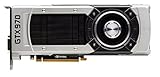
- The GeForce GTX 970 is a high-performance graphics card designed for serious gaming.
- Powered by new NVIDIA Maxwell architecture, it features advanced technologies and class-leading graphics for incredible gaming experiences.
- NVIDIA GPU Boost 2.0
- NVIDIA SLI Technology
- NVIDIA G-SYNC Technology
For historical VR use, the GTX 970 was the named NVIDIA target, alongside the AMD Radeon 290 or an equivalent. SteamVR also used the GTX 970/Radeon R9 290 class as its minimum graphics tier. An equivalent card could satisfy the comparison; the model name did not have to be exactly GTX 970.
Buying a GTX 970 or another old graphics card now cannot revive AltspaceVR. A replacement card would only make sense for unrelated legacy VR software, testing an archived environment, or another application with a known requirement.
Common compatibility mistakes
Confusing 2D minimum with VR readiness
Four gigabytes of RAM and an i5-class processor describe the 2D entry tier, not the complete VR target. Headset use should be compared with 8 GB of RAM, i5-4590-class processing and GTX 970/Radeon 290-class graphics.
Checking only the amount of RAM
RAM is one line in the checklist. The operating-system architecture, dedicated video memory, DirectX capability, processor model and headset ports are separate conditions.
Assuming a newer Windows version guarantees compatibility
The listing required 64-bit Windows 10 or newer, but an operating-system match does not make an underpowered GPU or missing headset connection compliant. Check every category independently.
Reading “SteamVR required” as proof that a headset is optional
SteamVR was part of the software stack listed by Steam. For VR, it also brought hardware and connection requirements. The historical 2D listing still named SteamVR while explicitly describing the minimum as no-headset 2D mode.
Treating a service shutdown as a hardware failure
A passing checklist cannot overcome the March 10, 2023 service shutdown. If an old setup cannot sign in or load hosted worlds, replacing the GPU or adding RAM is not a remedy for that availability problem.
Using Steam’s own requirements panel
Steam’s general support guidance is to open a game’s Store page, scroll to System Requirements and check both the hardware and operating-system sections. For an installed or archived copy, compare the displayed entries with the exact CPU and GPU models recorded from Windows rather than judging by the computer’s age or brand.
Because AltspaceVR is discontinued, the listing should be read as a historical reference. If the Store page is unavailable, the tables in this article preserve the relevant distinctions: 2D versus VR, minimum versus recommended, and local hardware versus SteamVR connections.
Quick Recap
A practical decision checklist
- Confirm 64-bit Windows 10 or newer.
- Record the exact CPU model in Task Manager or System Information.
- Record installed RAM and separate dedicated GPU memory from shared memory.
- Compare the machine with the 2D minimum first.
- For historical VR, compare with i5-4590, 8 GB RAM and GTX 970/Radeon 290-class graphics.
- Verify DirectX capability and at least 500 MB or 1 GB of free storage for the relevant historical tier.
- Confirm broadband connectivity.
- For headset use, verify SteamVR, USB 2.0-or-newer and HDMI 1.4 or DisplayPort 1.2.
- Keep the result labeled archival: the service shut down on March 10, 2023.
Product prices and availability are accurate as of the date/time indicated and are subject to change. Any price and availability information displayed on Amazon at the time of purchase will apply.

