
Free tools Windows power users keep installed
One-click scans. No signup required.
iTechGuides is reader-supported. When you buy through links on our site, we may earn an affiliate commission. As an Amazon Associate I earn from qualifying purchases. Learn more
An “AI terminal” is a terminal-centered way to work with an AI agent: you give it a task, it consults a model, uses commands or other tools to act, then reads the results and either continues or responds. The shared pattern is task and context → model decision → tool action → feedback. That is a useful conceptual loop, not a promise that every product uses the same internal design.
What “AI terminal” means
The term describes an interaction pattern, not a standardized product category. The terminal is where a person interacts with the agent and where commands may run; the agent coordinates the model, tools, and working environment. The model by itself is not the whole system. A 2026 survey of terminal agents describes behavior as shaped jointly by the model, interface, harness, runtime, and environment (survey).

In coding work, that environment can include a project repository, files, installed development tools, prior conversation, and configured permissions. The agent may inspect or edit files and run checks, so its work can change the environment rather than merely produce chat text. OpenAI’s Codex CLI guide describes this kind of local-repository workflow; Anthropic describes Claude Code as a way to delegate coding tasks through a terminal or supported IDE.
What’s actually slowing this PC down?
Pick the symptom - the matching free tool is one click away.
The four steps in the shared loop
These steps summarize the visible workflow common to terminal-mediated agents. They do not establish that every vendor implements an identical architecture. OpenAI’s explanation of the Codex agent loop describes the sequence clearly.
#1 Best Overall
1. Give the agent a task and context
Describe the outcome you want. For a coding agent, useful context may include the project you are working in and any constraints on the change. The surrounding system can also supply repository contents, prior conversation, project instructions, and permission settings. Codex’s documentation recommends starting from a project directory and describing the work to accomplish.
2. The model decides what to do next
The agent’s harness gathers the task and relevant context and sends them to a model. The model can return a response or request a tool action. Michael Bolin, a Member of the Technical Staff at OpenAI, wrote on January 23, 2026: “At the heart of every AI agent is something called ‘the agent loop.’” His article explains that loop through Codex; it is not a claim that every terminal agent has the same internals.
Rank #2

- The PocketTerm35 is a handheld computer designed specifically for the Raspberry Pi 4B and Pi 5.
- It provides a complete Linux desktop experience, enabling you to enter commands, run development tools, or execute daily computing tasks directly in the terminal at any time.
- Features a compact 93.5 × 168.5 × 37 mm design, equipped with a 3.5inch 640 × 480 optical bonding touch display. Portable and lightweight, it is an ideal tool for geeks, developers, and electronics enthusiasts.
- Suitable for terminal operations, command-line input,and graphical interface browsing
- Supports seamless switching between Batt and external power,enhancing system reliability. Supports handheld gaming, compatible with the RetroPie system
3. The agent acts through a tool
If the model requests an action, the agent can run a terminal command or use another available tool. In a coding task, it might inspect files, make edits, or run a local development tool. What it can do depends on the product’s available tools and permissions. Codex’s guide describes repository inspection, editing, and local tool use; Anthropic’s documentation describes Claude Code as a terminal or IDE-based coding assistant.
4. The agent reads the result, then continues or finishes
Command output or other tool results return as new context. The model can then request another action, adjust its approach, or respond to the user. This feedback step is what makes the process a loop rather than a one-shot answer. In software work, the primary result may be changed code or another update to the working environment, not just the final message.
Rank #3

- 【RK3399 Android 12 Fanless Platform】This All-in-one industrial Desktop Computer is powered by the RK3399 processor and Android 12. It features a 15.6-inch touchscreen, fanless operation for high reliability, 4GB memory, and 64GB ROM storage, ensuring smooth multitasking and data processing in harsh industrial environments
- 【 FHD Screen & 10-Point Touch】Designed for diverse industrial applications, this 15.6-inch PC features a 1920×1080 FHD 16:9 display for clear visuals and software compatibility. Its high-sensitivity G+G 10-point capacitive touch ensures precise and rapid operation in all conditions, including wet environments or when gloves are required
- 【Rugged Wide-Temp Design & Durability】This industrial all-in-one Desktop Computer features a compact and robust structure. It operates reliably across a wide temperature range of -10°C to 55°C and supports 12V/3A power input, delivering the high reliability, durability, and resistance required for the most demanding industrial applications
- 【Wi-Fi 5, BT 4.2 & Gigabit LAN】Experience stable and reliable connections with this industrial PC. It features enhanced signal reception via high-speed Wi-Fi 5, stable low-latency communication over an extended range with Bluetooth 4.2, and guarantees seamless network access in any setting through its 1000M LAN port
- 【Pivoting Mount & VESA】Built for durability and adaptable use, the device comes with a robust pivoting mount for flexible viewing. Its rear panel features standard VESA mounting holes, enabling secure installation on walls, desktops, or other supports, making it ready for various industrial and commercial environments
What the label does not guarantee
Calling something an AI terminal does not, by itself, tell you which model it uses, how autonomous it is, whether work runs locally or remotely, or what it is allowed to change. Nor does the label guarantee that commands, outputs, diffs, or decisions are visible to you. Those depend on the specific interface, harness, runtime, and environment.
When evaluating a particular tool, look for concrete answers to these questions:
Rank #4
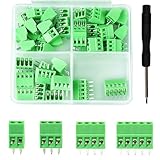
- 【Kit includes】52pcs 0.1" Pitch Screw Terminal Block Connector,2 Pins(20pcs) 3Pins(20pcs) 4Pins(10pcs) 5Pins(2pcs)+1pcs Special screwdriver.
- 【Rated Voltage】: 150V; Rated Current: 6A.
- 【Compatible wire sizes】:Screw terminals accomodate wire sizes from 18AWG to 26AWG.
- 【Quick Connection】: Screw Terminal on header provide secure connection and quick disconnection.
- 【Widely Applications】: It is well-suited for interfacing with I/O cards, data acquisition (DAQ) equipment, and any other device that uses a 2.54mm/0.1in header connector. Applications include the Raspberry Pi A+, B+, 2B, and 3B boards, Arduino, all of which use a 0.1" pitch pin header for their GPIO expansion ports.
- Task coverage: Which repositories, languages, commands, and workflows does it support?
- Action controls: What can it read, write, or execute, and when must you approve an action?
- Observability: Can you inspect commands, outputs, diffs, and the agent’s current activity?
- Verification and recovery: Can it run checks, respond to failures, and let you review or revert changes?
- Model and runtime: Which model or endpoint is available, and where does execution happen?
- Context and integrations: How does it use project instructions, previous work, scripts, IDEs, or external tools?
For example, Codex’s guide surfaces choices such as model, reasoning effort, permissions, and commands, and describes steering a turn and inspecting commands and diffs. Product capabilities can change, so check the relevant vendor documentation for current details rather than treating “terminal” as a feature score.
How to interpret reliability figures
A 2026 empirical preprint analyzed more than 3,800 publicly reported bugs in the open-source repositories of Claude Code, Codex, and Gemini CLI. In the reports it examined, the authors identified API errors in 18.3%, terminal problems in 14%, and command failures in 12.7%; they also reported that tool invocation and command execution were affected stages in 37.2% and 24.7% of cases, respectively (study abstract).
Best Value

- BUILD YOUR OWN PORTABLE CYBERDECK – Turn your Raspberry Pi CM4 into a powerful handheld Linux computer. The uConsole combines a 5-inch IPS display, backlit QWERTY keyboard, and modular design, making it ideal for programming, networking, cybersecurity, remote administration, and DIY electronics projects.
- LATEST REV.5 MAINBOARD – Features the newest ClockworkPi v3.14 Rev.5 mainboard with improved stability and compatibility. Supports Raspberry Pi Compute Module 4 (CM4) and includes WiFi + 4G LTE expansion capability for portable computing anywhere.
- PREMIUM HANDHELD LINUX COMPUTER – Equipped with a crisp 5-inch HD IPS display, ultra-portable backlit QWERTY keyboard, dual speakers, modular aluminum enclosure, and rechargeable battery module for an excellent mobile Linux experience.
- PERFECT FOR DEVELOPERS & MAKERS – Great for Linux enthusiasts, programmers, penetration testers, network engineers, embedded development, IoT projects, retro computing, SDR applications, and portable terminal use.
- WHAT'S INCLUDED – Includes Rev.5 mainboard, CM4 adapter, WiFi antenna, WiFi + 4G LTE module, 5-inch IPS display, backlit keyboard, battery module, dual speakers, enclosure, brackets, and assembly tools. 18650 batteries are not included. The Non-Core Kit does not include the Raspberry Pi CM4 or the 32GB microSD card.
These percentages describe categories in a selected sample of public issue reports. They are not the share of all users who encounter a problem, nor an estimate of any individual product’s overall failure rate. The preprint is evidence about reported bugs and failure patterns, not a forecast of typical user experience.
When an AI terminal is useful
The pattern is most relevant when a task benefits from both model reasoning and direct interaction with a working environment—for example, inspecting a codebase, editing project files, or running a development command and responding to its output. The agent’s actions and the feedback loop can make it more capable than a chat-only exchange, but they also make permissions, visibility, and review important parts of the workflow.
Quick Recap
Product prices and availability are accurate as of the date/time indicated and are subject to change. Any price and availability information displayed on Amazon at the time of purchase will apply.
Quick wins for a faster PC:
Fix the driver behind crashes, sound loss and screen glitchesFind Drivers →Clear out junk files and repair common Windows errorsFree Scan →
