
Do these 3 things before closing this tab:
1Clear out junk files and repair common Windows errors2Fix the driver behind crashes, sound loss and screen glitches3Repair Windows errors before they cause bigger problemsiTechGuides is reader-supported. When you buy through links on our site, we may earn an affiliate commission. As an Amazon Associate I earn from qualifying purchases. Learn more
The best typewriter keyboards for 2026 are the Qwerkywriter 2 for premium authenticity, the YUNZII QL75 for value and customization, and the AZIO Retro Classic Bluetooth for traditional desk appeal. Several strong alternatives, including 8BitDo, Logitech, and Lofree models, are retro mechanical keyboards rather than literal typewriter replicas.
That distinction matters. A typewriter-style keyboard may copy a return bar, circular keycaps, raised rows, or a decorative wood-and-metal body, while a retro mechanical keyboard may only borrow vintage colors, sounds, or classic-computer styling. The right choice depends on whether you care most about appearance, typing feel, noise, wireless features, customization, or distraction-free writing.
Key takeaways
- The Qwerkywriter 2 is the closest premium modern imitation of a typewriter, with an aluminum chassis, Cherry MX switches, a return bar, hot-swappable switches, USB-C, Bluetooth, and faster wireless connectivity.
- The YUNZII QL75 is the strongest value-oriented dedicated typewriter-style keyboard, combining an 84-key 75% layout, tri-mode connectivity, QMK/VIA, hot-swappable switches, a programmable lever, two knobs, and a 4,000-mAh battery.
- The AZIO Retro Classic Bluetooth prioritizes furniture-like design with a metal-alloy frame, round backlit mechanical keys, and leather or wood surfaces, but it offers less enthusiast customization.
- The 8BitDo Retro Mechanical Keyboard and Retro 108 are retro-computer-inspired rather than literal typewriter keyboards; both use Kailh Box White V2 clicky switches and support hot-swapping and wireless modes.
- Clicky switches provide the most recognizable typewriter sound but can be unsuitable for shared spaces; tactile or silent hot-swappable switches are safer choices for offices, libraries, and bedrooms.
- A typewriter aesthetic can make writing more enjoyable, but a decorative keyboard does not make a computer distraction-free.
15 best typewriter keyboards for 2026: quick comparison
This list is intentionally curated rather than pretending that 15 dedicated typewriter replicas exist. The first 11 entries are specific keyboards. The final four are practical alternatives that require product-level verification before purchase or publication as a specific model.
Recommended Free Tools
| Rank | Keyboard or route | Category | Layout | Switch or feel | Connectivity | Customization | Best for | Main caution |
|---|---|---|---|---|---|---|---|---|
| 1 | Qwerkywriter 2 | Dedicated typewriter-style | Not specified in supplied sources | Cherry MX mechanical | USB-C, Bluetooth, faster wireless | Hot-swappable | Most authentic premium experience | Expensive, deep, and observed editions were sold out |
| 2 | YUNZII QL75 Retro Typewriter | Dedicated typewriter-style | 84-key 75% | Hot-swappable mechanical; configuration-dependent | USB-C, Bluetooth, 2.4 GHz | QMK/VIA, hot-swap, programmable lever | Best value and flexibility | Tall, heavy, and some configurations may be backordered |
| 3 | AZIO Retro Classic Bluetooth | Dedicated decorative typewriter-style | Full-width design | Round backlit mechanical keys; clicky/tactile typewriter-like feel | Bluetooth and wired details should be checked on the live listing | Less customization-focused | Vintage desk décor | Large footprint and limited enthusiast features |
| 4 | 8BitDo Retro 108 | Retro-computer mechanical | 108-key full-size | Kailh Box White V2 clicky | USB-C, Bluetooth, 2.4 GHz | Hot-swap, programmable Dual Super Buttons | Full-size retro typing | Loud and not a literal typewriter replica |
| 5 | 8BitDo Retro Mechanical Keyboard | Retro-computer mechanical | 87-key | Kailh Box White V2 clicky | USB-C, Bluetooth, 2.4 GHz | Hot-swap, programmable Dual Super Buttons | Compact retro value | No number pad and default switches are loud |
| 6 | 8BitDo Retro 87 | Retro-computer mechanical | 87-key format | Edition-dependent; verify before buying | Verify exact edition | Verify exact edition | Alternative 8BitDo compact format | Price, switch, stock, and specifications vary by edition |
| 7 | 8BitDo Retro 87 M Edition | Retro-computer mechanical | Verify exact edition | Verify exact edition | Verify exact edition | Verify exact edition | Beige, IBM-style retro computing | More computer-inspired than typewriter-inspired |
| 8 | Logitech POP Keys | Mainstream typewriter-inspired | Compact; verify current regional layout | Clicky mechanical | Verify current regional specification | More limited than QMK/VIA boards | Giftable mainstream wireless keyboard | Decorative emoji keys and limited customization may not suit writers |
| 9 | Lofree Flow Lite84 with Retro keycaps | Low-profile modern with retro styling | 84-key 75% | 40gf linear POM low-profile switches | USB-C, Bluetooth, 2.4 GHz | Optional retro keycap set | Low-profile typing with vintage colors | Feels more like a slim modern keyboard than a typewriter |
| 10 | Lofree Flow 2 | Premium low-profile modern | Verify current configuration | Low-profile; verify current configuration | Verify current configuration | Modern customization; verify details | Premium low-profile typing | Not a literal typewriter board; sound and case trade-offs were noted in reviews |
| 11 | Lofree Return Mechanical Keyboard | Retro-modern mechanical | Verify current configuration | Verify current configuration | USB-C, Bluetooth 5.3, 2.4 GHz | Verify current configuration | Stylish compact desk setup | Confirm layout and typewriter resemblance before buying |
| 12 | QMK/VIA 75% board with round keycaps | Custom build | 75% target | Choose clicky, tactile, linear, or silent | Choose wired or wireless model | Usually extensive | Best long-term customization | Requires separate compatibility research and possibly assembly |
| 13 | Full-size hot-swappable board with round keycaps | Custom retro setup | Full-size target | Choose the switch | Choose the board | Usually extensive | Number-pad users | Bottom-row and spacebar compatibility can be difficult |
| 14 | Low-profile board with a retro keycap set | Custom low-profile setup | Compact or 75% | Low-profile, usually less typewriter-like | Choose the board | Keycap compatibility is critical | Laptop-like typing with vintage styling | Many standard keycaps do not fit low-profile switches |
| 15 | Dedicated writing device | Alternative category | Device-dependent | Writing-focused input | Device-dependent | Device-dependent | Distraction reduction | Not a conventional computer keyboard |
Prices and availability below reflect the supplied research observation dated August 16, 2026. Prices can change by region, currency, promotion, configuration, and inventory status.
#1 Best Overall
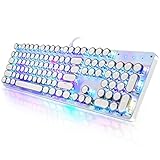
- 【Retro Typewriter Style Keyboard】: Merges the charm of vintage typewriters with advanced mechanical blue switches for medium resistance, clear click sounds, and tactile feedback, offering a unique and comfortable typing experience.
- 【 RGB Lighting】: Features multi RGB colors backlight modes and adjustable sidelights, enabling brightness and speed customization for immersive gaming or mood lighting in any setting
- 【Comfortable Typing Experience】 Enjoy a responsive and lag-free typing experience with our gaming keyboard featuring classic switches that provide satisfying tactile feedback with each keystroke. The stepped layout offers an ergonomic angle and concave keycap design for comfortable typing. Advanced anti-ghosting technology allows all 104 keys to work simultaneously, ensuring fast typing response.
- 【26Key Anti-Ghosting for Peak Responsiveness】: With 26 keys anti-ghosting, ensures every keystroke is registered during intense gaming or fast typing, for flawless performance.
- 【Powerful Compatibility 】 Our keyboard is compatible with Win XP, Vista, Win7, Win8, Win10A, Android, Linux, Mac, etc. It is a plug-and-play device that can be directly plugged into a computer's USB port for easy use. We provide a comprehensive after-sales system to ensure your satisfaction with our product.
How were these typewriter keyboards selected?
The shortlist weighs typewriter fidelity at 20%, typing quality at 25%, modern functionality at 20%, customization and repairability at 15%, ergonomics at 10%, and value and availability at 10%. The framework prevents a decorative chassis from automatically outranking a more practical keyboard.
Typewriter fidelity includes a return bar or lever, circular keycaps, stepped rows, curved proportions, and vintage materials. Typing quality includes switch choice, keycap stability, travel, stabilizers, tactility, and suitability for long sessions. Modern functionality includes USB-C, Bluetooth, 2.4-GHz wireless, device switching, operating-system support, battery behavior, and a wired fallback.
No unverified hands-on claim is used here. Subjective terms such as “premium,” “decorative,” and “authentic” describe the design intent and product positioning supported by the supplied product information, not a claim that every typist will prefer the keyboard.
Which typewriter keyboard is best overall?
The Qwerkywriter 2 is the best overall choice when physical typewriter resemblance and premium construction matter more than price, availability, or compact ergonomics. The official product listing describes an aluminum chassis, Cherry MX switches, a typewriter-inspired return bar, hot-swappable switches, USB-C, Bluetooth, and faster wireless connectivity.
The Qwerkywriter 2 is aimed at a writer who wants a substantial desk centerpiece modeled after a typewriter while retaining modern device compatibility. The manufacturer says its keyboards work with computers, tablets, and smartphones through modern wired and wireless connections; verify the exact current feature set for the chosen edition on the Qwerkywriter homepage.
Price and availability: According to the Qwerkywriter 2 Black Chrome product listing observed August 16, 2026, the price signal was $249.99 on sale against a $349.99 reference price. The Black Chrome and Black Gold listings were marked sold out when observed, so availability should be checked immediately before publication or purchase.
Buy it if: You want the most convincing premium typewriter-style object and accept a high price, deep footprint, and potentially limited stock.
What’s actually slowing this PC down?
Pick the symptom - the matching free tool is one click away.
Skip it if: You need a quiet office keyboard, a small desk footprint, a number pad, or guaranteed immediate availability.
Is the YUNZII QL75 the best value typewriter keyboard?
Yes. The YUNZII QL75 Retro Typewriter offers the strongest combination of typewriter styling and enthusiast functionality for most buyers who do not want to pay Qwerkywriter prices.
- 84-key 75% layout with a function row and arrow keys.
- Bluetooth, 2.4-GHz wireless, and USB-C wired modes.
- QMK/VIA support and a programmable typewriter-style lever.
- Hot-swappable 3-pin and 5-pin switch support.
- Two metal control knobs and a 4,000-mAh battery.
- Manufacturer-listed compatibility with Windows, Mac, Linux, Android, and iOS.
The QL75 is a strong writing compromise because the 75% layout preserves navigation keys while saving space compared with a full-size board. The programmable lever can function as Enter by default and can be remapped through QMK/VIA, making the lever useful rather than purely decorative. Full specifications are available on the official YUNZII QL75 product page.
The QL75 is not especially portable. The supplied product notes put its weight at approximately 3.2 pounds, and its tall, deep case may benefit from a wrist rest. ABS typewriter-style keycaps are also less premium than PBT keycaps found on some competing retro boards.
Price and availability: According to the official YUNZII listing observed August 16, 2026, the price signal was $109.99 discounted from $129.99. At least one switch or color configuration was marked backordered, so select the exact configuration before treating the keyboard as available.
Which typewriter keyboard looks most like vintage furniture?
The AZIO Retro Classic Bluetooth is the best choice for a traditional, furniture-like appearance. The keyboard combines round center-lit mechanical keys, a metal-alloy frame, and a leather or wood surface, with adjustable pillar-style feet and a US QWERTY configuration listed by the manufacturer.
The AZIO is aimed at buyers who want the keyboard to contribute to a desk’s visual design. The official AZIO Retro Classic Bluetooth page listed an observed price of $229.99. Natural leather and wood surfaces can vary in pattern and shade, and buyers should verify current connectivity, operating-system support, replacement parts, and regional layout details before ordering.
The trade-off is customization. The AZIO is less attractive than the QL75 for users who want QMK/VIA, easy switch replacement, or an enthusiast-oriented firmware workflow. The official dimensions are approximately 17.9 × 5.8 × 1.6 inches, making the AZIO a large keyboard for a small desk.
Quick wins for a faster PC:
Clear out junk files and repair common Windows errorsFree Scan →Scan for outdated or missing drivers - takes under a minuteDriver Scan →Buy it if: Desk décor, round backlit keys, and a vintage material finish are more important than compactness or deep configuration.
Skip it if: You want to replace switches, remap every key, or carry the keyboard between locations.
Rank #2

- Retro Typewriter Style Round Keycaps: Mechanical blue switch offers a quicker and springier response, crisp click sound, precise tactile feedback for ultimate gaming performance. Double-shot injection molded vintage steampunk round keycaps for clear backlight and extreme durability. The stepped floating keycap fit your fingertips perfectly for precise positioning, prevent fatigue and wrong typing. Comes with keycap puller for easy keycaps cleaning
- Multimedia and Backlight Control Knob: This wired mechanical keyboard effortlessly controls media thanks to its dedicated media control keys. Quick-access buttons for media volume, backlight effect, music play, pause, switch. You can switch 19 different lighting effects or adjust the backlit brightness and speed. And you can create 3 customized backlight as you like. Long press knob for three seconds to switch between media and lighting modes
- Metal Panel and Magnetic Wrist Rest: The computer keyboard panel is made of top-grade aluminium alloy material, with matte-finish texture, sturdy and robust enough to protect it from scratch. The ergonomic ABS palm rest provides firm support that alleviates pressure on your wrist from gaming at an elevated angle. The surface has a smooth and comfortable touch that enhances the feeling of the keyboard. USB connector for a reliable connection and ultimate gaming performance
- 104 Keys Anti-Ghosting Programmable: This mechanical gaming keyboard features Anti Ghosting Technology which ensures your simultaneous keystrokes register the way you intended, allow multi-keys to work simultaneously with high speed. Each key is controlled by independent switch, let you enjoy high-grade games with fast response, boosting your performance! The PC Gaming Keyboard has been ergonomically designed to be a superb typing tool for office work as well
- Stylish Durable and Wide Compatibility: Modern and sleek design with superior performance. High low key layout with suspended round key fits fingers effectively, help reduce hand fatigue, aluminum alloy metal panel, matte texture, sturdy and robust, protect it from scratch. Support PC Mac Laptop, Tablet, Desktop computer, suitable for Windows 7/8/10/XP/Vista, Linux and Mac OS systems. USB wired conection, plug and play! No drivers or softwares are required
Which retro keyboard is best for a full-size layout?
The 8BitDo Retro 108 is the best full-size option in this shortlist because it adds a number pad without giving up modern wireless connections, hot-swappable switches, or retro styling.
The Retro 108 has a 108-key layout, Kailh Box White V2 switches, an aluminum plate, dye-sublimated PBT keycaps, N-key rollover, USB-C, Bluetooth, and 2.4-GHz wireless connectivity. The keyboard also includes programmable Dual Super Buttons through the 8BitDo software ecosystem. See the official 8BitDo Retro 108 specifications and the official store listing.
Windows Errors? Fix Them Before They Spread
Repair common Windows errors and clear accumulated junk for a smoother, more stable PC - no reinstall needed.Free scan · no reinstallOutdated Drivers Are Slowing You Down
One free scan finds every outdated or missing driver and matches the right update for your exact hardware.Free scan · exact hardware matchAccording to the official 8BitDo store listing observed August 16, 2026, the price signal was $119.99. The Retro 108 resembles a classic computer or console keyboard more than a physical typewriter, so it is best described as retro-computer-inspired rather than a literal typewriter replica.
The factory Kailh Box White V2 switches are clicky. Clicky switches can be satisfying for solo writing but may be too loud for a shared office, apartment, library, or bedroom. Hot-swapping provides a possible upgrade path, but confirm switch compatibility and understand that changing switches does not eliminate every source of case or spacebar noise.
Which compact retro keyboard offers the best value?
The 8BitDo Retro Mechanical Keyboard is the best compact retro value for buyers who want an 87-key board, wireless connectivity, PBT keycaps, and switch replacement at a relatively moderate observed price.
The standard Retro Mechanical Keyboard includes an 87-key layout, Kailh Box White V2 switches, an aluminum plate, dye-sublimated PBT keycaps, a hot-swappable PCB, Bluetooth, 2.4-GHz wireless, USB-C, and programmable Dual Super Buttons. The manufacturer’s specification page lists Windows 10 version 1903 or later and Android 9 or later for the standard model. Do not assume complete Mac feature parity without checking the specific edition or testing it.
The Tool Desk
Outbyte PC Repair FREERepair Windows errors before they cause bigger problemsFix Now →Outbyte Driver Updater FREEFix the driver behind crashes, sound loss and screen glitchesFind Drivers →According to the official 8BitDo store listing observed August 16, 2026, the S Edition price signal was $109.99. The 87-key layout omits the number pad, making the board more suitable for writers and smaller desks than the Retro 108.
Buy it if: You want retro-computer styling, modern wireless modes, and enthusiast-friendly hardware without a large typewriter shell.
Skip it if: You specifically want a return bar, a curved typewriter body, quiet default switches, or a number pad.
What are the other 8BitDo retro options?
The 8BitDo Retro 87 and Retro 87 M Edition belong in a broad retro-keyboard comparison, but exact edition details must be checked before assigning a final award.
The Retro 87 is an alternative compact 8BitDo format. The manufacturer’s official store listing showed a Clear Blue listing with an August 14, 2026 shipping signal, while the official manual provides model-specific operating information. Shipping signals, switch choice, price, and stock can differ among editions.
The Retro 87 M Edition is more accurately described as an IBM-style or classic-computer-inspired mechanical keyboard than as a typewriter keyboard. Consult the official M Edition page for the current layout, switch, connectivity, and availability details.
Is Logitech POP Keys good for writers?
The Logitech POP Keys is a reasonable mainstream choice for users who want compact wireless hardware, clicky mechanical keys, and a playful typewriter-inspired appearance without entering the enthusiast keyboard market.
Logitech explicitly markets POP Keys around typewriter-style mechanical keys. The design is more casual and decorative than the Qwerkywriter 2, AZIO, or QL75, and the emoji keys will not appeal to every writer. The keyboard also offers less customization than a QMK/VIA board.
Use the official Logitech POP Keys page to confirm the current US price, connection modes, operating-system support, battery details, and regional layout before buying. The supplied research confirms the product and its typewriter-style positioning but does not provide a reliable current price.
Which Lofree keyboard is best for a low-profile typing experience?
The Lofree Flow Lite84 with Retro keycaps is the best low-profile option for buyers who want a modern, relatively compact board that can be given a vintage appearance without adopting a tall typewriter chassis.
The Flow Lite84 uses an 84-key 75% layout, 40gf linear POM switches, a gasket mount, PBT double-shot keycaps, a volume roller, USB-C, Bluetooth, and 2.4-GHz wireless connectivity. An optional retro keycap set changes the appearance, but the low-profile linear typing experience remains closer to a laptop or slim mechanical keyboard than to a traditional typewriter.
Rank #3

- ?Retro design?: The appearance is similar to that of a typewriter in the 1940s. The mechanical keys click and let you feel the charm of the typewriter.
- ?Ergonomic design?:Based on ergonomics, blue shaft and round keycaps are used, easy to click, and excellent input and response capabilities. Even if you use it for a long time, you won't feel tired.
- ?Anti-collision, high-definition printing?:83-key anti-collision button layout, laser engraving is not easy to fade, you can press multiple buttons at the same time, fast response, and enjoy a better gaming experience and work.
- ?Wireless and wide compatibility?: It can support 3 devices at the same time via Bluetooth wireless connection. Wide compatibility, can be used on iOS, Android, Windows and other devices. Supported operating systems: WIN2000 / WINXP / VISTA / WIN7 / WIN8 / WIN10 / LINUX / ANDROID / ISO / Mac
- ?LED Backlight?: Equipped with white backlight, you can accurately view the key position even in a dark place, and obtain high operability.
According to the official Lofree product page observed August 16, 2026, the price signal was $99 on sale against a $129 regular price. Independent coverage from Tom’s Guide also identified software-language behavior that may frustrate some users, so check the current software experience before relying on remapping features.
The Lofree Flow 2 is the premium low-profile alternative. It suits buyers who prioritize a refined low-profile design and modern customization over literal typewriter proportions. Reviews from Tom’s Guide and PC Gamer discuss its typing, design, sound, and case trade-offs. The Flow 2 should not be advertised as a typewriter replica.
The Lofree Return Mechanical Keyboard is another retro-modern compact option. Its official listing showed tri-mode connectivity—2.4-GHz, Bluetooth 5.3, and USB-C—and an observed sale price of $139. Confirm the current layout, keycap profile, switch, battery, operating-system support, and degree of typewriter resemblance on the official Lofree Return page.
What is the difference between a literal typewriter keyboard and a retro mechanical keyboard?
A literal typewriter-style keyboard imitates the physical appearance of a typewriter, while a retro mechanical keyboard mainly recreates a vintage computer or nostalgic color scheme. The distinction is useful because the two categories make different ergonomic and functional compromises.
| Category | Typical visual traits | Typical strengths | Typical limitations | Examples |
|---|---|---|---|---|
| Dedicated typewriter-style | Round keys, raised rows, return bar, curved chassis, wood, leather, chrome, or brass-style finishes | Strongest visual and tactile association with a typewriter | Often tall, deep, heavy, expensive, and less adjustable | Qwerkywriter 2, AZIO Retro Classic Bluetooth, YUNZII QL75 |
| Retro mechanical | Beige, cream, gray, green, or brown colors; classic-computer or console styling | Modern connectivity, familiar layouts, hot-swapping, and better desk practicality | Usually lacks a typewriter body or return mechanism | 8BitDo Retro Mechanical Keyboard, 8BitDo Retro 108, Logitech POP Keys |
| Modern keyboard with typewriter aesthetic | Round keycaps, retro profiles, pastel colors, or clicky switches on a conventional chassis | Greater choice of layouts, switches, firmware, and replacement parts | Appearance depends on the keycap set and may not look like a complete typewriter | Lofree, Keychron, NuPhy, or a conventional QMK/VIA board with compatible keycaps |
Which switch is best for writing?
Tactile switches are usually the safest starting point for long-form writing because they provide a noticeable actuation bump without requiring the sharp click of a clicky switch. The best switch still depends on sound tolerance, typing force, travel, and whether the keyboard permits replacement.
Free tools Windows power users keep installed
One-click scans. No signup required.
- Clicky: The closest acoustic match to a classic typewriter. Clicky switches can be disruptive in offices, shared rooms, libraries, and apartments.
- Tactile: Provides feedback without necessarily producing a loud click. Tactile switches are a practical compromise for writers who want key response without maximum noise.
- Linear: Smooth and generally less traditionally typewriter-like. Linear switches can suit fast typists who dislike a bump.
- Low-profile: Shorter and more laptop-like, with less of the tall mechanical-keyboard sensation. The Lofree Flow Lite84 uses a low-profile design and 40gf linear POM switches.
- Hot-swappable: Lets the owner change compatible switches without soldering. Hot-swapping is valuable when the factory sound or feel is wrong, but switch, socket, keycap, and stabilizer compatibility still need checking.
The Qwerkywriter 2, YUNZII QL75, 8BitDo Retro Mechanical Keyboard, and 8BitDo Retro 108 all provide some degree of switch customization or hot-swapping according to their official specifications: Qwerkywriter, YUNZII, 8BitDo Retro, and 8BitDo Retro 108.
How loud are typewriter-style keyboards?
Typewriter-style keyboards can be loud, especially when they combine clicky switches, a hollow or metal case, a large spacebar, and a decorative return bar. “Mechanical” alone does not determine volume; switch design, case resonance, keycap material, desk surface, and typing force all contribute.
The 8BitDo Retro and Retro 108 officially ship with Kailh Box White V2 switches, and TechRadar’s coverage specifically warns that the switches can be loud in shared spaces. A promotional video is not a reliable measure of how a keyboard will sound across a room.
Choose tactile or silent switches where available if other people work or sleep nearby. A hot-swappable keyboard offers a recovery route when the factory switches are too loud, although replacing switches will not necessarily remove case resonance or spacebar noise.
Are round keycaps comfortable for long writing sessions?
Round keycaps are not automatically comfortable for long writing sessions. Typing geometry depends on the keycap profile, switch travel, key spacing, case angle, board depth, wrist position, stabilizer quality, and the presence of a suitable wrist rest.
Round keys can make a keyboard visually distinctive and may provide strong separation between neighboring keys. Smooth circular caps can also be less forgiving if fingers slide across them, while a tall typewriter-style case can place the wrists in extension.
For a large or raised keyboard, use a low-profile wrist rest, adjust desk height, keep the wrists near neutral, and begin with shorter sessions. Stop or change the setup if discomfort develops. Raised rows, adjustable feet, or a decorative chassis do not by themselves make a keyboard ergonomic.
Which keyboard layout is best for writers?
An 84-key 75% layout is often the best balance for writers because it keeps the function row and arrow keys while taking less space than a full-size keyboard. The right layout changes if the writer regularly uses a number pad, navigation cluster, or application-specific shortcuts.
| Layout | What it includes | Best for | Trade-off |
|---|---|---|---|
| Full-size | Alphabetic block, function row, navigation keys, and number pad | Spreadsheets, accounting, data entry, and users who rely on a number pad | Uses more desk width and makes a decorative board even larger |
| TKL / 87-key | Full function and navigation areas without the number pad | Writers who want conventional navigation keys and a narrower desk setup | Loses dedicated numeric-entry keys |
| 75% / 84-key | Function row and arrow keys in a compact arrangement | Writers who want a compact board without hiding essential navigation keys | Compressed spacing can take adjustment |
| Compact | Fewer physical keys, with functions accessed through layers | Small desks and highly portable setups | Navigation and function keys may require key combinations |
The YUNZII QL75 uses an 84-key 75% layout, the standard 8BitDo Retro uses 87 keys, and the Retro 108 adds a full-size number pad, according to the YUNZII specifications, 8BitDo Retro specifications, and 8BitDo Retro 108 specifications.
Are typewriter keyboards compatible with Mac, Windows, tablets, and phones?
Compatibility varies by model, edition, firmware, and operating system, so a buyer should check the exact product page rather than assume that every wireless keyboard offers full Mac, tablet, or phone functionality.
- USB-C wired mode: Usually the safest connection for initial setup, firmware work, troubleshooting, and low-battery situations.
- Bluetooth: Useful for tablets and phones and often convenient for multi-device desks.
- 2.4-GHz wireless: Usually uses a USB receiver and can be preferable for desktop use, but it may not work with a phone or tablet without an appropriate adapter.
- Mac support: Modifier keys, media controls, software, and layout switching may differ from Windows support.
- Firmware software: A manufacturer utility may support Windows better than macOS, Linux, browsers, or mobile devices. QMK/VIA is powerful but still requires compatible firmware and a suitable configuration process.
The Qwerkywriter site describes compatibility with computers, tablets, and smartphones through USB-C, Bluetooth, and, for the Qwerkywriter 2, faster wireless connectivity. YUNZII lists Windows, Mac, Linux, Android, and iOS for the QL75. The official standard 8BitDo Retro page explicitly lists Windows 10 version 1903 or later and Android 9 or later. Review the Qwerkywriter site, YUNZII QL75 page, and 8BitDo compatibility information before purchase.
Independent reader supportYour contribution helps us test, update, and keep practical guides available for everyone.Is backlighting useful on a typewriter keyboard?
Backlighting is useful in a dim room and decorative on a premium retro board, but backlighting does not improve typing for every writer. Touch typists may prefer an unlit board, while users who look down at the keys may value readable legends.
Quick wins for a faster PC:
Clear out junk files and repair common Windows errorsFree Scan →Scan for outdated or missing drivers - takes under a minuteDriver Scan →Rank #4

- Retro Typewriter Style with Mechanical Keys: Mechanical blue switches offer medium resistance, audible click sound & tactile feedback, provides responsive and precise gaming environment and performance. Vintage steampunk keyboard round keycaps looks like a classical typewriter, brings you comfortable typing feeling & stable clicking touch.
- Unique RGB Backlit Light Up Keyboard: Featuring dynamic colorful Per-Key Illumination, up to 168 LED backlit modes, Dynamically adjusting color changing. This RGB mechanical keyboard has customizable transparent sidelight for an immersive gaming atmosphere. You can also adjust the rainbow keyboard backlit brightness and speed. Moreover, you can create customized backlight as needed.
- Detachable Wrist Rest & Metal Panel: The ergonomic ABS palm rest provides firm support that alleviates pressure on your wrist from gaming at an elevated angle.The gaming mechanical keyboard panel was made of top-grade aluminium alloy material, with matte-finish texture, sturdy and robust enough to protect it from scratch.
- 108-Key Anti-Ghosting: 108 keys full size keyboard with number pad, and all keys non-conflict. Every keystroke is registered during intense gameplay and fast typing, no matter how many other keys are pressed at the same time. Clicky keyboard let you enjoy high-grade game with fast response.
- PC Gaming Keyboard Compatibilty: Support PC Mac Laptop, Tablet, Desktop computer, compatible with Windows 7/8/10/XP/Vista, Linux and Mac OS systems. Plug and play. No drivers are required. Universal Keycaps Compatibility: Seamlessly swap between vintage typewriter keycaps and standard keycaps for a unique and versatile typing experience, catering to your individual style and preferences.
Backlighting can disappoint when legends are hard to read, light bleeds around the caps, or the lighting clashes with an otherwise traditional design. The AZIO Retro Classic Bluetooth explicitly includes round backlit mechanical keys, and the YUNZII QL75 lists north-facing RGB lighting. See the AZIO specifications and YUNZII specifications for the respective implementations.
How important is programmability for writers?
Programmability can be more valuable than decorative lighting for a writer who repeatedly uses em dashes, quotation marks, formatting commands, or application shortcuts. A programmable key can also switch layouts, remap Caps Lock, or create a convenient shortcut for an editing command.
The YUNZII QL75 supports QMK/VIA and makes its typewriter-style lever programmable. The 8BitDo Retro family includes programmable Dual Super Buttons through its software ecosystem. These features are especially useful when the keyboard’s physical layout is unusual, but verify the current firmware, browser, application, and operating-system requirements before depending on a macro.
What should buyers check before ordering?
- Confirm the category. Decide whether the keyboard is a literal typewriter-style board, a retro-computer board, a conventional keyboard with vintage keycaps, or a writing-focused device.
- Choose the noise level. Clicky switches suit solo typists who want a clack; tactile or silent switches are safer for shared spaces.
- Measure the desk. Include the board’s depth, the cable, a wrist rest, and room for a mouse. AZIO, Qwerkywriter, and QL75-style designs can occupy more depth than their key count suggests.
- Pick the layout. Choose full-size for a number pad, 87-key TKL for familiar navigation, or 75% for compact writing without giving up the function row and arrow keys.
- Verify the operating system. Check Mac modifier behavior, mobile compatibility, software support, and whether USB-C works as a fallback.
- Check the keycaps and switches. Confirm whether switches are standard, hot-swappable, proprietary, low-profile, clicky, tactile, or linear.
- Check stock for the exact edition. A product family can appear available while a specific color or switch configuration is sold out or backordered.
- Read the return policy and warranty. This is particularly important for small-batch decorative keyboards and products with unusual keycaps or wireless software.
What can go wrong with a typewriter-style keyboard?
The keyboard is louder than expected
Clicky switches, metal or hollow cases, large stabilizers, return bars, and hard desks can amplify sound. Select a tactile or silent configuration, add desk dampening where appropriate, or use a hot-swappable board that permits a switch change.
Recommended Free Tools
The decorative board causes wrist discomfort
A tall case or steep typing angle can extend the wrists. Try a suitable wrist rest, lower the desk or chair relationship, use a neutral wrist position, and shorten sessions while evaluating the setup.
Replacement round keycaps do not fit
Keycap compatibility can fail because of nonstandard bottom-row sizes, unusual right Shift or spacebar dimensions, stabilizer placement, proprietary stems, or low-profile switches. Check the complete keycap layout and switch type rather than buying based only on the keycap shape.
The software works on one platform but not another
Manufacturer configuration utilities may not offer identical support on Windows, macOS, Linux, tablets, and browsers. QMK/VIA can improve flexibility, but QMK/VIA is not universally plug-and-play; firmware, browser, layout, and operating-system details still matter.
The model is indexed online but unavailable
Small-batch keyboards can remain visible in search results after a product becomes sold out or backordered. The supplied research observed sold-out Qwerkywriter 2 Black Chrome and Black Gold listings and at least one backordered QL75 configuration. Treat stock as a time-sensitive property, not a permanent specification.
Do typewriter keyboards improve writing?
A typewriter-style keyboard may make writing more enjoyable and can help establish a repeatable writing ritual, but the keyboard does not create productivity or distraction-free work by itself. A computer with notifications, email, social media, and an unrestricted browser remains distracting regardless of its keycaps.
Writers seeking tactile feedback may prefer a clicky or tactile mechanical switch. Writers seeking focus should also consider a locked-down software setup, full-screen writing application, notification controls, or a dedicated writing device. A dedicated writing device is a different category and should not be treated as a conventional keyboard replacement without checking export, editing, and file-transfer needs.
Which typewriter keyboard should each reader buy?
| Reader priority | Best match | Why | Important warning |
|---|---|---|---|
| Most authentic appearance | Qwerkywriter 2 | Aluminum body, return bar, Cherry MX switches, and modern wireless connectivity | High price and limited availability for observed editions |
| Best value and customization | YUNZII QL75 | 75% layout, tri-mode wireless, QMK/VIA, hot-swap, lever, knobs, and large battery | Tall and heavy; configuration availability varies |
| Best decorative vintage design | AZIO Retro Classic Bluetooth | Metal frame, round backlit keys, and leather or wood surface | Large footprint and less enthusiast customization |
| Best full-size retro keyboard | 8BitDo Retro 108 | 108 keys, number pad, PBT caps, hot-swap, and three connection modes | Clicky and more retro-computer than typewriter |
| Best compact retro value | 8BitDo Retro Mechanical Keyboard | 87 keys, wireless modes, PBT caps, hot-swap, and programmable buttons | No number pad; default switches are loud |
| Best mainstream choice | Logitech POP Keys | Recognizable vendor and typewriter-style clicky mechanical keys | Less customizable; verify current regional specifications |
| Best low-profile route | Lofree Flow Lite84 with Retro keycaps | 84 keys, tri-mode wireless, and optional retro appearance | Linear low-profile feel is not traditional typewriter feel |
| Best customization route | QMK/VIA board plus compatible round keycaps | Choose the layout, switch, sound, firmware, and replacement parts | Requires careful compatibility research or assembly |
| Best focus-oriented alternative | Dedicated writing device | Addresses distraction reduction rather than nostalgia | Different category with different editing and file-transfer limits |
Bottom line
Choose the Qwerkywriter 2 if the physical presence of a premium typewriter replica is the main reason you are shopping. Choose the YUNZII QL75 if you want the best balance of typewriter appearance, compact layout, wireless connectivity, QMK/VIA, and switch customization. Choose the AZIO Retro Classic Bluetooth if your keyboard is also a piece of desk furniture.
Choose the 8BitDo Retro Mechanical Keyboard or Retro 108 if retro-computer styling matters more than a literal typewriter silhouette. Choose Lofree if you prefer low-profile modern typing with optional vintage keycaps. Before ordering any model, check noise, desk depth, layout, operating-system support, keycap compatibility, and live stock for the exact configuration.
Frequently Asked Questions
What is the most authentic typewriter keyboard for 2026?
The Qwerkywriter 2 is the most authentic premium typewriter-style option in this shortlist because it combines an aluminum chassis, Cherry MX switches, a typewriter-inspired return bar, and modern wireless connectivity. The Black Chrome and Black Gold listings were observed as sold out on August 16, 2026, so availability must be checked before purchase.
What is the best affordable typewriter-style keyboard?
The YUNZII QL75 is the best value-oriented dedicated typewriter-style keyboard in the supplied research. The QL75 has an 84-key 75% layout, tri-mode connectivity, QMK/VIA, hot-swappable switches, a programmable lever, two knobs, and a 4,000-mAh battery; its observed August 16, 2026 price signal was $109.99 on sale from $129.99.
Are typewriter keyboards loud?
Typewriter keyboards can be loud when they use clicky switches, resonant cases, large stabilizers, or a decorative return bar. Tactile or silent switches are better for shared rooms, and a hot-swappable keyboard lets the owner replace compatible switches if the factory sound is too loud.
Are typewriter keyboards good for long writing sessions?
Typewriter keyboards can work well for long writing sessions when the keycap profile, switch, case angle, desk height, and wrist support suit the typist. Round keycaps and raised cases are not automatically ergonomic, so buyers should evaluate the entire typing geometry rather than choosing by appearance alone.
Do typewriter keyboards make writing distraction-free?
A typewriter-style keyboard can make writing more enjoyable but does not make a computer distraction-free. Writers primarily seeking focus may need notification controls, a locked-down writing application, or a dedicated writing device instead of a decorative keyboard.
The Bottom Line
Best overall authenticity: Qwerkywriter 2. Best value: YUNZII QL75. Best décor piece: AZIO Retro Classic Bluetooth. Best full-size retro option: 8BitDo Retro 108. Best compact retro option: 8BitDo Retro Mechanical Keyboard. Buy according to typing sound, layout, ergonomics, connectivity, customization, and live availability—not appearance alone.
Quick Recap
Product prices and availability are accurate as of the date/time indicated and are subject to change. Any price and availability information displayed on Amazon at the time of purchase will apply.

