
Free tools Windows power users keep installed
One-click scans. No signup required.
iTechGuides is reader-supported. When you buy through links on our site, we may earn an affiliate commission. As an Amazon Associate I earn from qualifying purchases. Learn more
There is no single universal “PC case plug.” A case may have separate leads for the power and reset buttons, status LEDs, front USB, front audio, and fans. Match each lead to the compatible header shown in the manual for your exact motherboard; do not rely on a generic pin diagram.
Before connecting any case leads
- Shut down and unplug the PC. Disconnect it from power before working inside the case.
- Identify both models. Find the motherboard and case model numbers, then open their manuals. Use the motherboard’s layout and internal-connector diagrams and the case manual’s cable descriptions.
- Read each cable label. Look for labels such as POWER SW, RESET SW, HDD LED, PWR LED, USB, HD AUDIO, or a fan-hub label. Do not identify a lead by wire color alone.
- Locate the matching header. Board labels and connector locations vary by model. ASUS notes that appearance and port names can vary by manufacturer and model, and advises consulting the motherboard manual for precise guidance (ASUS support guide, updated April 21, 2025).
Connect power, reset, and indicator-light leads
These small case leads usually attach to the motherboard’s system-panel header. It may be labeled F_PANEL, PANEL, JFP1, or something similar. Match each lead to the exact pins in your board’s diagram. Pin positions are not universal: for example, an ASUS P8H77-I layout manual identifies a 10-1-pin system-panel connector, but that example does not establish the pin order for other boards (ASUS support guide; P8H77-I manual).
- Power and reset switches: Connect each to the pins named for that switch in the diagram. Switch leads generally do not have polarity.
- Power and drive LEDs: Connect to the indicated LED pins, observing the positive and negative markings. LEDs are polarity-sensitive.
If you cannot identify the board’s model-specific pin layout, stop and find its manual rather than trying a pinout from another motherboard.
Match front USB leads to the correct USB header
Connect a front USB cable only to a compatible internal USB header identified in the motherboard manual. USB 2.0, USB 3.x, and front USB-C connectors can use different header types and keying; a plug that looks close is not proof that it fits or is compatible. The reviewed ASUS manuals show more than one internal USB-header type, so check both the case cable and board documentation before connecting (ASUS support guide; P8H77-I manual; H81M-P manual).
#1 Best Overall

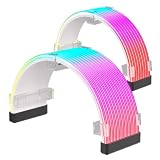
- [Stable Performance] Adopting UL1015 16AWG copper tinned wire with 2.8mm diameter wire body, this white pc cable extensions is stronger energizing and heat resistance, no need to worry about high temperature odor problem. Works perfectly with all power supplies, such as RM, RMX RM550x, RM650x, RM750x, RM850x, RM1000x, HX1000 series, Corsair CX and so on.
- [Extremely Soft Material] Unlike hard and difficult to use cables on the market, asiahorse cable extension cords are made with exclusive nylon braid technology for greater softness. Easy to use even in tight places. Each cable is supplied with 4 combs, making these white psu cables easy to mold and keep their shape for a long time without worrying about sagging.
- 【Upgrade Connector】 The all white precision combination connector effectively solves the problem of difficult connection in the market. Allows you to connect GPU and motherboard pins more easily without having to worry about small cable gaps that make installation difficult.
- 【More combs】1 x 24 Pin ATX Extension Cable (for Motherboard), 1 x 4 + 4 Pin EPS Cable(for CPU), 2 x 6+2 Pin PCI-E Cable (for GPU), 4 combs of each cable. Note: These cable extension only are for extension, not to replace the modular cables.
- 【Confident Purchase】We focus on quality control of raw materials and stylish appearance design to provide the best products to all customers. If you are not satisfied with our products, please contact us by email. We will provide you with a satisfactory solution within 24 hours.
Connect the front audio cable
Look for the motherboard’s front-panel audio header, often labeled AAFP or F_AUDIO, and connect the matching case lead according to the manual. Do not confuse it with a system-panel or USB header.
Instructions can depend on the board and audio lead. For example, the ASUS H81M-P manual describes its 10-1-pin AAFP header as supporting HD Audio or legacy AC’97, recommends HD Audio, and says the BIOS front-panel type setting must match when AC’97 is used. Treat those directions as specific to that example; consult your own board’s manual for its supported connector and settings (H81M-P manual).
Rank #2
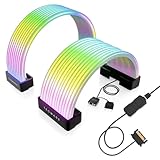
- Compatible with most power cables: This RGB pc cables kit features a universal ARGB design, supporting standard 24-pin motherboard power cables and 8-pin or 16-pin graphics card power cables. Its flexible design makes it easy to install in most PC configurations
- ARGB Synchronization and Customization: Supports synchronized lighting effects via a standard 5V 3-pin ARGB connector. Users can select preset lighting modes and customize colors using motherboard software to achieve dynamic lighting effects
- 20,000-Hour Lifespan: Utilizes high-precision, high-durability LEDs with an ultra-long lifespan, allowing for continuous use without concerns about light decay
- High-Density LED Arrangement: Provides bright and uniform RGB lighting with smooth color transitions and reduced shadows and light spots. Supports various lighting effects, delivering smooth and vibrant RGB lighting
- 360-degree flexible bendable design: Made of soft silicone and ultra-flexible LED strips, these RGB strip sleeves can be bent freely to accommodate different cable layouts and chassis sizes, including compact chassis, and are designed specifically for tempered glass chassis
Connect case fans or a fan hub
For a direct connection, plug each case fan into a designated chassis or system-fan header identified in the motherboard manual. If the case uses a hub, follow the hub instructions to connect its primary motherboard lead; ASUS likewise advises checking the case or fan-hub manual to find that connection (ASUS support guide; ASUS fan-hub guidance).
The Tool Desk
Outbyte Driver Updater FREEFix the driver behind crashes, sound loss and screen glitchesFind Drivers →Outbyte PC Repair FREEClear out junk files and repair common Windows errorsFree Scan →Check the motherboard and hub documentation for supported limits and controls rather than assuming one board’s specifications apply to another. ASUS says that fans connected through a splitter synchronize speed with the first fan’s RPM; that describes the cited splitter guidance, not every hub or fan setup (ASUS fan-hub guidance; ASUS splitter guidance).
Rank #3
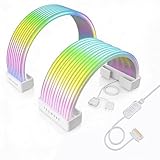
- BRING LIFE TO YOUR PSU CABLES: Upgrade your gaming PC with the TECWARE Flex RGB Cable Cover Kit, featuring high-density ARGB lighting with up to 81 LEDs per cable. These flexible RGB PSU cable extensions create bright and consistent color flow across your 24-pin motherboard and 8-pin or 16-pin GPU cables, giving your rig a premium, customizable glow. Made from durable silicone for smooth bends and a clean finish.
- SEAMLESS SYNC WITH YOUR SYSTEM: Fully compatible with 5V 3-pin ARGB headers, this RGB lighting kit for PC cables connects directly to your motherboard or controller for synchronized effects across your setup. Supports popular lighting software for unified color transitions, animations, and brightness control. Perfect for gaming PCs, custom builds, and ARGB fans or components.
- COMPATIBLE WITH MOST PSU CABLES: Designed as a universal ARGB PSU extension, this RGB cable kit supports standard 24-pin motherboard and 8-pin or 16-pin GPU power cables up to 14 mm thick. The flexible design makes it easy to install in most PC builds, ensuring a clean and professional appearance. Ideal for upgrading existing PSU cables without full replacements.
- SMOOTH AND VIBRANT RGB STREAM: Enjoy a seamless and vivid RGB lighting experience with up to 81 LEDs per cable, supporting multiple lighting effects across your setup. While the LEDs cannot be controlled individually, each RGB power supply cable cover diffuses light evenly for a smooth, dynamic ARGB effect. Whether you’re showcasing your GPU, motherboard, or full build, every color transitions beautifully without flicker.
- KIT INCLUDES: The RGB PSU cables kit includes a 24-pin motherboard cable cover, an 8-pin/16-pin GPU cable cover, 12 cable braces for easy installation; and male and female 5V ARGB 3-pin connectors; power cables NOT INCLUDED
Check the connections before powering on
- Confirm every plug is seated on its intended header and aligned with the documented pins.
- If an LED does not light, shut the PC down and check its polarity against the motherboard diagram.
- If a plug or header does not match, do not force it. Recheck the case and motherboard manuals.
When you need a pin-by-pin answer
Look up the exact motherboard model and use its internal-connector diagram; the case model or cable labels can help identify which lead you are connecting. With both model numbers, you can determine the applicable header names and pin layout without guessing from a generic diagram.
Quick Recap
Best Value
- BRING LIFE TO YOUR PSU CABLES: Upgrade your gaming PC with the TECWARE Flex RGB Cable Cover Kit, featuring high-density ARGB lighting with up to 81 LEDs per cable. These flexible RGB PSU cable extensions create bright and consistent color flow across your 24-pin motherboard and 8-pin or 16-pin GPU cables, giving your rig a premium, customizable glow. Made from durable silicone for smooth bends and a clean finish.
- SEAMLESS SYNC WITH YOUR SYSTEM: Fully compatible with 5V 3-pin ARGB headers, this RGB lighting kit for PC cables connects directly to your motherboard or controller for synchronized effects across your setup. Supports popular lighting software for unified color transitions, animations, and brightness control. Perfect for gaming PCs, custom builds, and ARGB fans or components.
- COMPATIBLE WITH MOST PSU CABLES: Designed as a universal ARGB PSU extension, this RGB cable kit supports standard 24-pin motherboard and 8-pin or 16-pin GPU power cables up to 14 mm thick. The flexible design makes it easy to install in PC builds, ensuring a clean and professional appearance. Ideal for upgrading existing PSU cables without full replacements.
- SMOOTH AND VIBRANT RGB STREAM: Enjoy a seamless and vivid RGB lighting experience with up to 81 LEDs per cable, supporting multiple lighting effects across your setup. While the LEDs cannot be controlled individually, each RGB power supply cable cover diffuses light evenly for a smooth, dynamic ARGB effect. Whether you’re showcasing your GPU, motherboard, or full build, every color transitions beautifully without flicker.
- KIT INCLUDES: The RGB PSU cables kit includes a 24-pin motherboard cable cover, an 8-pin/16-pin GPU cable cover, 12 cable braces for easy installation; and male and female 5V ARGB 3-pin connectors; power cables NOT INCLUDED
Rank #4

- Cable Alignment: Keep motherboard power cable, 24 pin, 8 pin, and 6 pin sleeved wires lined up for a cleaner pc build, helping reduce twisting and making cable management for pc easier during assembly, upgrades, or routine maintenance
- Snap in Design: These can be installed by simply snapping them into place, with rounded edges that help protect sleeve cables from abrasion while supporting a neat and organized cable manager layout inside the case
- Material Support: Made from PP plastic, each is designed for repeated use across multiple computer builds, offering a practical way to keep pc power supply cables separated and arranged without adding bulk
- size Fit: Measuring 2.12 x 0.39 x 0.19 in, these cable clamps are sized for organized cable routing in computer cases, and the set includes 24 pieces to help manage multiple motherboard power cable runs in
- Wide Use: Suitable for organizing 24 pin motherboard cable, 8 pin gpu cable, and 6 pin GPU cable, these cable organizer pieces help keep sleeved cables aligned for gaming pcs, custom builds, and upgrade projects
Product prices and availability are accurate as of the date/time indicated and are subject to change. Any price and availability information displayed on Amazon at the time of purchase will apply.

