
iTechGuides is reader-supported. When you buy through links on our site, we may earn an affiliate commission. As an Amazon Associate I earn from qualifying purchases. Learn more
In standards terminology, “ANSI character set” usually means US-ASCII, the 7-bit coded character set standardized as ANSI X3.4. In Windows documentation and software, however, “ANSI” often means a legacy Windows code page—and does not identify one universal character set. The right interpretation depends on where you encountered the term.
What is the ANSI character set?
ANSI X3.4 is the American standard associated with US-ASCII. ANSI X3.4-1986 defines a coded character set as rules that establish a set of characters and a one-to-one mapping between those characters and assigned bit combinations. The standard specifies a 7-bit code. IANA’s character-set registry identifies ANSI X3.4-1986 as a source for US-ASCII and lists aliases including ANSI_X3.4-1968 and ANSI_X3.4-1986.
A character is an abstract symbol; a coded character set defines how symbols correspond to numeric bit patterns. That mapping is not, by itself, a complete description of how bytes are packaged or transported in a file or communication stream.
The Tool Desk
Outbyte Driver Updater FREEFix the driver behind crashes, sound loss and screen glitchesFind Drivers →Outbyte PC Repair FREERepair Windows errors before they cause bigger problemsFix Now →Is ANSI the same as ASCII?
In standards and Internet contexts, ANSI X3.4 and US-ASCII are closely linked: US-ASCII is the clear charset name to use when ASCII is intended. IANA lists US-ASCII as the preferred name and encourages its use. Use US-ASCII rather than the ambiguous label “ANSI” when identifying that character set.
#1 Best Overall

- KEYBOARD: The keyboard works for Windows with hot keys that enable easy access to Media, My Computer, Mute, Volume up/down, and Calculator
- EASY SETUP: Experience simple installation with the USB wired connection
- VERSATILE COMPATIBILITY: This keyboard is designed to work with multiple Windows versions, including Vista, 7, 8, 10 offering broad compatibility across devices.
- SLEEK DESIGN: The elegant black color of the wired keyboard complements your tech and decor, adding a stylish and cohesive look to any setup without sacrificing function.
- FULL-SIZED CONVENIENCE: The standard QWERTY layout of this keyboard set offers a familiar typing experience, ideal for both professional tasks and personal use.
In Windows usage, “ANSI” may instead refer to a code page. Microsoft calls using “ANSI” to mean Windows code pages a historical misnomer, and its glossary lists several possible pages: 1252, 1250, 1251, 1253, 1254, 1255, 1256, 1257, 1258, 874, 932, 936, 949, and 950. These are alternatives, not one shared mapping. Microsoft’s Windows protocol glossary explains the usage.
| Context | What “ANSI” usually means | What to identify |
|---|---|---|
| Standards or Internet charset label | US-ASCII, associated with ANSI X3.4 | The charset name US-ASCII |
| Windows application, file, or legacy setting | A Windows code page described informally as “ANSI” | The actual code-page number and relevant locale or application context |
How should I interpret “ANSI” in a file or program?
Look for the specific encoding or code-page setting used by the program that created the data. If the bytes represent only characters in the ASCII repertoire, US-ASCII may be the intended mapping. If regional characters are present, a Windows code page may be involved; do not assume it is ASCII or that it matches another system’s “ANSI” setting.
Rank #2
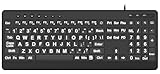
- 【Premium Large Print Ergonomic Keyboard with 4X Oversized Large Key】 - This Large Print Ergonomic Keyboard boasts 4X larger fonts than standard Keyboard, with bold, clear Large key that are easy to see and find at a glance. It effectively alleviates eye strain, reduces typing errors, and is ideal for the elderly, visually impaired, students, special needs departments, libraries, and anyone who needs a more visible, user-friendly Keyboard.
- 【Ergonomic Large Print Keyboard with Wrist Rest 】-Our Large Print Ergonomic Keyboard is ergonomically designed with a soft, supportive Keyboard with Wrist Rest (palm rest), paired with a folding holder that keeps the Keyboard at an optimal slope. This design prevents wrist soreness during long typing sessions, while anti-slip pads keep the Large Print Ergonomic Keyboard stable even when typing quickly.
- 【Silent Wired USB Large Print Ergonomic Keyboard 】-As a high-quality silent Large Print Ergonomic Keyboard, it features quiet key switches that reduce typing noise, making it perfect for home, office, library, or study use. This wired USB Keyboard connects stably, avoiding the lag or disconnection issues of wireless keyboards, ensuring a smooth typing experience.
- 【Plug and Play Large Print Keyboard with No Latency】-This USB computer Large Print Ergonomic Keyboard requires no charging or battery replacement—just plug and play with no complicated setup. Equipped with a 5.25ft USB cable, it easily connects to laptops, PCs, Windows, desktops, MAC OS, and Chrome (note: multimedia keys may not be fully compatible with MAC OS systems). Enjoy fast response and no latency with this reliable Keyboard.
- 【Full Size Large Print Ergonomic Keyboard with Productivity Hotkeys】-This Full Size Large Print Ergonomic Keyboard features a standard QWERTY (US) layout with a numeric keypad, so you don’t need to relearn typing. It comes with 12 multimedia keys and 10 hotkeys for instant access to email, calculator, and other frequently used apps, helping you save time and boost productivity.
- Find the producer’s encoding or code-page setting in the application, export options, or file documentation.
- Identify the specific mapping, such as a named charset or Windows code-page number.
- Check whether the data’s characters can be represented under that mapping before converting it.
When text looks garbled, use the producer’s actual mapping to interpret the bytes before changing encodings. Converting an unspecified “ANSI” file as ASCII can lose or misread characters that a regional code page represents.
Recommended Free Tools
Does the 7-bit definition mean ASCII files contain only 7-bit bytes?
ANSI X3.4 specifies a 7-bit code; that describes the code assignments, not every detail of the byte stream in which data is stored or transmitted. A reported RFC Editor erratum concerning RFC 2046 highlights the distinction between a 7-bit code definition and octet sequences. Its status is reported, so it should be treated as a technical clarification rather than an adopted correction. RFC Editor erratum 2046
Rank #3

- Split-Key Ergonomic Design: One-piece split layout separates keys into left and right zones to reduce wrist bending and support a natural hand position, helping minimize strain during long hours of typing.
- Long Key Travel & Tactile Feedback: Extended key travel delivers responsive, tactile feedback with audible confirmation, similar to brown mechanical switches. Built for durability with up to 20 million keystrokes.
- Old-School Curved Row Design: Stepped, curved key rows promote a natural typing posture and reduce fatigue during long sessions. Made from high-quality ABS with membrane switches and 4.2 mm key travel.
- Ergonomic Curved Keycaps: Curved keycaps with flatter tops and back edges fit fingertip contours for improved comfort and control. Available in black, beige, and white color options.
- Natural Learning Curve: Ergonomic shape may require a short adjustment period. Most users adapt within 1–2 weeks and experience improved comfort and reduced wrist pressure with continued use.
Do ASCII control characters have fixed meanings everywhere?
No. A character’s assignment in a coded character set does not guarantee that every application or format interprets it identically. RFC 2046 says MIME text assigns meaning to most control characters only when a subtype rule or private agreement does so, while recognizing some commonly used conventions. RFC 2046
Quick Recap
Best Value
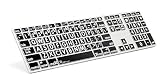
- Perfect for those who are visually impaired or just need a little bit more help with their eyesight.
- Original ultrathin anodized aluminum keyboard Supported host applications: Mac OS X v10 or later
- Host Interface: USB 2.0; Color: Alu; Number of USB Ports: Two
- Key mechanism: Scissor switch; Number of LEDs: One (Caps Lock); USB cable: 0.9 meter ~ 35.4 inches White
- Supported host applications: Mac OS X v10 or later
Rank #4

- ⌨【Large Print Keyboard】With letter characters larger than usual and command keys in a larger bolder font, these high-contrast keys can really help those who have trouble seeing keyboards. Perfect for elderly, the visually impaired, schools, special needs departments and libraries, as well as companies.
- ⌨【Spill resistant keyboard】It is designed to keep electronic components of keyboard safe. Water-Resistant function protection against accidental spills provides extra peace of mind. Be sure to air dry completely after spill before further use.
- ⌨【High Contrast】Large print keyboard offers increased visibility with easy to see yellow key caps and crisp large print black letters, Easily seen print, even in low light. With a life cycle of 5 million keystrokes, membrane key switches provide a faster response along with a quieter typing experience.
- ⌨【Ergonomics Design】Unfold the feet at back of the keyboard to reduce hand fatigue and enjoy long hours of playing. Full QWERTY English (US) 104 key keyboard layout with numeric keypad, Large Print keys provides superior comfort without forcing you to relearn how to type.
- ⌨【Wide Compatibility & Lifetime After-Sales Service】Compatible with Windows 10 / 8 / 7 / Vista / XP / 2000 / 98 | Also works with Mac OSX and macOS. Easy to install with plug and play technology | No additional software required.Except for Windows systems, other system hotkeys may not work and are only used for typing
Product prices and availability are accurate as of the date/time indicated and are subject to change. Any price and availability information displayed on Amazon at the time of purchase will apply.

