
iTechGuides is reader-supported. When you buy through links on our site, we may earn an affiliate commission. As an Amazon Associate I earn from qualifying purchases. Learn more
To show products as a browsable catalog in a Hostinger AI Builder store, you turn off direct purchasing on each product rather than deleting it. Enable Hide ‘Add to bag’ button on the product, optionally remove its price, and uncheck Track quantity to remove the quantity picker. Then add product sections to your pages and update the website, because product records do not appear on the site by themselves. These steps apply to manual mode.
Before you start
- Confirm the store mode. Hostinger’s catalog procedure is documented for stores built in manual mode. Hostinger’s access guide also describes separate navigation for agentic mode, so if your store uses that mode, follow its store settings instead of the labels below. See how to access the online store settings.
- Check your subscription. Hostinger’s access guide says an active Hostinger Ecommerce subscription is required for manual-mode store management. Eligibility and terms can change, so verify the status on your own account.
- Create the products first. Creating a product and displaying it on the site are separate steps, covered in the sections below.
Turn off direct purchase on each product
Hiding the purchase button is the core setting for a catalog. According to Hostinger’s catalog guide, a product with this option enabled cannot be bought directly, and because it is no longer for sale, showing its price is no longer required. The steps are in the Hostinger catalog guide.
- Open the store management area and go to Products.
- Select the product you want to list as a catalog item.
- Under Pricing, enable Hide ‘Add to bag’ button. If you no longer want the price shown, remove it in the same section.
- Save the product.
Repeat this for every product you want to display without selling. Hiding the button does not take the product off the site; it only changes how the product can be used once it is displayed.
The Tool Desk
Outbyte PC Repair FREERepair Windows errors before they cause bigger problemsFix Now →Outbyte Driver Updater FREEScan for outdated or missing drivers - takes under a minuteDriver Scan →Remove the quantity picker
A catalog item with a visible quantity selector still suggests a purchase. To remove it, open the product page, select the product’s section, and locate Pricing. Uncheck Track quantity and save. Hostinger’s guide describes this as the way to remove the product quantity picker.
#1 Best Overall

- Clear Book Stand: Unlike the inferior wood and metal display stands on the market, our book stand is made of clear premium acrylic, which is strong and transparent and will not block the view, making it easy to display your items.
- Stable And Strong: Our book holder is made of high-quality acrylic material, which is durable and has a long service life. The stable triangular structure design allows it to firmly support books and items of different weights.
- Smooth Rounded Corners: You will get a cost-effective 6 pack easel stand set, each easel stand is laser cut with smooth sides and round corners for safety, so you don't have to worry about scratching your hands when placing items.
- Multi Function Stand: The acrylic stand can be used to display books, albums, pictures, photos, CDs, artworks, plates, postcards, tablets, or phones. It is widely used in commercial and home decoration to elegantly display your collections.
- Hassle Free Purchase Policy: Each of our book display you purchased comes with an 18 month worry-free product warranty and friendly customer service. You can feel free contact us if you have any questions, we are dedicated to ensuring your 100% satisfaction.
Make products appear on your pages
Hostinger states this directly in its manual-mode store guide: “Products are not automatically displayed on your website.” (Hostinger Help Center, How to create an online store in manual mode). Add product sections to each page where the catalog should appear. Sections can be filtered by category, which is how you control what each section shows.
Once your changes are saved, update the website so they go live. Until you do, the storefront may not reflect the edits you made in the product settings.
Rank #2
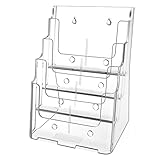
- Sturdy Acrylic Material: The 8.5″ x 11″ brochure holder is constructed from high-quality transparent acrylic that resists scratches and is not easily damaged, keeping your displayed materials clear and professional over time
- Removable Divider: The provided removable divider can easily divide the 4 pocket into 8 pocket which is perfect to hold 4 x 9 inch brochures. Each slot can hold approximately 150 pieces of paper
- Slanted Back Design & Non-slip Slot: Make it stable for storing brochures, pamphlets, flyers, papers, literatures. You can put brochures in and out conveniently
- Wall Mount & Countertop Use: The brochure holder has a pre-drilled hole, you can hang it on the wall. It keeps your files organized and your desk tidy
- Warm Service: 12 months after sale service, replacement service for damaged or defected items. Any questions, please feel free to contact us
Organize a multi-product catalog with categories
Hostinger recommends creating product categories before you build a catalog with many items, because visitors can browse by category. Categories can be displayed together on one page or on separate category pages. See how to create product categories.
| Layout | How it is built | Best suited for |
|---|---|---|
| One page with several category-filtered sections | Add multiple product sections to one page, each filtered to a different category | Smaller catalogs where visitors should scan everything in one place |
| Dedicated page per category | Create a separate page for each category and add a section filtered to that category | Larger catalogs where each category needs its own page |
Choose the right outcome: listed, hidden, or inactive
Two outcomes are often confused. A visible catalog listing keeps the product on the site without direct purchase. An inactive product is a different setting: it remains in the store management database but is unavailable from the public storefront and from direct product pages. Hostinger’s product visibility guide covers the inactive setting.
Rank #3

- ✔Sleek, crack resistant, 3mm clear high quality acrylic construction without the need to assemble.
- ✔Acrylic Material Sturdy, odorless, safe, stable and not fragile. On the other hand, its transparency is the same as glass, but tougher than glass, it can withstand mobile phones, e-readers or other tablets.
- ✔Multi-purpose decorative display easel can be applied on various occasions, such as kitchens, houses, offices, exhibition, study room, art galleries, museums and other places you want to show.
- ✔Whether you are using recipes for dinner in the kitchen or displaying a book at home, this book display stand is very suitable for use in your home. Used to display books in bookstores or retail stores, it can also used reading books, documents or tablet.
- ✔Package content: 2 pcs acrylic book display stand; Size: 12”x8.5"x5.1"(30.5x21.6x13cm) Please note: The transparent acrylic book display rack has a double-sided protective film to prevent scratches during transportation. So please remember to remove the protective film before use.
| Goal | Setting to use | Result on the storefront |
|---|---|---|
| Show the product for browsing without direct purchase | Enable Hide ‘Add to bag’ button; optionally remove the price and disable Track quantity | The product can appear in a product section, but customers cannot buy it directly |
| Temporarily remove the product from browsing | Set the product to inactive | Unavailable from the public storefront and direct product pages; still kept in store management |
Product limits to verify
Hostinger’s current AI Builder product guide states a limit of up to 1,000 products (checked in early October 2026). Older Hostinger Website Builder help material gives a different figure, so use the live guide as the reference. The product guide is where to confirm the limit before you plan a large catalog.
Quick Recap
Best Value

- Premium Build Quality:Featuring smooth finish, sturdy structure, and long-lasting durability, our brochure display rack resists bending or deformation over time
- Large Capacity:This literature display stand easily organizes and displays brochures, flyers, sheets, and magazines with a spacious multi-level layout
- Clear Categorization:Breathable mesh design of the literature rack keeps materials dust-free, avoids slipping, and ensures every document remains visible
- Portable & Easy Assemble:The magazine literature floor comes with a carry bag for convenient transport, plus a simple fold-and-install design for effortless setup and storage
- Versatile Use:Ideal for offices, libraries, hotels, malls, trade shows, and more—perfectly showcasing materials in any setting
Rank #4

- Stable Construction: Full metal frame with classic black cover, heavy duty, anti-rust, durable and stable, as well as providing a stylish appearance for libraries, waiting rooms and reception areas.
- Large Size: Measuring 14 x 10 x 52 inches unfolded, each pocket measures 9.25 x 14.37", which provides enough space to display A4 size magazine, brochures, flyers, catalog, book, and other marketing materials of various sizes.
- Foldable Design: This floor-standing magazine rack with one-piece foldable design for quick unfolding and folding; no additional tools are required, you can collapsed it within seconds. And compact folded size make it easy to storage, carry and transport safely.
- Multi Purpose: Widely used in reception areas, trade fairs, exhibitions, waiting rooms, schools, libraries, tourist information centers to display various information, brochures, leaflets and magazines etc., also very suitable for salesmen to display products on the go.
Troubleshooting
- The purchase button still appears on the live site. Confirm that Hide ‘Add to bag’ button is enabled on that specific product, that you saved it, and that you updated the website afterward.
- The quantity picker still appears. Open the product’s section, check Pricing, and confirm that Track quantity is unchecked. Save and update the website.
- A product is missing from a page. Products are not displayed automatically. Add a product section to the page and check its category filter.
- A product is missing everywhere. Check whether it is set to inactive, since inactive products are removed from the public storefront and direct product pages.
- The menu labels do not match these steps. Check your store mode and subscription status, since the access guide documents different navigation for agentic mode.
Product prices and availability are accurate as of the date/time indicated and are subject to change. Any price and availability information displayed on Amazon at the time of purchase will apply.

