
PC Slower Than It Used to Be?
A free scan shows the junk files, broken settings and background clutter dragging Windows down - then fixes them in one click.Free scan · Windows 10 & 11Crashes, No Sound, or Screen Glitches?
Random freezes, missing sound and display glitches usually trace back to one bad driver. Find and replace yours safely.Free scan · under a minuteRetire an unused support SLA by checking what depends on it, preserving the policy and its history, then using the platform’s reversible archive or disable option before considering permanent deletion. Do not assume that removing a policy from an active list changes existing tickets or conversations: Intercom and Zendesk handle already-open work differently. There is no universal retention period for old SLA records; use your organization’s contract, records schedule, and applicable legal requirements.
What retiring a support SLA means
A support SLA is a policy that specifies or measures service response and resolution commitments. Retiring one means stopping its use for appropriate new work while deciding what to do with its configuration, historical reporting, and retained evidence. “Archive,” “disable,” and “delete” are not universal terms across support platforms, so check what each action does in the product you use.
In Salesforce’s model, an SLA policy is distinct from an entitlement. An entitlement defines the support channels and types available to a user and determines which SLA policy and process applies to a support record. That relationship matters when identifying records that may depend on a policy.
Archive, disable, and delete are different choices
| Action or question | What it means in the documented platform examples | What to check before proceeding |
|---|---|---|
| Archive in Intercom | Removes an SLA target from the active SLA list while preserving historical data for reporting. It can later be renamed, restored, or deleted from the Archived tab. Intercom Help | Whether workflows still use it, whether historical reports remain useful, and how existing conversations are treated. |
| Delete in Intercom | A permanent action available after archiving. The target is no longer available in reports or conversations and cannot be restored. Intercom Help | That dependencies are cleared, approvals are documented, retention requirements are met, and archived evidence is retrievable. |
| Delete in Zendesk | A deleted SLA policy can continue to apply to tickets to which it was already applied. Those tickets must be updated to remove the policy. Zendesk Support | Which existing tickets have the policy and how they should be updated. |
| Archive in SAP examples | Some SAP archiving processes use configured residence periods and product-specific prerequisites; archived records can be retrieved in the relevant product context. SAP Help Portal SAP Help Portal | The specific SAP product, archiving object, residence rules, and completion conditions. These examples are not general support-platform instructions. |
For Intercom, archiving is the reversible intermediate step: historical reporting is preserved, and archived targets can be restored. Its documented behavior also says archived SLAs are reapplied to conversations that began before archiving. For Zendesk, the documented concern is different: deleting a policy does not by itself remove it from tickets already carrying it. Neither behavior should be generalized to other products.
#1 Best Overall

- Reliable Storage for Everyday Use: These cardboard file boxes with lids are perfect for everyday storage - ideal for organizing paperwork, client files, tax records, and seasonal or temporary storage.
- Tape-Free Standard Assembly with Lift-Off Lid: Each file storage box features a removable lid that fits securely over the top - keeping contents covered, dust-free, and organized.
- Sized for Letter & Legal Documents: Designed to hold both letter and legal folders, these file boxes with lids offer flexible storage for offices, homes and everywhere in between.
- Easy to Carry with Built-In Reinforced Handles: Move your storage file boxes confidently with tear-resistant hand holes - designed for easy lifting and carrying between offices, rooms, or locations.
- Stackable Design Saves Space: These document boxes stack neatly to maximize vertical storage - ideal for those looking to keep storage tidy without taking up floor space.
How to retire an unused SLA safely
- Inventory the candidate policy. Record its purpose, owner, effective dates, customers or services covered, and last active use. Identify whether it represents an external commitment, an internal group target, a platform configuration, or a linked contract record; these can have different owners and dependencies.
- Confirm replacement coverage and approvals. Establish whether another policy will cover the same service and obtain the relevant operational, contract, and records-management review before making the SLA inactive. No universal retention term is established here; requirements depend on the organization’s schedule, contract, jurisdiction, and industry.
- Inspect dependencies and in-flight work. Check workflows and automations, entitlements, tickets, and conversations. Migrate dependent rules or records to a replacement policy where appropriate, or document how they are intended to be handled. A policy disappearing from an active list does not necessarily change existing cases.
- Preserve a retrievable record. Keep the policy text and versions, effective dates, related-record context, and metadata needed to explain and retrieve it later. Restrict access as appropriate, and verify that the archive can be retrieved and its integrity supported before deleting a live configuration. This is a lifecycle practice, not a command shared by all support products.
- Prefer a reversible action while validating effects. Where available, archive or disable the policy first. Confirm it is no longer assigned to new work, then test the platform’s documented behavior for historical reports and existing cases. In Intercom, archived history remains reportable and the target can be restored; in Zendesk, already-applied tickets may retain a deleted policy until updated.
- Delete only after the record is eligible. Proceed only when the approved residence or retention period has ended, required approvals are recorded, dependencies are cleared, and retained evidence is retrievable. Intercom deletion follows archiving and is permanent. SAP’s archiving examples impose product-specific residence or completion requirements; they do not set a general rule for support SLAs.
- Log the decision. Record what was retired, when, by whom, why, its replacement if any, the retention basis, and where the archive can be retrieved. Include the decision in periodic policy cleanup so later owners can understand the change.
Intercom: archive first, delete only if appropriate
Intercom documents the path as Settings > Inbox > SLAs. Its guidance is aimed at SLA targets no longer in use; the available actions and effects are specific to Intercom.
- Open Settings > Inbox > SLAs and identify the target to retire.
- Before archiving, check for workflows using the SLA. Intercom will not allow archiving while a workflow uses it and identifies the workflows that need to be resolved.
- Archive the target. It leaves the active SLA list, while historical data remains available for reporting.
- Open the Archived tab to review the target. From there, it can be renamed, restored, or deleted.
- Validate how existing conversations and reports behave. Conversations that began before archiving can have the SLA reapplied.
- If deletion is approved, delete the target from the Archived tab only after considering that deletion is permanent and removes the target from reports and conversations.
These steps and behaviors are documented in Intercom Help. Intercom’s article, dated August 19, 2025, notes that support needs change and organizations may have SLA targets they no longer use.
Rank #2

- 10 storage boxes per pack
- Basic-duty box is great for storing items that will be used, accessed, and moved infrequently
- Filled box can have up to 350 lbs. stacked on top of it
- Accommodates both letter- and legal-sized documents
- Lift-off lid provides easy access to contents as well as deters dust and other debris that can accrue during storage
Zendesk: check tickets that already have the policy
Zendesk’s documented deletion behavior does not match Intercom’s archive workflow. A deleted SLA policy continues to apply to tickets to which it was already applied; update those tickets to remove the policy. Before deleting, identify affected tickets and determine whether they should be moved to a replacement policy or handled another way. See Zendesk’s policy-deletion guidance for the product-specific procedure. Do not use Intercom’s Settings path or assume an archive-and-restore option applies in Zendesk.
Retention: there is no one-size-fits-all period
The cited sources do not establish a universal number of months or years to keep support SLA records. Retention depends on the organization’s obligations and decisions, including applicable law, contracts, and its records schedule. Consult the responsible records-management or legal owner before irreversible deletion.
Rank #3

- Product Size: Measures 32.5cm x 24 x 6.5 cm, fit for standard A4 Paper. With a 65mm large capacity for the storage of up to 500 sheets.Package includes 2 Pack *Green A4 box files.
- Material: This document box file is made of sturdy PP material, they are lightweight and durable, not easy to deformation.
- Design: With metal buttons effectively protect files. The built-in spring clip can fix the documents well, and put the documents in the file box in order.
- Classification Lable & Spine Label:The front label and spine label design for easy identification of contents.
- Application: Use at home, office, school, museums, archives, libraries; Perfect for storing A4 size file, publication, catalogs and and any other paperwork.
SAP documentation illustrates configurable, product-specific controls rather than a general rule. An S/4HANA archiving example for object /PF1/SLA requires the applicable residence time to be complete and supports configurable retention rules and archive retrieval. SAP CRM service-contract archiving has its own prerequisites, including completed status, completed follow-up transactions, and elapsed residence time. These are SAP-specific examples and should not be treated as instructions for other support systems: SAP S/4HANA Help and SAP CRM Help.
RFC 4810 describes technical archive-service capabilities, including submitting, retrieving, and deleting archived data objects, as well as identifiers, controlled access, managed archival periods, and integrity evidence during archival. It is an Informational RFC, not a legal retention schedule. Use it to understand archive-service capabilities, not to infer how long your organization must keep a support record: RFC 4810.
Rank #4

- Letter/legal-size Basic Duty cardboard box (20-pack) for storage or filing
- Made of B-flute corrugated cardboard (rated 32 ECT); 450-pound stacking strength with double-walled bottom and ends; contains 20% recycled content
- Can be assembled without packaging tape; collapsible and reusable
- 20 lift-off lids are included (lid comes attached to box; to be torn/cut for assembly)
- 2 side handles for easy carrying
Questions to resolve before permanent deletion
- Is the SLA a customer-facing commitment, an internal target, a configuration, or a record linked to a contract?
- Which workflows, entitlements, tickets, or conversations rely on it?
- What happens to existing work in this specific platform after archive, disablement, or deletion?
- Will historical reporting remain available, and can an authorized user retrieve the policy and related evidence?
- Has the appropriate owner confirmed the replacement coverage, retention basis, and approval for irreversible deletion?
Frequently Asked Questions
Will deleting an SLA affect existing tickets or conversations?
It depends on the platform. Zendesk says a deleted policy continues to apply to tickets that already had it until those tickets are updated. In Intercom, conversations started before archiving can have the SLA reapplied. Check the product’s documented behavior rather than assuming deletion detaches existing work.
How do I archive or delete an SLA in Intercom?
Go to Settings > Inbox > SLAs, resolve any workflows that use the target, and archive it. Review it in the Archived tab, where it can be renamed, restored, or deleted. Deletion is permanent and removes it from reports and conversations.
Best Value
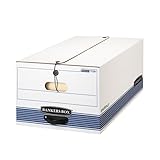
- Older documents are still important to your business, but don't require daily access. To keep everything neat, store paperwork in Bankers Box FastFold boxes. These boxes provide medium-duty strength when used with or without shelving.
- String & button closure keeps contents secure even if box is overturned.
- FastFold quick and easy assembly.
- Medium-duty stacking strength for use with or without shelving.
- Plastic handle for easy access to records.
How long should I keep old support SLA records?
There is no universal retention term established for support SLAs. Follow the organization’s records schedule and applicable contract and legal requirements, with guidance from the responsible records-management or legal owner.
Can an archived Intercom SLA be restored?
Yes. Intercom lists restore as an option for archived targets. Deletion is different: it is permanent and cannot be undone.
Quick Recap
Product prices and availability are accurate as of the date/time indicated and are subject to change. Any price and availability information displayed on Amazon at the time of purchase will apply.

