
What’s actually slowing this PC down?
Pick the symptom - the matching free tool is one click away.
iTechGuides is reader-supported. When you buy through links on our site, we may earn an affiliate commission. As an Amazon Associate I earn from qualifying purchases. Learn more
VGA remains useful in 2026 for a practical reason: compatible computers, monitors and projectors are still in service. If your equipment already connects reliably, the older port may let you keep using it without replacing hardware just because a newer connector exists. VGA is not universal, however; support and picture quality depend on the exact devices and connection.
Why VGA is still used
VGA is an analog video connection with a familiar connector of 15 pins arranged in three rows, also called DE-15 or HD-15. Dell identifies classrooms, meeting rooms, offices, small businesses and home workspaces as settings where legacy equipment remains in service. Ricoh’s projector support tables, updated in 2026, and Vivitek’s legacy D5010-WNL specifications show that VGA compatibility persists in real equipment documentation.
That makes continued use a matter of compatibility and practicality, not proof that every user has the same motive. The available evidence does not measure how many VGA devices are still in use or establish why individual people keep them. A working compatible setup can still be useful without replacement solely because its port is older. Dell explains VGA connections and legacy equipment; Ricoh lists projector compatibility information; Vivitek’s D5010-WNL specifications.
Quick wins for a faster PC:
Repair Windows errors before they cause bigger problemsFix Now →Fix the driver behind crashes, sound loss and screen glitchesFind Drivers →Clear out junk files and repair common Windows errorsFree Scan →What a VGA connection can—and cannot—do
It carries video, not audio
VGA sends video only. If a presentation, video or game needs sound, plan a separate audio connection, such as the audio output on the computer to an input on the display or speakers. Check the devices for the right audio ports and cable; a VGA cable alone will not provide sound. Dell’s VGA connection guidance covers this limitation.
#1 Best Overall

- 【Full HD 1080P & Gold-Plated】Supports resolutions at 800x600 (SVGA), 1024x768 (XGA), 1600x1200 (UXGA), 1920x1080P, 2560×1080,3440×1080,3840×1080,1440×1080,1280×1080 and up for high resolution LCD and LED monitors., making it ideal for connecting high-resolution monitors and projectors. With gold-plated connectors and bare copper conductors, this VGA monitor cable guarantees exceptional RGB signal transmission, producing vivid and crisp video output
- 【Protect Against EMI & RFI】Foil & braid shielding and 100% pure copper cores on the shielded VGA male to male PC cable minimize crosstalk, suppress noise, and protect against electromagnetic interference (EMI) and radio frequency interference (RFI)
- 【A Wide Range of Uses】 6FT VGA cable used with Computer, Laptop, Monitors, Projectors, VGA Splitters, KVM and more. Note: Card point design, please use a little force when inserting the Female VGA port (Please Note: VGA have no audio function,Sound can still play through the device's built-in speakers or headphone port).
- 【15 pin VGA Coupler】Links VGA-equipped computer to any display with 15-pin VGA port (also known as RGB, DB-15, DE-15, HD-15, HDB-15 or D-sub 15).
- 【Lifetime Warranty & Upgraded】1. We should always provide the customer with good service after warranty. 2. Our VGA cable in this product line have been upgraded from nickel to gold plating while maintaining original pricing.
Compatibility depends on both devices
A direct VGA cable is appropriate when both the computer or other video source and the display have compatible VGA ports. Having a connector that looks right is not enough to establish that a device supports the required signal. For example, Ricoh lists VGA analog PC signal modes for applicable projector models, including 1920 × 1080 at 60 Hz; that mode listing is model-specific, not a guarantee for every VGA device. Consult the manual or manufacturer’s support page for both ends of the connection. Ricoh’s projector compatibility information provides model-specific mode tables.
How to connect VGA to a newer display
If the source has VGA output but the display accepts only a digital input such as HDMI, the connection needs to translate an analog signal into a digital one. A simple passive plug adapter does not perform that conversion. Dell says an active converter is often needed for analog VGA to a digital display input.
Rank #2

- High-Performance VGA Cables for Older Devices: This VGA cable is designed to connect a VGA-equipped computer (commonly found on older models) to a monitor or projector with a 15-pin VGA port (also known as RGB, DB-15, DE-15, HD-15, HDB-15, or D-sub 15). Note: This is a VGA male-to-male cable, not a DisplayPort, HDMI, or DVI cable. Please verify your device’s port before purchasing.
- Supports High-Resolution Video: The VGA monitor cable supports resolutions up to 1920x1200 (WUXGA), 1080p (Full HD), 1600x1200 (UXGA), 1024x768 (XGA), and 800x600 (SVGA), making it ideal for connecting high-resolution monitors and projectors.
- Durable and Easy-to-Use Design: Built with molded strain relief connectors and grip treads for easy plugging and unplugging, this VGA cord also includes finger-tightened screws for a secure connection. Designed for long-lasting durability, the 15-pin VGA to VGA cable is perfect for frequent use in various environments.
- Superior Performance for Clear Video Output: Featuring gold-plated connectors and bare copper conductors, this VGA computer monitor cable (VGA cable male to male, RGB cable) ensures superior RGB signal performance, delivering vibrant and sharp video quality.
- Enhanced EMI and RFI Protection: Foil and braid shielding combined with dual ferrite cores minimizes crosstalk, suppresses noise, and protects against electromagnetic (EMI) and radio frequency (RFI) interference, ensuring stable and reliable signal transmission with this VGA male to VGA male cable.
- Check the source and display. Confirm the source’s video output and the display’s available inputs in their manuals. Verify that the display has VGA before choosing a direct cable.
- Confirm the signal direction. For a VGA source and a digital-input display, choose a converter explicitly designed for VGA-to-that-display-input. Do not assume a converter intended for the reverse direction will work.
- Check the supported mode. Confirm that the converter and both devices support a resolution and refresh rate in common. Manufacturer compatibility tables can help identify supported modes.
- Plan audio separately. If you need sound, verify how audio will reach the display or speakers. VGA does not carry it.
- Connect and select the input. Attach the VGA cable to the source and converter, connect the converter to the display, provide any power the converter requires, then select the matching input on the display. Follow the converter’s own instructions for its power and connection sequence.
Conversion can affect the image. Barco cautions that digitizing an analog signal can introduce noise depending on the device, so an adapter should not be assumed to deliver the same picture quality as a direct digital connection. Its documentation also illustrates why model checks matter: the NGS-D320 does not support analog video input through VGA or the analog pins of DVI. Barco’s NGS-D320 video-input note describes that limitation and the potential for noise during digitization.
Quick Recap
Best Value
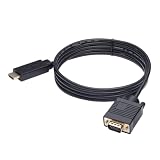
- ONE-WAY TRANSMISSION: This is NOT a bi-directional cable; Transmits signals one-way only from HDMI Source to VGA Display; Does NOT transmit signals from VGA Source to HDMI Display; Does NOT support audio
- IN THE BOX: 6-foot black HDMI to VGA cable, male to male
- COMPATIBILITY: Connects a computer, laptop, Xbox, Roku, or other device with HDMI port to a TV, monitor, projector, or other device with VGA port. For laptops, works with Windows PCs like Lenovo Yoga / ThinkPad, HP Elite, Dell XPS, Microsoft Surface, Razer, LG, Acer laptops and more. NOT compatible for devices with low-power HDMI ports like Blu-ray player, PS4, PS5, Apple MacBook Pro, Mac mini, Apple TV. Do not use any converter/adapter between the laptop and cable
- PERFORMANCE: Supports resolutions up to 1920x1080@60Hz (1080p Full HD), including 720p, 1600x1200, and 1280x1024
- connectors improve signal transmission and resist corrosion and abrasion
Rank #4

- Full HD Support: Delivers high-speed transmission at 1920x1080 resolution with a smooth 60Hz refresh rate, ideal for crisp visuals on compatible devices.
- Male-to-Male VGA Connectors: Ensures secure and reliable connectivity between devices like monitors, TVs, PCs, gaming consoles, and projectors.
- Optimal Length: The 1.5-meter (5ft) cable offers flexibility for clean setups without excess slack or strain.
- Genuine Parts: Built with authentic components specifically designed for Sceptre products, ensuring compatibility and performance.
- Versatile Use: Perfect for connecting a wide range of devices including TV boxes, projectors, and gaming systems, making it a solid choice for both work and entertainment setups.
Rank #3

- Screw-in VGA cable with 15-pin male input and output
- Supports resolutions at 800x600 (SVGA), 1024x768 (XGA), 1600x1200 (UXGA), 1920x1080P and up for high resolution LCD and LED monitors
- The VGA cord engineered with molded strain relief connectors for durability, grip treads for easy plugging and unplugging, and finger-tightened screws for a secure connection
- Links VGA-equipped computer to any display with 15-pin VGA port
- Cable Length : 1M/ 3Ft;Jacket Material : PVC
When keeping VGA makes sense
- Keep the existing connection if both devices support VGA, the supported display mode suits your work, and the picture is acceptable.
- Use an active converter when a VGA source must connect to a digital-only display, after checking direction, compatible modes, power needs and separate audio.
- Consider another connection or replacement if the equipment does not support the required signal, conversion produces unacceptable image quality, or the setup cannot meet your needs. The sources here do not establish a general repair-versus-replacement cost rule.
Product prices and availability are accurate as of the date/time indicated and are subject to change. Any price and availability information displayed on Amazon at the time of purchase will apply.

