Quick wins for a faster PC:
Fix the driver behind crashes, sound loss and screen glitchesFind Drivers →Repair Windows errors before they cause bigger problemsFix Now →iTechGuides is reader-supported. When you buy through links on our site, we may earn an affiliate commission. As an Amazon Associate I earn from qualifying purchases. Learn more
Are you interested in learning about WiFi sniffing? This article covers all the essential details you need to know about this network analysis technology.
Overview
WiFi sniffing, also known as WiFi packet sniffing, is a process of intercepting/eavesdropping and analyzing the traffic of a wireless network. It involves capturing and decoding data packets sent between devices over a wireless network.
Moreover, both wired and wireless networks can be sniffed. However, wireless networks are easier to sniff because they use radio signals to communicate.
That being said, Wi-Fi sniffing can be used for various purposes. These include network troubleshooting, security analysis, and performance optimization.
Popular on Amazon

- Cutting-Edge, latest 802.11ac Wi-Fi technology. Dual-Band 2.4GHz(150Mbps) and 5GHz(433Mbps) Performance to prevent network freezing and lags when streaming and gaming online
- High-Sensitivity Dual-Band external antenna optimizes signal for more coverage
- Compact design, saving space without blocking other USB peripherals on your laptop/desktop computer
- Driver support for Windows XP/ Vista / 7 / 8 / 8.1 and Windows 10, Apple MacOS 10.4 to 10.12 and Linux
Moreover, WiFi sniffing typically involves using a software tool called a packet sniffer. This software tool listens for data packets transmitted over a wireless network.
Then, it records the data contained in those packets. These data include the source and destination addresses, the transmitted data type, and other relevant information.
Although Wi-Fi sniffing is a robust network analysis and optimization tool, some use it unethically and for devious purposes. For example, hackers can use it to intercept and analyze wireless network traffic.
Recommended Free Tools
Doing so allows them to access sensitive information, like credit card numbers, passwords, and login details. Thus, it is essential to use Wi-Fi sniffing responsibly and ethically.
Besides, unauthorized WiFi sniffing is illegal and can result in severe consequences. As a matter of fact, you can face jail time if you use WiFi sniffing illegally.
Features of WiFi Sniffing
The previous section explains what WiFi sniffing is. However, this section will discuss some of its significant features.
It Has Two Modes
Wi-Fi sniffing typically has two modes – monitor mode and promiscuous mode. In monitor mode, a wireless adapter is told to listen for the radio signals other wireless devices send.
However, it is not instructed to broadcast any signal of its own. This mode of Wi-Fi sniffing is almost impossible to detect because the sniffer does not broadcast radio signals.
Also popular on Amazon
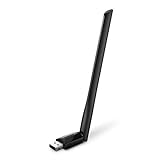
- 𝐋𝐨𝐧𝐠 𝐑𝐚𝐧𝐠𝐞 𝐀𝐝𝐚𝐩𝐭𝐞𝐫 – This compact USB Wi-Fi adapter provides long-range and lag-free connections wherever you are. Upgrade your PCs or laptops to 802.11ac standards which are three times faster than wireless N speeds.
- 𝐒𝐦𝐨𝐨𝐭𝐡 𝐋𝐚𝐠 𝐅𝐫𝐞𝐞 𝐂𝐨𝐧𝐧𝐞𝐜𝐭𝐢𝐨𝐧𝐬 – Get Wi-Fi speeds up to 200 Mbps on the 2.4 GHz band and up to 433 Mbps on the 5 GHz band for upgraded web surfing, gaming, and streaming. Performance varies by conditions, distance to devices, and obstacles such as walls.
- 𝐃𝐮𝐚𝐥-𝐛𝐚𝐧𝐝 𝟐.𝟒 𝐆𝐇𝐳 𝐚𝐧𝐝 𝟓 𝐆𝐇𝐳 𝐁𝐚𝐧𝐝𝐬 – Dual-bands provide flexible connectivity, giving your devices access to the latest routers for faster speeds and extended range. Wireless Security - WEP, WPA/WPA2, WPA-PSK/WPA2-PSK
- 𝟓𝐝𝐁𝐢 𝐇𝐢𝐠𝐡 𝐆𝐚𝐢𝐧 𝐀𝐧𝐭𝐞𝐧𝐧𝐚 – The high gain antenna of the Archer T2U Plus greatly enhances the reception and transmission of WiFi signal strengths.
- 𝐀𝐝𝐣𝐮𝐬𝐭𝐚𝐛𝐥𝐞, 𝐌𝐮𝐥𝐭𝐢-𝐃𝐢𝐫𝐞𝐜𝐭𝐢𝐨𝐧𝐚𝐥 𝐀𝐧𝐭𝐞𝐧𝐧𝐚: Rotate the multi-directional antenna to face your router to improve your experience and performance
Meanwhile, a sniffer becomes associated with a wireless access point in promiscuous mode. This allows all data on that particular access point to be monitored.
However, it could expose the sniffer.
Supports Multiple Protocols
Wi-Fi sniffing tools supports several network protocols. These include TCP, UDP, ICMP, and others.
This allows network administrators to monitor and analyze different types of network traffic. These network traffic include web traffic, email traffic, and file transfers.
What’s actually slowing this PC down?
Pick the symptom - the matching free tool is one click away.
Hence, multiple protocol support is vital for organizations with diverse network traffic.
Real-time Monitoring
Real-time monitoring is a crucial feature of WiFi sniffing tools. This is because it allows network administrators to detect and respond to any issues or security threats as they occur.
This means administrators can quickly identify network issues, such as congestion, bandwidth issues, or security breaches. With real-time monitoring, network administrators can also identify the source of any problem, enabling them to take corrective action fast.
Additionally, real-time monitoring allows administrators to identify patterns and trends in network traffic. Therefore, allowing them to optimize network performance and improve the user experience.
Free tools Windows power users keep installed
One-click scans. No signup required.
Cross-platform Compatibility
Cross-platform compatibility is another valuable feature of WiFi sniffing. Network administrators can use the tool on various operating systems and platforms.
Also popular on Amazon

- Supports Aircrack-NG suite, Monitor mode, Packet injection with Linux, Native support on Linux distros including Kali Linux (NO needs for any drivers).
- Supported Systems: Kali Linux (Kali\ubuntuAircrack_ng), Archlinux manjaro 16.10, Linux 2.6.X, Ubuntu, CD Linux, Centos, Windows 2000/XP/7/8/10 32/64-bit, ROS etc.
- Wireless 2.4GHz data rate up to 150Mbps, NOT supports with 802.11ac. Complies with IEEE 802.11b/g/n standards.
- All of the above is tested with Kali 2017.1 and 2017.2 both as a virtual machine and as a main OS.
- Each pack come with: 1x AR9271 USB WLAN Adapter, 1x 3dBi Antenna (NO Retail Packaging).
This means administrators can analyze network traffic from any device, including desktops, laptops, and mobile devices. Cross-platform compatibility guarantees administrators can use the tool on their preferred platform without worrying about compatibility issues.
Packet Filtering
Packet filtering is a helpful feature of WiFi sniffing tools, allowing administrators to filter out specific packets. It filters out packets based on criteria such as source or destination IP address, port number, protocol type, or data payload.
Moreover, packet filtering can help network administrators focus on the most relevant packets for their analysis. Therefore, lowering the amount of data they need to analyze and increase the efficiency of their analysis.
Pros of WiFi Sniffing
Helps Reduce Network Downtime
Wi-Fi sniffing can help administrators quickly identify and respond to network issues.
Therefore, reducing network downtime and minimizing the impact on users. By detecting network issues in real-time, administrators can take corrective action before they escalate into severe problems.
It Improves Security
WiFi sniffing can help administrators detect security threats by monitoring network traffic for suspicious activity.
For instance, administrators can sniff WiFi to detect unauthorized access attempts resulting in potential data breaches. By detecting these threats early, administrators can take steps to protect the network and its data.
It is a Cost-effective Troubleshooting Solution
WiFi sniffing helps administrators cost-effectively troubleshoot network issues.
Hence, network administrators won’t need expensive diagnostic equipment or specialized expertise. Basically, by using WiFi sniffing tools to analyze network traffic patterns and identify potential issues, administrators can resolve problems quickly and efficiently.
Better Network Planning
Wi-Fi sniffing can help network administrators plan for future network upgrades or expansions.
It does this by providing insights into current network usage and capacity. By analyzing network traffic patterns and usage trends, administrators can make informed decisions around network capacity planning.
Therefore, ensuring that the network can handle the demands placed on it in the future.
Do these 3 things before closing this tab:
1Scan for outdated or missing drivers - takes under a minute2Clear out junk files and repair common Windows errors3Fix the driver behind crashes, sound loss and screen glitchesIt Improves Network Management
WiFi sniffing can help administrators manage a network more effectively by offering detailed information about usage and performance.
The information obtained can make it easier for the administrators to make informed decisions. Also, it can ensure that the network is optimized for the needs of the organization.
Also popular on Amazon
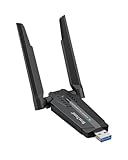
- Linux Plug-and-Play: This AXE3000 WiFi 6E Linux USB adapter works with all Linux distributions with kernel of 5.18 or newer (older kernels not supported)
- Broad Linux Compatibility: The Linux USB WiFi adapter is compatible with Ubuntu, Linux Mint, Debian, Raspberry Pi OS, Kali Linux, Fedora, Arch Linux, and more. Perfect for users running dual-boot setups, multiple distros, or virtual machines. Also supports Windows 11/10 (driver required)
- WiFi 6E Tri-Band Speeds: Get up to 1201 Mbps on 6 GHz, 1201 Mbps on 5 GHz, or 574 Mbps on 2.4 GHz with the Linux USB WIFi adapter. Ideal for coding, large file transfers, server access, and remote collaboration. Built with a Mediatek MT7921AU chipset. 6 GHz is only available on recent Linux distros or Windows 11
- Extended Range with Dual Antennas: This Linux compatible WiFi adapter features dual adjustable antennas and Beamforming technology to enhance signal focus, providing stronger and more reliable coverage throughout your home or office
- High-Speed USB 3.0 Interface: USB 3.0 ensures the wireless Linux USB adapter reaches its full WiFi 6E speeds, delivering fast and stable connections. For optimal performance, plug the adapter into a USB 3.0 port
Cons of WiFi Sniffing
It Can be Used Maliciously
Hackers can use WiFi sniffing to get sensitive information such as passwords, usernames, and credit card numbers from a wireless network.
That information can be used to blackmail individuals or access their accounts.
Legal Implications
Using Wi-Fi sniffing tools without permission can be illegal in some jurisdictions.
This can lead to legal action against the responsible person or organization. Therefore, you should ensure you have the legal permissions to use specific WiFi sniffing tools.
Also, you need to comply with any applicable laws or regulations to avoid any legal charges.
Complex Analysis
Analyzing data obtained by WiFi sniffing tools can be complicated and time-consuming.
Hence, you might require significant expertise and specialized tools. Therefore, organizations should ensure they have the necessary resources to analyze data obtained by Wi-Fi sniffing tools effectively.
Otherwise, they should consider outsourcing this function to a third-party provider.
Resource-intensive
Tools or software used for WiFi sniffing can be resource-intensive.
Hence, they require powerful computers and significant storage capacity to capture and analyze data over extended periods.
Frequently Asked Questions
Wi-Fi sniffing can be done remotely using specialized software tools and devices. However, remote WiFi sniffing may require additional legal and ethical considerations.
Also, organizations should carefully evaluate the risks and benefits before implementing it.
WiFi sniffing tools can obtain a wide range of data. These include IP addresses, MAC addresses, URLs, passwords, usernames, and other data transmitted over the wireless network.
However, the effectiveness of the data obtained may be limited by factors like encryption and network traffic volume.
The legality of Wi-Fi sniffing varies depending on jurisdiction and use case. Generally, obtaining and analyzing wireless network traffic on your wireless network is legal.
However, it may be illegal or require special permissions in other circumstances.
Wi-Fi sniffing is the process of obtaining and analyzing the traffic of a wireless network. This is done to gain insights into the network’s performance and security.
Also popular on Amazon

- Works with any 2.4GHz and 5GHz 802.11 a/ac/b/g/n networks. Max. wireless connection speed: 433Mbps. Supports both infrastructure and ad-hoc modes. Security: WEP 64/128bit, WPA, WPA2, 802.1x and 802.11i compliant.
- Multi-OS support: 32-bit and 64-bit Windows 7/8/10/11/2019/2022, Zorin, MXLinux, EndeavourOS, Mint, Manjaro, Ubuntu, Lubuntu, Kubuntu, Pop!_OS, Fedora, Rocky, Debian, Arch Linux, openSUSE, Zorin, Kali Linux, Tails, Raspbian and Puppy. NO Mac support for Panda Wireless PAU0B.
- The Panda Wireless PAU0B adapter is designed to run on an Intel/AMD based PC or Raspberry Pi 0/1/2/3/4/5. It doesn't work with any Digital Media Players, Digial Video Recorders, Netwok-Attached Storage devices, Playstations, Security Cameras, etc. Please consult Panda Wireless if you want to use Panda Wireless PAU0B on any non Intel/AMD-based systems.
- If you want to use Panda Wireless PAU0B with a guest OS like Kali in a Virtual Machine, please contact Panda Wireless for more info. In general, we recommend our customers to use Panda Wireless PAU0B on a computer running a supported operating system in the list above.
- Technical Support and Warranty - Please email or call Panda Wireless Technical Support or your seller if you have any problems or warranty issues about your Panda Wireless PAU0B adapter, we will respond to your email/call within 24 hours.
WiFi sniffing is mainly used for network troubleshooting, performance monitoring, and security analysis. It can also be used to identify bottlenecks in network traffic and detect unauthorized devices or activity.
That’s not all; network administrators also use it to identify potential security threats such as malware or phishing attacks.
Conclusion
WiFi sniffing can be helpful for performance monitoring, network troubleshooting, and security analysis. It enables network administrators to gain insights into the traffic of a wireless network.
Therefore, identifying potential issues, bottlenecks, and security threats before they escalate. However, there are also potential drawbacks to Wi-Fi sniffing.
Windows Errors? Fix Them Before They Spread
Repair common Windows errors and clear accumulated junk for a smoother, more stable PC - no reinstall needed.Free scan · no reinstallCrashes, No Sound, or Screen Glitches?
Random freezes, missing sound and display glitches usually trace back to one bad driver. Find and replace yours safely.Free scan · under a minuteThese include legal and ethical concerns, malicious usage, and complex analysis. Thus, organizations and individuals should carefully evaluate the benefits and risks of Wi-Fi sniffing.
Also, it would be best to implement it only after obtaining proper legal permissions and ensuring it is used ethically and responsibly.
Hopefully, you found this article informative. If you did, we value your feedback and would love to hear your thoughts.
Take a moment to leave your comments using the “Leave a Reply” form at the bottom of this page.
The Tool Desk
Outbyte Driver Updater FREEFix the driver behind crashes, sound loss and screen glitchesFind Drivers →Outbyte PC Repair FREEClear out junk files and repair common Windows errorsFree Scan →Alternatively, you can respond to the “Was this page helpful?” question below.
You can visit our Internet & Networks Explained page to explore more insightful articles like this one.
Quick Recap
Product prices and availability are accurate as of the date/time indicated and are subject to change. Any price and availability information displayed on Amazon at the time of purchase will apply.