PC Slower Than It Used to Be?
A free scan shows the junk files, broken settings and background clutter dragging Windows down - then fixes them in one click.Free scan · Windows 10 & 11Outdated Drivers Are Slowing You Down
One free scan finds every outdated or missing driver and matches the right update for your exact hardware.Free scan · exact hardware matchiTechGuides is reader-supported. When you buy through links on our site, we may earn an affiliate commission. As an Amazon Associate I earn from qualifying purchases. Learn more
EVEO Premium Dual Monitor Mount Desk Arms

Beginning at no 5 in my pick of the best dual monitor stand is “EVEO Premium Dual Monitor Mount Desk Arms”.
This dual stand offers a 360-degree rotation with a tilt range of a 70° backward and 5° forward. This is to ensure you get your desired viewing angle.
It also offers extension and retraction. You can also extend the arm of the stand from 0.4inch to 2.4inches. This ensures a considerable distance between the monitor and your eyes. Thereby, preventing back ache or neck strain.
Finally, this product caps it up with its easy installation. You can set up the mount in two different ways. It can be done either through the desk clamp or grommet. With the manual guide, it takes about 5minutes to finish the installation.
Popular on Amazon
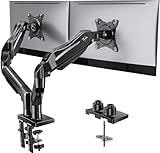
- Compatible with Wide Screens - To ensure compatibility with the dual monitor mount, your each monitor must meet three conditions at the same time: First, computer screens size range: 13 to 32 inches. Second, screen weight range: 4.4 to 19.8 lbs. Third, the back of the monitor screen must have VESA mounting holes with a pitch of 75x75mm or 100x100mm.
- Regarding the compatibility with desks - Your desk must meet three conditions at the same time: First, desk material: Only wooden desks are recommended, plastic or glass desks cannot be used. Second, desk thickness range: 0.59" - 3.54". Third, the bottom of the desk should not have any cross beams or panels, as this will interfere with installation. We recommend carefully checking that your desk and monitors meets all above conditions before purchasing.
- Dual C-Clamp Hold - Worried your dual monitors might wobble or slip? Our upgraded base uses a larger platform plus a dual C-clamp structure to lock the dual monitor arm firmly to your desk. Each arm safely keeps your screens steady while you type, click and game—no shaking, no sliding, just a clean and secure setup you can trust every day. It also provides Grommet Mounting installation choice, both options ensure stable and secure fixation for your 0.59" - 3.54" desk.
- Full-Motion Adjustment For Comfortable View - Pull the screen closer when you’re deep in a spreadsheet, push it back to watch videos, or rotate to portrait for coding — moving everything smoothly with just one hand. The monitor stand offers +85°/-50° tilt, ±90° swivel and 360° rotation. Raise your monitor up to 15.75″ to support a healthy sitting posture. Whether you’re working from home, gaming through the night, or switching between video calls and documents, getting the screens to your natural line of sight helps relieve neck, shoulder and back strain so you can stay focused longer with less fatigue.
- Keep Your Desk Organized: By lifting both screens off the desktop, this dual monitor stand opens up valuable space for your keyboard, notebook, docking station or a simple, clutter-free work area. Built-in cable management guides wires along the arms, keeping cords out of sight and out of the way. Enjoy a tidy, modern workstation that looks as good as it feels to use.
AmazonBasics Premium Dual Monitor Stand

Coming 4th in my pick of the best dual monitor stand is “AmazonBasics Premium Dual Monitor Stand”.
The first most fantastic feature of this mount stand is its various viewing angles. The arms of the stand can easily extend and retract. It can also tilt to different angles with 70° back and 5° forward angles. With the adjustable arm, you can rotate your monitor from landscape to portrait mode.
Another notable and important feature of this product is its design quality. The monitor arms are adjustable to an average height necessary for the best viewing experience.
The final feature that makes this product unique its attachment setup options. The stand can be easily attached in two different ways. You can use the desk clamp to attach it to the edge of a desk or table. The other way is through the grommet mount – this requires a hole through the table for attachment.
Also popular on Amazon

- Fits 13" to 30" Screens - Dual monitor mount fitting two screens 13” to 30” in size and up to 22 lbs in weight each with VESA 75x75mm or 100x100mm backside mounting holes. Cable management clips are provided along the arms and center pole.
- Articulation & Height Adjustment - Adjustable arm offers +90° to -90° tilt, 180° swivel, 360° rotation, and height adjustment along the center pole. Monitors can be placed in portrait or landscape orientation.
- Heavy Duty C-Clamp - Mounts to the back of your desk (up to 3.25” thick) via a heavy-duty C-clamp or optional grommet mount.
- Easy Installation - Mounting your monitors is a simple process with detachable VESA bracket plates. We provide the hardware and easy-to-follow instructions for assembly.
- We've Got You Covered - Sturdy steel design is backed with a 3 Year Manufacturer Warranty and friendly tech support to help with any questions or concerns.
VIVO Dual LED LCD Monitor Free-Standing Desk

Taking the 3rd spot in my pick of the best dual monitor stand is “VIVO Dual LED LCD Monitor Free-Standing Desk”.
“VIVO Dual LED LCD Monitor Free-Standing Desk” has a lot of amazing features. The first feature that caught my attention is its viewing angles. You can adjust the arm from +45° to -45° tilt angle with 180° swivel. The stand also supports 360° rotation for the best viewing experience.
It also offers a sturdy base. The base is strong enough to hold two monitors with up to 20 kg. Also, the bottom of the base comes with padding that protects your desk from scratches.
Quick wins for a faster PC:
Clear out junk files and repair common Windows errorsFree Scan →Fix the driver behind crashes, sound loss and screen glitchesFind Drivers →Repair Windows errors before they cause bigger problemsFix Now →Finally, the product is easy to install. It comes with a manual guide and tools with hardware for quick setup. Additionally, the stand offers a cable management system that ensures your cables are organized.
Also popular on Amazon

- Computer Compatibility - To ensure compatibility of the dual monitor mount, each of your monitors must meet three conditions: Firstly, screen size range: 13 to 32 inches. Secondly, screen weight limit: 17.6lbs. Thirdly, there must be VESA mounting holes on the back of the monitor screen that are spaced 75x75 mm or 100x100 mm apart. Please make sure that your monitor meets all of the above conditions before purchasing, if you are still unsure, you can seek help from customer service.
- Two Installation Options - With a detailed instruction manual and labeled hardware, the ErGear monitor mount is a breeze to set up. For the sake of using experience, please check if your table meets the following three conditions: Material first, we only recommend wooden table. Secondly, The bottom of the table should preferably be free of any beams or panels that may interfere with installation. Table thickness thirdly,'C' clamp fits 0.39"-3" while grommet mount fits 0.39"-2.36".
- Versatile Compatibility - With a 31.22“ wide arm span and 16” high bar, this dual monitor arm accommodates two 32” monitors, providing a very large amount of adjustability for your work use and allowing you to enjoy an immersive viewing experience.
- Flexible Screen Positioning - Experience ultimate flexibility with our dual monitor stand that features +/-90° swivel, +/-45° tilt, and 360° rotation. Easily adjust monitor angle for ergonomic viewing to avoid neck and eye strain. Achieve optimal comfort with customizable screen positioning, perfect for your office desk, gaming setup, or multitasking workspace.
- Free Up Desk Space - Elevate your monitors closer to eye level with our dual monitor desk mount, freeing up valuable desk space for laptops, keyboards, speakers, or other devices. Integrated cable management clips allow you to route cables for a clean look that maximizes efficiency and focus.
WALI Free Standing Dual LCD Monitor Fully Adjustable Desk Mount

“WALI Free Standing Dual LCD Monitor Mount” is no 2 in my pick of the best dual monitor stand.
This product has some exciting features. Firstly, it offers a firm mount. Also, it is strong enough to hold up a 10kg monitor per arm. This ensures a stable grip with most computer monitors. It also supports up to 27-inches monitor.
Secondly, the product features adjustable arms. It supports 360-degree angle rotation. This makes it easy to adjust to any preferred angle of your choice.
Do these 3 things before closing this tab:
1Fix the driver behind crashes, sound loss and screen glitches2Clear out junk files and repair common Windows errors3Scan for outdated or missing drivers - takes under a minuteFinally, this dual stand is compatible with several monitors. It works well with computer monitors and LCD flat-screen TVs. Additionally, you can easily adjust the height of the stand. It also offers a cable management clip to ensure your desk is cable-free.
Also popular on Amazon

- Fits 13" to 32" Screens: Compatible with computer monitors up to 13” to 32” in size and weighing up to 22 lbs each with 75x75mm or 100x100mm backside mounting holes --Patented--
- Strong and Balanced Tempered Glass Base: Provides extra support and increases stability for dual-screen setups. The rectangular glass base measures 15.2” x 10.2" and features bottom-side padding. The pole and arms are made of steel
- Flexible Screen Positioning: Adjustable arms offer +90° to -90° tilt, 360° swivel, 360° rotation, and height adjustment along the center pole. Monitors can be placed in portrait or landscape positions
- Removable VESA Plates: Create a simple screen mounting process. We include easy-to-follow instructions and hardware for quick assembly
- Best Practices: Please do not pull monitors too far forward or backward unless the stand is bolted down, as this will cause stability issues
VIVO Dual LCD Monitor Desk Mount Stand

Finally, at no 1 in my pick of the best dualmonitor stand is “VIVO Dual LCD Monitor Desk Mount Stand”.
This dual stand has loads of tantalizing features but one of the outstanding of them is its range of motion. The stand’s adjustable arms allow you to tilt your monitor in 360° rotation. With this feature, you can easily place your monitor in a portrait or landscape view.
“VIVO Dual LCD Monitor Desk Mount Stand” also offers cable management. The dual stand comes with a cable clip to keep your cables organized and desk clean.
There is one more feature I think will be of interest – its simple setup. The product comes with a step by step manual and necessary tools for easy installation. By simply following the guidelines, you can easily put the stand together and clamp onto your desk.
Also popular on Amazon

- Fits 13" to 27" Screens: Freestanding dual monitor mount holds two screens 13” to 27” and up to 22 lbs with 75x75mm or 100x100mm backside mounting holes. Keep power and AV cables clean and organized with detachable cable clips on the arms and center pole
- Full Articulation: Adjustable mount offers +90° to -90° tilt, 180° swivel, 360° rotation, and height adjustment along the center pole for convenient, customizable viewing angles
- Heavy Duty Extra Large Base: Measures 13" x 10.5" providing solid stability while monitors are held within its center of gravity. The bottom of the base features padding to protect your desk from scratches
- Easy Installation with Detachable VESA Plate: Mounting your monitors is a simple process with detachable VESA bracket plates. We provide the hardware and easy-to-follow instructions for assembly
- Best Practices: Please do not pull monitors too far forward or backward unless the stand is bolted down, as this will cause stability issues. Additionallly, please check to make sure the base size fits your available desk space
Conclusion
I hope you found this Itechguide pick helpful. If you did, click on “Yes” beside the “Was this page helpful” question below.
You may also express your thoughts and opinions by using the “Leave a Comment” form at the bottom of this page.
Finally, to read more gadget picks, visit our Online Buying Guides page. You may also find our Work From Home page helpful.
What’s actually slowing this PC down?
Pick the symptom - the matching free tool is one click away.
Quick Recap
Product prices and availability are accurate as of the date/time indicated and are subject to change. Any price and availability information displayed on Amazon at the time of purchase will apply.